

CUCKOO
User Manual
CWP-A501TW
CWP-A501TW User Manual
Parts & Accessories
Parts
- 1Sealing Ring
- 2Inner Lid
- 3Water Dispenser
- 4Full Capacity Line
- 5Handle
- 6Body
- 7Steam Vent
- 8Lid Open Button
- 9Water Dispenser
Accessories
- User Manual
- Detachable Power Cord
※ The product illustrated on this manual may vary from the actual product.
Key Features
Thank you for choosing Cuckoo Automatic Hot Water Dispenser·Warmer
Carefully read all instructions in this user manual before operating. Keep this manual in a handy location for future reference.
- Electric water supply systemThe embedded motor pump allows water supply through one-touch.
- Warming temperature setting functionIt is convenient to set the temperature to keep warm at the desired temperature (104°F, 113°F, 131°F, 149°F, 167°F, 185°F).
- Chlorine evaporation functionThe chlorous substance in the tap water is evaporated by boiling water function.
- Automatic lock device functionThe water supply function will be locked automatically if water is not supplied. This will prevent accidents caused by the misuse of children.
- Water level indication display on the outsideThe remaining water can be checked from outside.
- Detachable lidThe detachable lid allows easy cleaning and convenient water refilling.
- Detachable power cordThe detachable power cord ensures easy storage of the power cord.
- Portable handleEasy to carry with a portable handle.
Important Safeguards
- Read and follow all safety instructions provided in this manual to ensure safety and to protect the user and other individuals from physical harm and household damage.
- Safety instructions are classified and described according to the level of harm and damage caused by improper use, as shown below.
| Symbol Type | Description |
|---|---|
| Warning | Potentially dangerous situation that can cause serious injuries or death if not avoided. |
| Caution | Potentially dangerous situation that can cause minor injuries if not avoided. |
| Triangle Alert Icon | This symbol is to remind you to be cautious about a potentially dangerous situation under special circumstances. Please read the details carefully and follow the instructions to avoid dangerous situations. |
| Do not | This symbol is used to indicate actions that are prohibited. |
| Instruction | This symbol is used to indicate ‘instruction’ actions. |
Power Supply
WarningDo not
Do not bend, tie or pull the power cord by force.
- This may cause electric shock or fire due to a short circuit. Please check the state of the Power Cord frequently.
WarningDo not
Plug the power plug into a 120V outlet with at least a rating of 10A and power surge protection. Do not plug in multiple devices into the same power outlet or extension cord simultaneously.
- When multiple devices are plugged into the same power outlet or if the device is plugged into an inappropriate power input, it may cause heating, fire and electric shock.
- If there is a foreign substance or water on the power plug, please wipe it clean before plugging it into the socket.
- Use an extension cord of 10A or higher.
WarningDo not
Use 120V power input only.
- This may cause electric shock or fire.
- The device will not operate properly.
- Please check the state of the power cord and plug frequently.
WarningDo not
Wipe off any foreign substance from the Power Plug with a dry cloth.
- This may cause electric shock or fire. Please check the state of the power plug frequently.
WarningDo not
Stop the use and contact customer service when the power cord or plug is damaged or the power outlet is loose.
- If the sheath of the power cord is peeled off or chopped during use due to negligence, it may cause fire or electric shock. Thus, please check the state of the power cord, power plug and power outlet frequently.
- To replace the damaged power cord or plug, please visit CUCKOO website and contact customer service to prevent dangerous situations.
- We strongly recommend that the damaged parts must be repaired or replaced. Otherwise, this may cause electric shock or fire due to a short circuit.
WarningDo not
When putting in or pulling out the power plug, remove moisture first from your hands and put in or pull out the power plug by holding the power plug.
- Pulling out the power plug with wet hands can cause electric shock.
- Pulling the power cord by force can damage the cord and may cause a short circuit or electric shock. Please check the state of the power cord and plug frequently.
WarningDo not
Please unplug the device before cleaning the machine.
- There is a risk of electric shock or malfunction. Please check the state of the power plug and power cord frequently.
WarningDo not
Do not pull the power cord when unplugging the product.
- Force applied to the power cord may cause electric shock or fire. Please check the state of the power cord and plug frequently.
WarningDo not
Do not put the product or anything heavy on the power cord.
- This may cause damage to the Power Cord that could lead to fire, electric shock, or fall of the product.
WarningDo not
Make sure the power cord is not under a heavy object or near sharp objects. Please ensure that it is not damaged by your pet.
- If the power cord is damaged, it may cause electric shock or fire. Please check the state of the power cord frequently.
WarningDo not
Please turn off the product by pressing the power button. Also, unplug the product before inspection, repair or replacement of its components.
- This may cause electric shock or breakdown. Please check the state of the power cord frequently.
WarningDo not
When moving the product, do not pull the power cord.
- It may cause a damage to the product, electric shock or fire. Please check the state of the power cord frequently.
WarningDo not
If the power supply area is wet, unplug the product and let it dry completely before use.
- This may cause electric shock or fire. Please check the state of the power plug and the power cord frequently.
WarningDo not
Do not put in and pull out the power plug continuously.
- This may cause electric shock or fire.
WarningDo not
Do not randomly connect or process the power cord.
- This may cause electric shock or fire.
Installation Guide
WarningDo not
The product must not be used near direct sunlight, gas burners, lighters or heating devices.
- This can cause short circuit, electric shock, deformation, discoloration and fire.
- Do not place the power cord near heating devices. The cord cover may melt, causing fire or electric shock.
WarningDo not
Do not keep nor use insecticides, combustible gas, inflammables, or toxic substances near the product.
- This may cause fire or a deformation or malfunction of the product.
WarningDo not
Do not place it in a bumpy or slanted area. Do not place it on a rug, cushion or laminated floor.
- This may cause malfunction, unwanted noise or injury. Please check the state of the product frequently.
WarningDo not
Do not use the product near chemical substances, sink or bathtub where the product may get wet.
- It may cause short circuit and electric shock.
- Do not use the product in high dust environment or near chemical substances.
- Contact the customer service immediately when water entered into the product.
Operation
WarningCaution
Place the product in a right place to prevent from power cord getting caught on legs.
- It may cause the product to fall, causing fire or safety incidents.
WarningCaution
Ensure that your home appliances or outlets do not come in contact with steam.
- It may cause electric shock or fire.
WarningCaution
Do not let children to use the product and always keep out of reach of children.
- It may cause burn injury due to high heat or electric shock and safety incidents.
During Use
WarningDo not
Do not insert any metal bars or other foreign matter in the steam vent or inside the product.
- It may deteriorate water, cause fire, or damage the inner pot coating.
WarningDo not
If there is abnormal noise, smoke, or smell is emitted from the product, first pull out the Power Plug, and then contact our customer service centre.
- This may cause fire, burns, or injury.
WarningDo not
Do not place the product near the heat of fire.
- This may cause a malfunction or deformation of the product or fire.
WarningDo not
Do not let the connection part of the power plug to come in contact with metal objects, such as metal chopsticks, nails, and pins.
- It may cause electric shock or fire.
WarningDo not
Do not touch the steam vent and water-supply-vent.
- You may get burn from steam.
- Do not let children to handle this product. The steam vent discharges hot steam; therefore, do not come in contact with the product with your face or hands.
WarningDo not
Do not clean/wash the product inside the sink. Ensure that water does not enter the product except the inner pot.
- It may cause short circuit, electric shock, or fire. If water has entered the product, do not use the product, pull out the power plug, and call our customer service.
WarningDo not
Do not close the lid by force.
- It may damage the product or bring down the product and may cause burn.
WarningDo not
Do not spray insecticide or chemical substances inside the product.
- It may cause fire.
WarningDo not
Do not stand on top of the product or put anything heavy.
- It may cause a malfunction of the product or injury due to fall or damages.
WarningDo not
Please avoid using it near a heating device.
- It may cause fire or electric shock.
WarningDo not
This product should not be used by people including children who lack physical or mental abilities, experience and knowledge to use the product properly without instruction.
- Do not let children play with the product.
- It may cause electric shock or injury.
WarningDo not
Do not turn off by pulling the plug.
- It may cause an electric shock or malfunction of the product.
WarningDo not
Must use the power cord that came with the product only.
- Other power cords may cause electric shock and fire.
WarningDo not
Use the transport handle to transport the product.
- Transporting the product without using the handle may cause the product to be dropped, causing surface damage, electric shock, or fire.
WarningDo not
Water should be refilled more than the water fill display level. If the inner pot has no water, do not plug the power in the outlet.
- It may cause defect or discoloration of the inner pot due to overheating.
- Water must be filled inside the product. If the product is used without water, smoke will be generated through the water supply port. This smoke is from burning of foreign matters around the heater which is not the defect of the product.
WarningDo not
Please refer to the cleaning instruction to cleaning the inner pot. Do not use scrubbing brushes (metal, tough brushes, sponges, etc.) when cleaning the product inside.
- The coating of the inner pot may get damaged, causing corrosion (rust) or fur.
WarningDo not
Do not apply impact on the product or drop the product.
- It may cause product defect or other safety issues.
- Do not apply excessive impact on the product or drop the product.
WarningDo not
Do not heat up the water long hours.
- It may discolor or deteriorate the water.
- The container shall be best if emptied if not in use for a long period.
WarningDo not
The product is designed to perform as a water container only; thus, do not put milk, coffee, ramyeon, ice, green tea, or barley tea. Do not use the product other than boiling water.
- It may cause odour or defect.
WarningDo not
Do not press the unlock button while the product is in the heating mode and do not open the lid.
- It may cause fire or safety incidents.
WarningDo not
Water must fill up to the full level and ensure that water does not flow out on the surface of the product.
- It may cause water to boil over, causing product damage, burn, or fire.
Control Panel
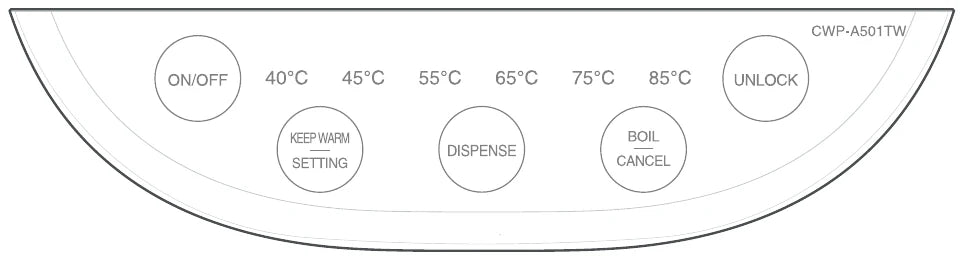
| Button | Description |
|---|---|
| ON/OFF | Press to power the unit on or off. |
| UNLOCK | Press to unlock the buttons on the control panel. If you wish to dispense water while the panel is locked, press the DISPENSE button for 3 seconds. |
| BOIL/CANCEL | Press once to begin bringing water to boiling temperature. Press twice to cancel a currently running function. |
| DISPENSE | While the unit is unlocked, press and hold this button to dispense water. Water will stop dispensing when the button is released. |
| KEEP WARM/SETTING | Press this button once to keep the water at a warm serving temperature. Press twice to enter the system's settings. |
Operation
Before First Use
-
Add 5 liters of water to the tank and boil 1-2 times
-
Unplug the power cord, open the lid, and discard the rest of hot water. Do not drink this water.
-
Do not place this unit near the edge of a bench or table during operation. Ensure that the surface is level, clean and free of water and other substances.
-
Never immerse the unit, power cord or power plug in water, or allow moisture to come into contact with these parts.
-
The temperature setting can be done either when boiling water or after water is boiled. The indicator light flashes on the selected temperature.
Basic Operation
-
Open the lid and pour water into the unit.
-
Close the lid and connect the power cord.
-
After turning on the unit, the indicator light will be on for one second and go into standby mode.
※ The amount of water shall be from 1L to 5L, and shall not exceed the full water gauge.
Boiling Water
Turn on the unit and press BOIL/CANCEL button to boil the water.
- After the water boils, it will cool naturally.
Keep Warm
Turn on the unit and press KEEP WARM/SETTING button to keep the water warm.
- The water does not boil. It will directly reach the setting temperature.
- To select preferable temperature, press KEEP WARM/SETTING button continuously.
- 104°F → 113°F → 131°F → 149°F → 167°F → 185°F → OFF
Keep Warm after Boiling
Turn on the unit, press BOIL/CANCEL button to boil the water, and press KEEP WARM/SETTING button to keep warm.
- After boiling the water, it will naturally cool down and keep warm at the temperature you set.
Dispense
In standby mode, press UNLOCK button and then press DISPENSE button to dispense the water.
- In standby mode, the safety lock is automatically activated. Press UNLOCK button to dispense.
- If you have pressed UNLOCK button, the unlocking indicator light will be always on.
Cleaning & Descaling
Descaling
-
Place 100 grams of descale solution or powder into the water tank and fill with tap water until the full gauge.
-
Turn on the unit and press BOIL/CANCEL button. If water tank is not completely cleaned up, press BOIL/CANCEL button again to repeat.
-
Disconnect the power and wait until the hot water is cooled down. Discard the water and wipe off the water stain with a dry towel. Wipe the exterior with a damp towel and prepare for the future usage.
Notes
-
For safe and efficient operation of your unit, it is important to clean regularly. You may apply cleaning detergent such as vinegar, citric acid to clean.
-
There may be a minor odour after each cleaning. This is normal and will diminish with use.
-
Do not rinse the kettle exterior with water, do not use steel balls, chemical or powdering detergent to clean the exterior.
-
Use water-containing sponge to wipe the liner. Do not use detergent powder, grass brush nor nylon brush.
-
Do not dry the unit in any dishwasher or dryer. Otherwise, the unit will be deformed and damaged.
-
Always turn the unit to the off position, switch off at the power outlet and unplug at the power outlet when the unit is not in use.
Troubleshooting
▼ The unit may not work properly if you do not follow the user manual. Please read and check the following. If you cannot remedy problems by using the troubleshooting chart below, contact Cuckoo customer service.
| Problem | Possible Causes | Corrective Actions |
|---|---|---|
| Water does not boil or is not warm enough. | • Was there a power outage while the unit was in operation? • Is the detachable power cord securely plugged into the product? • Is the unit plugged into a 120V power outlet? |
• Check if power is out in the building, connect electrical plug to the product and plug it to the outlet. • Securely plug the power cord into the product • This product is only compatible with 120V power outlets • Contact Cuckoo customer service. |
| Water leaks from the steam vent while boiling. | • Is the tank filled past its capacity? • Are any substances or materials obstructing the steam vent? |
• Do not exceed this unit's 5 liter tank capacity • Safely remove any obstructions from the steam vent |
| • Water does not dispense even if the operation button is pressed properly. • Only small amount of water is dispensed. |
• Is the lid securely closed? • Is the lid gasket torn or not properly installed? • Was the tank filled past its minimum capacity? • Is the control panel in locked mode? |
• Ensure the lid is closed securely and properly • Fill the tank with at least 1 liter of water • Unlock the control panel • Contact our customer service center |
| The water tank coating is damaged. | • Did you use strong abrasives, metal or kitchen brushes to clean the tank | • To clean the water tank, follow the method on cleaning instructions. • If the coating has completely peeled off, contact our customer service center |
| There are some visible substances floating in water. | • Is the water tank cleaned regularly? | • Ensure to clean the tank regularly after use and if the unit has not been in operation for an extended period of time |
Product Specifications
| Category | Automatic Hot Water Dispenser·Warmer |
| Model | CWP-A501TW |
| Rated Voltage | 120V, 50/60Hz |
| Rated Power Consumption | 1,750W |
| Capacity | 5L |
| Warm Temperature | 104°F, 113°F, 131°F, 149°F, 167°F, 185°F |
| Cord Length | 4.3 ft |
| Temperature Fuse | 421°F |
| Size | 10.4 in x 8.5 in x 12.2 in |
| Weight | 7.96 lbs. |
| Accessories | User manual, detachable power cord |
※ For household use only.
※ The information (design and specifications) provided in this user manual is subject to change without prior notice.
CUCKOO
CUCKOO ELECTRONICS AMERICA, INC.
For service inquiries, contact us at support@cuckooamerica.com
www.cuckooamerica.com