

CUCKOO
User Manual
CP-U011W
CP-U011W User Manual
Part Names and Descriptions
Part Names

Control Panel
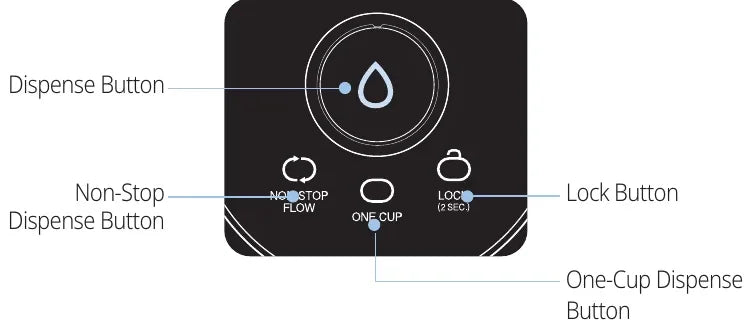
- 1
Dispense Button
- For manual dispensing of water.
- 2
Non-Stop Dispense Button
- For continuous dispensing of water.
- 3
One‑Cup Dispense Button
- For dispensing approximately one cup of water.
- 4
Lock Button
- Used to enable or disable the lock function. (Press and hold the button for 2 seconds to turn the lock function on or off.)
Accessories

The Benefits of CUCKOO
Dear users, thank you for choosing the CUCKOO Water Purifier. Please keep the User Manual (and the warranty certificate) in a safe place. it will be of great help when you have questions during use or when certain features do not work properly.
- 3-layer filtering systemThe CUCKOO water purifier’s 3‑layer filtration system provides clean, great‑tasting filtered water for everyday use.
- Economic & Eco-friendly PurificationThe electrostatic‑powered (positively charged) filters are designed to provide efficient filtration while helping you use water more efficiently.
- Status Indicator LightsAllow the user to see the product’s operational status at a glance.
- Stylish DesignThe slim, stylish body naturally blends into any space.
- Lock ButtonThe Lock Button function prevents malfunctions that may be caused by children or those who are not familiar with the product.
- Tank-free Direct PurificationProvides fresh water without an additional storage tank.
- Tap Water Lock Valve ApplicationWhen replacing the filter, a tap water lock valve is applied to block the water supply, allowing for safer and more convenient filter replacement.
Safety Warnings
- Please read and follow these safety warnings to help ensure safe use of the product and reduce the risk of injury or property damage.
- This safety information includes both “Warnings” and “Cautions,” which are defined as follows:
| Symbol Type | Description |
|---|---|
| Warning | A potentially dangerous situation that may result in serious injury or death if not averted. |
| Caution | A potentially dangerous situation that may result in minor injury if not averted. |
| Triangle Alert Icon | This symbol indicates a potential risk under certain conditions. Always read the instructions carefully and use the product as directed to help ensure safe operation. |
| Prohibited | This symbol indicates prohibited actions. |
| Instructions | This symbol indicates that a specific action is required. |
Regarding Power
WarningProhibited
Be sure to use this product in an AC 120V~ dedicated outlet rated 10A or higher that is grounded, and avoid using this product with other products simultaneously plugged into one outlet.
- When used with multiple products or with other devices, it may result in a fire or electric shock. Frequently check the condition of the outlet.
- If there are any foreign substances or moisture on the power plug, wipe the power plug before use.
- Use extension cords that are certified for over 10A.
WarningProhibited
Do not bend, twist, or pull the power cord excessively.
- It may damage the cord and could result in electric shock or fire. Be sure to frequently check the condition of the power cord.
WarningProhibited
If the power cord or plug is damaged, or if the outlet is loose, stop using the product immediately and contact the Customer Service Center.
- If the power cord’s sheath is inadvertently peeled or chopped, it may result in fire or electric shock. Therefore, frequently check the power cord, power plug, and wall outlet.
- If the power cord or power plug is damaged, to prevent any dangerous situations, contact the manufacturer, the store, or a qualified technician (service engineer) to replace the power cord.
- This product must be repaired at a designated service center.
- Electric shock and short-circuit fires may occur.
WarningProhibited
Clean any dust, moisture, or foreign substances from the power plug with a dry cloth before use.
- It may result in an electric shock or a short circuit, potentially resulting in fire. Periodically check the condition of the outlet, power plug, and power cord for signs of damage or overheating.
WarningProhibited
Unplug the product by pulling the plug, not the power cord.
- Applying excessive force to the power cord may damage it and could result in electric shock or fire. Periodically check the condition of the power cord and plug.
WarningProhibited
Be sure to unplug the cord when there is water leakage or when washing (cleaning).
- Failure to do so may result in electric shock or product damage. Periodically check the condition of the power cord and plug for damage or moisture.
WarningProhibited
Keep the power cord away from heavy and sharp objects as well as pets to prevent the cord from being crushed or cut.
- A damaged cord may result in an electric shock or fire. Be sure to frequently check the condition of the power cord.
WarningProhibited
Make sure to unplug the product during repair, inspections, or part replacement.
- Failure to do so may result in electric shock or product damage. Periodically check the condition of the power cord and plug.
WarningProhibited
Only use AC 120V~.
- Using the wrong voltage may result in electric shock or fire.
- Failure to do so may damage the product.
- Do not use any transformer or voltage conversion device to operate the product at a different voltage.
- Periodically check the condition of the power cord and plug for damage.
WarningProhibited
Make sure to dry your hand and grab the power plug when plugging in or unplugging the product.
- Pulling out the power plug with a wet hand may lead to an electric shock.
- Forcefully unplugging the power cord may cause damage, leading to a short circuit or electric shock.
- Periodically check the condition of the power cord and plug for damage.
WarningProhibited
If water has entered the power unit, unplug the product immediately and allow it to dry completely before use.
- It may result in an electric shock or fire. Be sure to frequently check the condition of the power cord and plug.
WarningProhibited
When the product will not be used for a long period of time, close the tap water supply valve, remove any remaining water from the product using the Dispense button, unplug the power cord, and store the product in a safe place.
- It may result in an electric shock or fire. Be sure to frequently check the condition of the power cord and plug.
- Before using the product again, please check Read Before Use.
Regarding Installation
WarningProhibited
Do not install the product in very humid, damp, or dusty places.
- Doing so may result in electric shock or fire.
WarningProhibited
Do not install the product in or near the bathroom.
WarningProhibited
Do not install the product on an uneven surface, on a slope, or on top of unstable objects such as boards, cushions, or pads.
- Doing so may cause the product to become unstable, resulting in noise, malfunction, or injury.
- Periodically check that the product is installed on a flat and stable surface.
WarningProhibited
The water purifier must be installed in a clean indoor location.
- Do not install the product in areas where the water supply or surrounding environment may be contaminated.
WarningProhibited
Install the product away from direct sunlight and heat sources.
- It may cause discoloration or fading.
- Be sure to frequently check the condition of the power cord.
WarningProhibited
The tap water supply hose connected to the product should be no longer than 5 meters (about 16 feet) from the tap water supply valve.
- If the hose is longer than this, water pressure may be reduced and product performance may deteriorate.
WarningProhibited
Do not install the product in areas where gas leaks may occur or near heaters or air conditioners.
- Doing so may result in an explosion or fire.
WarningProhibited
Use only a tap‑water supply, and connect the tap water supply valve to the cold‑water pipe.
- Do not purify groundwater or any other non-tap water with the product.
- The recommended filter replacement cycle may vary depending on local water quality and usage.
- Connecting the product to a hot‑water pipe may damage the filters or cause product malfunction.
WarningProhibited
Do not install the product outdoors or in locations where the temperature may drop below 0 °C (32 °F).
- It may cause the filters or other internal parts to freeze, resulting in a product failure or leak.
WarningProhibited
Clean and maintain the product regularly after installation.
- Refer to “Cleaning Instructions” for the cleaning method
WarningProhibited
Make sure the ambient temperature at the installation location does not fall below 0 °C (32 °F), as this may cause water inside the filters and internal pipes to freeze and damage the product.
- If the ambient temperature drops below 0 °C (32 °F) and the tap water supply is interrupted due to freezing, turn off the hot water supply for safety.
WarningProhibited
This appliance is not intended for use by persons (including children) with reduced physical, sensory, or mental capabilities, or by persons who lack the experience or knowledge to use the appliance safely, unless they are supervised or instructed by a person responsible for their safety.
- Keep children from playing with the product.
- It may cause injury, such as electric shock or burns.
WarningProhibited
Do not place or use heating appliances such as microwave ovens, electric ovens, or toasters on top of the product. Do not place candles, gas cylinders, lighters, or other flammable items on the product.
- Doing so may result in fire, electric shock, or other accidents.
WarningProhibited
Keep the inside of the water purifier dry and free from moisture.
- Failure to do so may result in an electric shock or fire.
WarningProhibited
Ensure that children do not operate or play with the control panel.
- It may cause malfunctions or safety accidents.
WarningProhibited
Do not place chemicals, water bottles, or small metal objects on top of the product.
- These items may fall into the product and cause fire, electric shock, or product damage.
WarningProhibited
Do not disassemble or modify the product.
- It may result in a fire or electric shock.
- The product can be disassembled and collected only by service engineers.
- Please contact Customer Service for repair and malfunction inquiries.
WarningProhibited
After installation, check all tubes and hose joints in the house for water leaks.
- Loose fittings may cause water to leak, potentially resulting in an electric shock or property damage.
Warning — Instructions
WarningInstructions
If water leaks from or pools around the product, close the tap water supply valve, turn off the power, unplug the product cord, and contact our Customer Service Center.
- Failure to do so may result in electric shock or product damage.
WarningInstructions
When moving the product, do not pull the power cord or connecting hose, and do not lift the product by the dispenser.
- Doing so may damage the product or the power cord. Periodically check the condition of the power cord.
WarningInstructions
Please close the tap water supply valve before replacing the filter (adapter). (The tap water supply valve is usually located under the sink or on the faucet.)
- If the valve is not closed, water may leak during filter replacement.
WarningInstructions
If the product generates a burning smell or smoke, unplug the power cord immediately, close the tap water supply valve, and contact our Customer Service Center.
- Failure to do so may result in a fire.
WarningInstructions
Do not place tableware or other metal objects on top of the product (especially around the Dispense button).
- It may cause abnormal dispensing of water, potentially resulting in a fire or electric shock.
WarningInstructions
Request support from a service technician through the CUCKOO Customer Service Center when installing and disassembling the product.
WarningInstructions
Scrubbing the cooking water valve with a brush, abrasive sponge, or similar tools may damage the surface plating and promote mineral buildup.
Safety Precautions
Caution — Instructions
CautionInstructions
Fully close the filter replacement cover before using the product.
- This helps prevent insects and foreign substances from entering the product.
CautionInstructions
If the product has not been used for a long time, dispense water for at least 10 minutes before use.
- For tubes and filters left unused for a long time, the recommended dispensing time is 10 minutes.
CautionInstructions
Replace the filters according to the recommended replacement cycle.
- Failure to do so may result in reduced performance or unpleasant odors. For details on the filter replacement cycle, refer to “Filter Replacement Cycle”.
CautionInstructions
Be sure to use genuine CUCKOO filters.
- Using non‑genuine filters may lead to reduced purification performance, abnormal water taste, leaks, or product malfunction.
CautionInstructions
Cooking water may become contaminated if it is left unused for a long period of time. If you want to reuse cooking water, drain the remaining water for 1–2 minutes before purification.
- Cooking water is intended for cooking only and must not be used for drinking.
Caution — Prohibited
CautionProhibited
Do not clean the product with benzene or thinner.
- This may result in product damage.
CautionProhibited
Do not remove the rear hose during use.
- It may cause a product failure due to a leak.
CautionProhibited
Do not move the product while it is running.
- Do not move or shake the product while it is turned on. The hose may come off, causing a product failure or leak.
CautionProhibited
Do not use purified water for fishbowls or aquariums.
- Purified water may not be suitable for fish tanks and may be harmful to fish.
Pipe Diagram / Purification System
Water Purification Pipe Diagram

Water Purification System
This filter is tested and certified by WQA against NSF/ANSI/CAN 372.
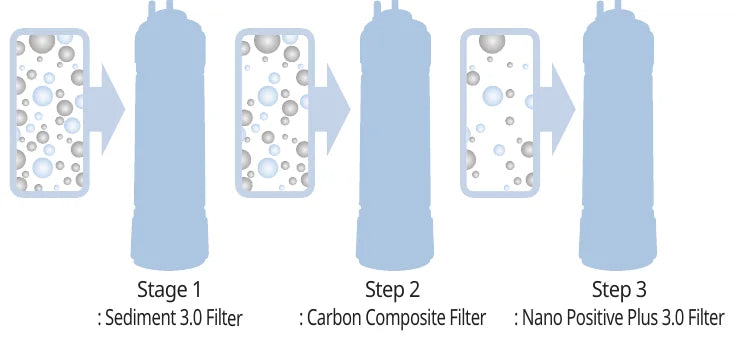
-
Stage 1 : Sediment 3.0 Filter
-
Step 2 : Carbon Composite Filter
-
Step 3 : Nano Positive Plus 3.0 Filter
※ Using a non-genuine filter or using a genuine filter beyond its recommended lifespan may reduce filtration performance.
Read Before Installation
Cautions Regarding Installation Location
-
Keep the product away from direct sunlight and heating appliances.
- Failure to do so may result in fire or discoloration of the product.
-
Make sure the installation area meets the following requirements.
- For the convenience of filter replacement, ensure a distance of at least 20 cm from the wall and install the water supply hose in a location where the length of the water supply hose is less than 5 m from the tap water supply valve.
-
Refrain from installing in areas exposed to moisture, dust, or water splashes.
- Failure to do so may result in a product malfunction.
-
Refrain from installing on a bumpy, sloping, or soft surface.
- Failure to do so may result in product instability, which could cause fire or product damage.
-
Refrain from installing where the temperature may drop below 0°C (32°F).
- This product is intended for indoor use. Installing it in locations where the temperature falls below 0 °C (32 °F) may cause the filters or internal parts to freeze, resulting in product malfunction.
-
The water purifier must be installed in a clean place.
- Do not install it in areas prone to water contamination or in contaminated areas.
Cautions Regarding Moving the Product
Use caution when moving the product.
- Do not tilt the product more than 45 degrees when moving it.
- After moving the product and supplying water, wait about 30 minutes before plugging in the power cord.
Cautions Regarding Connecting Pipes
Connect the product to the cold-water pipe.
- Connecting the product to a hot‑water pipe may damage the filters and cause product malfunction.
- For more information on connecting hoses, please refer to “How to Install”.
How to Install

-
Keep the tap water supply valve closed during installation.
-
Caution
- Keep the tap water supply valve closed during installation.
- Make sure it is connected to the cold‑water pipe. Connecting it to a hot‑water pipe may damage the filters or cause product malfunction.
-
-
Connect the tap water supply hose to the tap water inlet at the back of the product.
-
Caution
- Make sure it is properly connected to the tap water inlet. (Apply force until you hear a squish.)
-
-
Turn open the tap water supply valve.
-
After installation, check for any leaks from the hose connectors.
- Tap water supply valve (Hose)
- Tap Water Connector
- Filter Joints
-
Connect the power plug to a wall outlet.
※ The water purifier must be used with tap water only. Do not use this product to purify groundwater or any other non‑tap water.
Read Before Use
Caution
- If the product will not be used for a long period of time, close the tap water supply valve and unplug the product. This product is designed for 120 V / 60 Hz only. Please plug it into a dedicated outlet.
-
Turn the tap water supply valve to the open position.
- Open the water tap to check the water supply before opening the tap water supply valve.
-
Open the tap water shut‑off valve.
-
Connect the power.
- This product is designed for 120V~/60 Hz only. It must be connected to a dedicated outlet.
- Once you’ve checked the water supply, turn on the power.
-
After installation, dispense water for at least 10 minutes before using the product.
- When reusing after a long period of non-use, make sure to drain the water for at least 10 minutes before use.
- After replacing the filter, use the Non‑Stop Dispense function about 10 times before use.
-
Periodically empty and clean the water tray.
How to Use
TIP — Standby modes
| Mode | Description |
|---|---|
| Standby mode | The status in which the product is plugged in but is yet to be operated. The Dispense light will turn on in this mode. |
| Non-Stop Dispense Standby mode | The product will enter this mode if the Non-Stop Dispense button is pressed while it’s in Standby mode. The Non-Stop Dispense light will turn on, and the Dispense light will flash. |
| One‑Cup Dispense standby mode | The product enters this mode when the One‑Cup Dispense button is pressed while it is in Standby mode. The One‑Cup Dispense light will turn on and the dispense light will flash. |
-
Manual Dispense Function
- This function allows you to dispense purified water manually.
- Press the Dispense button in Standby mode to dispense purified water.
- ☞ Dispensing will continue only while the Dispense button is pressed.
- ☞ If you press the Dispense button for more than 30 seconds, water dispensing will stop. If you release your hand and press it again, water dispensing will resume.
-
Non-Stop Dispense (The dispensed amount may vary by water pressure.)
- This function allows you to dispense purified water continuously.
- Press the Non-Stop Dispense button in standby mode to enter Non-Stop Dispense standby mode, then press the Dispense button to dispense water continuously.
- ☞ The product will switch to Standby mode if there is no input within 3 seconds of entering Non-Stop Dispense Standby mode.
- ☞ Press Non-Stop Dispense button to stop dispensing during Non-Stop Dispense.
- ☞ The default dispensing time set for Non-Stop Dispense is 1 minute. Please refer to “Dispensing Time Settings” for setting instructions.
-
One‑Cup Dispense (The dispensed amount may vary depending on the water pressure.)
- This function allows you to dispense approximately a cup of purified water.
- Press the One-Cup Dispense button in standby mode to enter One-Cup Dispense standby mode, then press the Dispense button to dispense water continuously.
- ☞ The product will switch to Standby mode if there is no input within 7 seconds of entering One-Cup Dispense Standby mode.
- ☞ Press any button to stop dispensing during One-Cup Dispense.
- ☞ The default amount of water for One‑Cup Dispense is about 8.5 fl oz. For details on changing this setting, refer to “Dispensing Time Settings”.
-
Lock Button Function
- This function allows you to set the button lock (LOCK) to prevent malfunction due to cleaning or child operation.
- Press and hold the Lock button for 2 seconds in standby mode to lock the buttons. The button lock will be set and the LOCK LED will light up.
- When the button lock is set, press and hold the Lock button for 2 seconds to unlock the buttons. The LOCK LED will turn off.
Dispensing Time Settings
Setting the Dispensing Time for Non-Stop Dispense
-
In Standby mode, press and hold the Non-Stop Dispense button for 10 seconds to enter Non-Stop Dispense Time Settings mode.
-
The Non-Stop Dispense LED will blink according to the set time. (The initial setting is 60 seconds.)
-
Press the Dispense button to select the desired dispensing time for Non-Stop Dispense (30 to 80 seconds).
| Step | Non-Stop Dispensing Time Setting | Indicator |
|---|---|---|
| 1 | 30 seconds | The Non-Stop Dispense LED blinks 3 times at 0.3 second intervals and then turns off for 1 second. |
| 2 | 40 seconds | The Non-Stop Dispense LED blinks 4 times at 0.3 second intervals and then turns off for 1 second. |
| 3 | 50 seconds | The Non-Stop Dispense LED blinks 5 times at 0.3 second intervals and then turns off for 1 second. |
| 4 | 60 seconds (default) | The Non-Stop Dispense LED blinks 6 times at 0.3 second intervals and then turns off for 1 second. |
| 5 | 70 seconds | The Non-Stop Dispense LED blinks 7 times at 0.3 second intervals and then turns off for 1 second. |
| 6 | 80 seconds | The Non-Stop Dispense LED blinks 8 times at 0.3 second intervals and then turns off for 1 second. |
-
Select the desired Non-Stop Dispense time, then press the Non-Stop Dispense button.
- ☞ Pressing buttons other than Dispense and Non-Stop Dispense will cancel the function and start Standby mode.
- ☞ If no input is made within 20 seconds of entering Non-Stop Dispense Time Settings mode, the function will be cancelled, and the product will return to Standby mode.
Setting the Dispensing Time for One-Cup Dispense
-
In Standby mode, press and hold the One-Cup Dispense button for 10 seconds to enter One-Cup Dispense Time Settings mode.
-
The One‑Cup Dispense LED will blink according to the currently set time. (The initial setting is 7 seconds.)
-
Press the Dispense button to select the desired dispensing time for One-Cup Dispense (4 to 9 seconds).
| Step | One-Cup Dispensing Time Setting | Indicator |
|---|---|---|
| 1 | 4 seconds | The One-Cup Dispense LED blinks 4 times at 0.3 second intervals and then turns off for 1 second. |
| 2 | 5 seconds | The One-Cup Dispense LED blinks 5 times at 0.3 second intervals and then turns off for 1 second. |
| 3 | 6 seconds | The One-Cup Dispense LED blinks 6 times at 0.3 second intervals and then turns off for 1 second. |
| 4 | 7 seconds (default) | The One-Cup Dispense LED blinks 7 times at 0.3 second intervals and then turns off for 1 second. |
| 5 | 8 seconds | The One-Cup Dispense LED blinks 8 times at 0.3 second intervals and then turns off for 1 second. |
| 6 | 9 seconds | The One-Cup Dispense LED blinks 9 times at 0.3 second intervals and then turns off for 1 second. |
-
Select the desired amount of water for One‑Cup Dispense, then press the Non‑Stop Dispense button.
- ☞ Pressing any button other than Dispense or Non‑Stop Dispense will cancel the function and start Standby mode.
- ☞ If no input is made within 20 seconds after entering the One‑Cup Dispense time‑setting mode, the function will be canceled and the product will return to Standby mode.
Cleaning Instructions
Caution
- Always keep the area around the water purifier clean.
-
First, close the tap water supply valve.
-
For safety, make sure to unplug the product.
-
After wiping off any foreign substances with a neutral detergent, wipe the product with a dry cloth.
Cleaning the Water Tray
-
Removing the drain dish
- Hold the water tray and pull it up to detach it from the product.
-
Removing the water tray grill
- After removing the water tray, lift the grill by the top hole to detach it.
-
Cleaning the water tray.
- Throw away the collected water and wipe off any remaining moisture with a soft cloth.
-
Assembling the water tray.
- Reassemble the cleaned water tray in reverse order of disassembly.
Detaching and Cleaning the Faucet
-
Rotate the dispensing outlet (faucet) clockwise to detach it.
-
Once the faucet is detached, wipe the inner tip with a clean cloth.
-
Wash the detached faucet thoroughly under running water.
- (You can wipe the hard‑to‑reach areas inside the faucet with a cotton swab.)
-
Remove any remaining moisture from the faucet with a clean cloth.
-
Reattach the faucet by rotating it counterclockwise.
Filter Replacement
(Always use genuine CUCKOO filters)
Caution
- When replacing the filter, be sure to turn the tap water lock valve to the CLOSE position to cut off the tap water supply before replacing the filter.
- After replacing the filter, close the filter cover to resume the water supply, then dispense water for about 10 minutes before use.
-
Turn the tap water lock valve to the CLOSE position as shown in the image.
- Since the tap water supply is cut off, purified water will not come out of the cooking water outlet while the filter is being replaced. (The cooking water outlet can be used again after the tap water supply is restored.)
-
Release any remaining water by pressing the Dispense button.
-
Unplug the power cord.
-
Remove the filter replacement cover on the right side of the product.
- "+" screwdriver is required.
-
Lift the filter to be replaced, then pull it out to remove it. (Be careful, as any remaining water may come out. This water is released from the filter and is not a leak from the product.)
-
Insert the new filter as shown in the image, then push it into the filter case until it is fully connected.
- The filter’s label should face the front.
- Check that the filters are properly installed in the filter case.
-
Return the tap water lock valve to its original position as shown in the image to allow water to flow.
- After completing the filter replacement, return the tap water lock valve to its original position and use a dry cloth to check for any leaks.
-
Reattach the filter replacement cover on the right side of the product and tighten the screw to secure it.
- "+" screwdriver is required.
-
Wipe any moisture off your hands with a dry towel, then plug in the power cord.
-
Press the Non‑Stop Dispense button to dispense water until the flow stops. Repeat this step 10 times. (Water containing microbubbles may come out as part of the filter stabilization process.)
-
Before using the product, please wait around 25 minutes for the filter to stabilize. If the product is used before 25 minutes have passed, you may hear a popping sound caused by air bubbles in the filter and internal pipes.
Filter Replacement Cycle
- The following filter replacement cycles presume 10 L of daily household water usage and may vary by tap water conditions.
| Filter Name | Estimated Replacement Cycle |
|---|---|
| Sediment 3.0 Filter | 4 months |
| Carbon Composite Filter | 4 months |
| Nano Positive Plus 3.0 Filter | 8 months |
Recommendations
- Effective Purification Capacity
It refers to the minimum treatment capacity during which the filter helps reduce impurities and maintain water quality without cleaning, regenerating, or replacing the filter. - Filter Replacement Cycle
The filter replacement cycle indicates the expected lifespan during which the filter is designed to perform effectively. The cycle is calculated based on an average daily tap water usage of approximately 10 L (about 2.6 gallons). If water usage is higher, the replacement cycle may be shorter.
Filter Layout Diagram
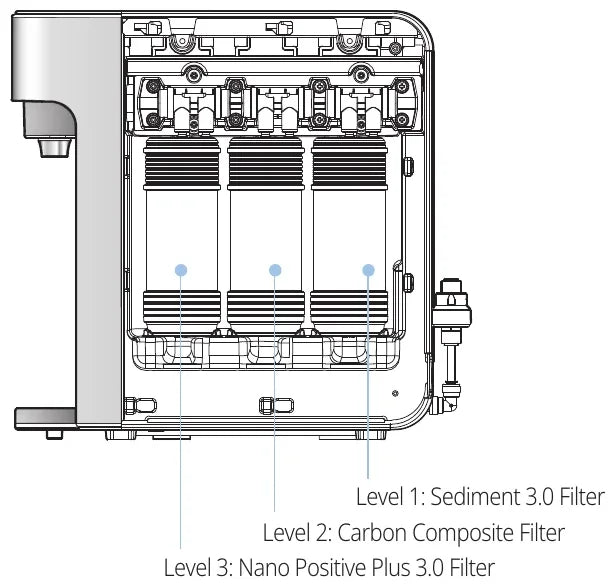
Read Before Requesting Support
▼ The product may not operate properly if it is not used in accordance with this manual. If you experience a problem, refer to the troubleshooting guide below. If the issue persists, contact Customer Support.
| Issue | What to Check | What to Do |
|---|---|---|
| The water tastes or smells unpleasant. | • Has the water purifier been left unused for a long time? | • Run water for about 10 minutes before use |
| • Do the filters require replacement? | • Replace the filters with genuine CUCKOO filters. | |
| Water is not being dispensed. | • Is there an issue with the tap water supply? | • Open the tap water supply valve. • Check whether the water supply hose is bent or kinked • Check if the water supply has been cut off. |
| The purification volume has suddenly decreased. | • Is the tap water lock valve closed? | • Open the tap water lock valve. |
| • Has the filter replacement cycle passed? | • Replace the filters with genuine CUCKOO filters. (The dispensed amount may vary by water pressure.) | |
| The product makes excessive noise. | • Is the product installed on an even surface? | • Place the product on a flat, stable surface. |
| • Is the product in contact with other objects? | • Make sure it is not in contact with other objects. | |
| • Do you hear the noise after dispensing water from the faucet? | • Because the product is directly connected to tap water, it may produce noise while the filters refill. This is a normal part of the purification process. | |
| Nothing happens when the button is pressed. | • Was the Dispense button pressed for more than 30 seconds? | • To prevent unintended operation, the product automatically disables input if the Dispense button is held for more than 30 seconds. • Release the Dispense button and press it again. |
| • If the red LED on the Lock indicator is on? | • If the red LED on the Lock indicator is turned on, the Lock button is activated. Press and hold the [Lock] button for more than 2 seconds to disable the Lock button function. (Refer to ‘Lock Button Function’ in “How to Use”) | |
| Particles are visible in the water. | • Has the filter replacement cycle passed? | • Replace the filters with genuine CUCKOO replacement filters |
| Water is leaking from the water purifier. | • Is the humidity too high in the house or the outside environment? | • Condensation may occur when the cold air inside the water purifier comes into contact with moisture, similar to condensation forming on the outside of a glass |
Product Specifications
| Product Name | CUCKOO Water Purifier |
| Model Name | CP-U011W |
| Rated Voltage | Single-phase current, 120 V~, 60 Hz |
| Power Consumption | 14W |
| Purification Method | Multi-stage filtration system |
| Filter Specifications | Sediment 3.0 Filter Carbon Composite Filter Nano Positive Plus 3.0 Filter |
| Filter Capacity | 2,400L |
| Installation Location | Indoor use only |
| Weight | Approx. 3.6 kg (7.9 lb) |
| Dimensions | 124 × 353 × 360 mm (4.9 × 13.9 × 14.2 in) |
| Rated Operating Pressure | 0.15–0.69 MPa (22–100 psi) |
※ Details in this User Manual, such as exterior, design, and specification information, may change without notice to improve the product’s quality.
※ This device is designed for a household (Class B) electromagnetic environment. It is primarily intended to be used in all household areas.
※ Manufacturer: CUCKOO HOMESYS Co., Ltd.
CUCKOO
We provide satisfying consultation and services concerning your complaints, suggestions, and recommendations upon receiving your troubled product model name, status, and contact information.
www.cuckooamerica.com
- After reading this manual, keep it in a place easily accessible to the user for future reference.
- This manual includes the warranty.
- Caution: Please read this manual carefully to ensure safety and a longer product lifespan.
This CP-U011W is tested and Certified by WQA against NSF/ANSI/CAN 372