

CUCKOO
User Manual
CMC-ZSN601F
CMC-ZSN601F User Manual
PART DESCRIPTION
Parts and Accessories
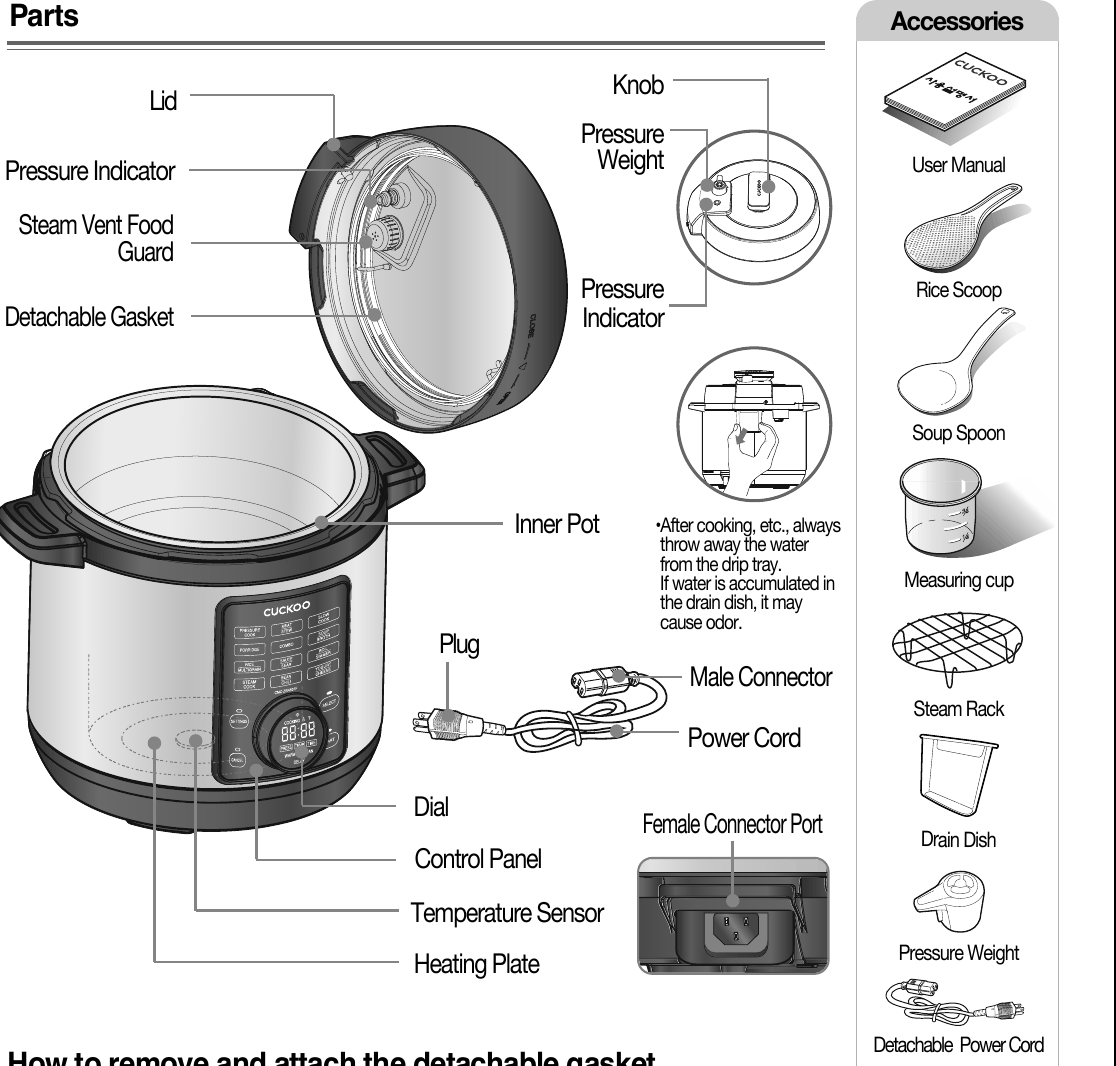
• After cooking, etc., always throw away the water from the drip tray. If water is accumulated in the drain dish, it may cause odor.
How to remove and attach the detachable gasket

How to remove
- As shown in the picture, holding one end of the detachable gasket(from the arrow part) and pulling it slightly, it is easily separated.
- Separated as shown in the picture
※ Be careful as the parts may be deformed if excessive force is applied.
How to attach
- As shown in the picture, insert one part of the detachable gasket(arrow) first, press it in one direction, and insert the entire gasket into the corresponding part of the top cover.
- After inserting the entire gasket into the top cover, make sure to check that there are no uninserted parts as shown in the photo (arrow) before using the product. If not, steam will leak, resulting in poor cooking quality and product failure.
IMPORTANT SAFEGUARDS
- Read all instructions before using this appliance.
- Do not touch hot surfaces. Use handles or knobs.
- To protect against fire, electric shock and / or injury to persons do not immerse cord, plugs, or Pressure Cooker Body in water or any other liquid.
- Close supervision is necessary when this appliance is used by or near children. This appliance is not intended for use by young children without supervision.
- Unplug cord from outlet when not in use and before cleaning. Allow appliance to cool before putting on or taking off parts, and before cleaning the appliance.
- Do not operate any appliance with a damaged cord or plug, after the appliance malfunctions, or has been damaged in any manner. Return the appliance to the nearest authorized service facility for examination, repair or adjustment.
- The use of accessory attachments not recommended by the appliance manufacturer may result in fire, electric shock, and / or injury to persons.
- If the supply cord is damaged, it must be replaced by a special cord or assembly available from the manufacturer or your service agent.
- Do not use outdoors.
- Do not let the cord hang over the edge of a table or counter, or touch hot surfaces.
- Do not place on or near a hot gas, electric burner, or in a heated oven.
- Always attach the plug to the appliance first, then plug the cord into the wall outlet. To disconnect, or set all control to “off”, then remove the plug from the wall outlet.
- Do not use this appliance for other than its intended use.
- Extreme caution must be used when moving an appliance containing hot oil or any hot liquids.
- Oversized foods, metal foil packages, or utensils must not be inserted into the appliance as they are a risk of fire or electric shock.
- Fire may occur if the appliance is covered or touching flammable material, including curtains, draperies, walls, etc while in operation.
- To reduce the risk of electric shock, cook only in the provided removable container.
- This appliance cooks under pressure. Improper use may result in scalding injury. Before operating the unit, properly secure and close the unit. See “Operating Instructions.”
- Before use always check the pressure releasing device for clogging.
- Do not use this pressure cooker to fry in oil.
- This appliance is not intended for use by persons (including children) with reduced physical, sensory, or mental capabilities, or lack of experience and knowledge, unless they are closely supervised and instructed concerning use of the appliance by a person responsible for their safety. Close supervision is necessary when any appliance is used by or near children. Children should be supervised to ensure that they do not play with the appliance.
- Never immerse the appliance in water while cleaning.
- WARNING : Do not hold the pressure regulator knob. Hot steam/liquid may be ejected. Keep hands and face away from steam vents, use pot holders when removing the inner pot or touching any hot items, and never force them lid open. The lid will only open once the pressure is released. Remove the lid by lifting it away from you to avoid being burned by the steam.
SAVE THESE INSTRUCTIONS
THIS APPLIANCE IS FOR HOUSEHOLD USE ONLY
ADDITIONAL IMPORTANT SAFEGUARDS
WARNING
This appliance generates heat and releases steam during use. Use proper precaution to prevent risk of burns, fires, other injuries, or damage to property.
- Keep hands and face away from the Pressure Release Valve when releasing pressure.
- Take extreme caution when opening the Lid after cooking. Severe burns can result from steam inside.
- Never open the Lid while the unit is in operation.
- Do not use without the inner Pot in place.
- Do not cover the Pressure Valve with anything as an explosion may occur.
- Do not touch the inner pot nor any heating parts, immediately after use. Allow the unit to cool down completely first.
This appliance is intended to be used in household and similar applications such as :
- staff kitchen areas in shops, offices and other working environments;
- farm houses;
- by clients in hotels, motels and other residential type environments;
- bed and breakfast type environments.
HOW TO USE EXTENSION CORD
Note:
- A. A short power-supply cord (or detachable power-supply cord) is provided to reduce the risk resulting from becoming entangled in or tripping over a longer cord.
- B. Longer detachable power-supply cords or extension cords are available and may be used if care is exercised in their use.
- C. If a longer detachable power-supply cord or extension cord is used:
-
The marked electrical rating of the cord set or extension cord should be at least as great as the electrical rating of the appliance;
-
The cord should be arranged so that it will not drape over the countertop or tabletop where it can be pulled on by children or tripped over unintentionally; and
-
If the appliance is of the grounded type, the cord set or extension cord should be a grounding-type 3-wire cord.
SAFETY PRECAUTIONS
- Read the following product safety guide carefully to prevent any accidents and/or serious danger.
- ‘Warning’ and ‘Caution’ are different as follows.
| Symbol Type | Description |
|---|---|
| Warning | This means that the action it describes may result in death or severe injury. |
| Caution | This means that the action it describes may result in injury or property damage. |
| Triangle Alert Icon | This sign is intended to remind and alert that something may cause problems under the certain situation. Please read and follow the instruction to avoid any harmful situation. |
| Do not | Indicates a prohibition |
| Instruction | Indicates an instruction |
Warning — Do not
WarningDo not
Do not cover the automatic steam outlet or pressure weight with your hand or face.
- It can cause burns.
- Especially be careful to keep it out of children’s reach.
WarningDo not
Do not use the cooker near hot things such as stove, gas stove or direct ray of light.
- It can cause an electric shock, fire, deformation, malfunction, or discoloration. Please check the power cord and plug frequectly.
WarningDo not
Do not alter, reassemble, disassemble or repair.
- It can cause fire, electricshock or injury.
- For repair, contact dealeror the service center.
WarningDo not
Use a single socket with the rated current above 15A.
- Using several lines in one socket can cause overheating or fire. Please check the power cord and plug frequently.
- Use an extension cord with the rated current above 15A.
WarningDo not
Please pay careful attention against water and chemicals
- It can cause an electric shock or fire.
WarningDo not
Do not use a multi cooker at a place where dust is trapped or chemical material is located.
- Do not use any combustible gas or flammable materials nearby a product.
- It can cause explosion or fire.
WarningDo not
Do not use damaged power cord, plug, or loose socket.
- Please check the power cord frequently for damage.
- Serious damage can cause electric shock or fire.
- If the plug is damaged, contact the dealer or a service center.
WarningDo not
Do not clean the product with water or pour water in the product.
- It can cause an electric shock or fire.
- If it contacts water, please separate power cord and contact dealer and service center.
WarningDo not
Do not cover the automatic steam outlet or pressure weight with a duster, a towel, or apron, etc.
- It can cause deformation or a breakdown.
- It can cause an explosion by pressure.
WarningDo not
Do not use pots that are not designed for the cooker. Do not use abnormal pot and do not use without the inner pot.
- It can cause an electric shock or fire.
WarningDo not
Do not bend, tie, or pull the power cord by force.
- It can cause an electric shock or short circuit resulting in fire. Please check the power cord and plug frequently.
WarningDo not
Do not use it without the inner pot.
- It can cause electric shock or malfunction.
- Do not pour rice or water without the inner pot.
- If rice or water gets in then do not turn the product over or shake it, please contact the dealer or service center.
WarningDo not
Do not turn the Lid to “OPEN” while cooking.
- The hot steam or any hot content within the cooker can cause burns.
- After you finish the cooking do not try to open the cooker by force until the steam is completely exhausted.
WarningDo not
Do not over unplug and plug the power cord over and over.
- It can cause an electric shock or fire.
WarningDo not
Do not insert metal objects such as pins and wires or any other external substances in the automatic steam exhaust outlet or any other slot.
- It can cause an electric shock or fire.
- Especially be careful to keep it out of reach of children.
WarningDo not
This device is not intended for use by people who lack physical, sensory, and mental abilities or lack the experience and knowledge to safely use the device without supervision or instruction, including children.
- Keep device out of reach of children.
- Device may cause electric shock, burns, etc
WarningDo not
Don’t spray or put any insecticides or chemicals.
- It can cause an electric shock or fire.
- If cockroaches or any insects get inside the cooker, please call a dealer or a service center.
WarningDo not
Don’t let foreign substances such as needle, cleaning pin, or metal get in or block the in let/out let pipe or gape.
- It can cause an electric shock or fire.
- Do not put a cleaning pin in a gap or a hole of the product except when dearing a steam outlet.
WarningDo not
Do not open the top cover while in heating and cooking.
- When cooking is in progress, the main body top cover does not open due to pressure.
- There is a risk of burns and explosions if forced to open.
- If you need to open the main body top cover while cooking is in progress, press the cancel button for about 2 seconds and turn the pressure weight toward “VENTING” to remove the internal pressure and open the main body top cover after the pressure indicator goes down.
WarningDo not
Remove a foreign substance on the cord and plug with a clean cloth.
- It can cause fire. Please check the power cord and plug frequently.
WarningDo not
Be careful that both the plug and power cord are not to be shocked by animal attack or sharp metal materials.
- Damages by impact can cause an electric shock or fire. Please check the power cord and plug frequently.
Caution — Do not
CautionDo not
Do not use it on a rice chest or a shelf.
- Do not place the power cord between furniture. It can cause an electric shock resulting in fire. Please check the power cord and plug frequently.
- When using on furniture be cautious of steam release As it can cause damage, fire and and/or electric shock.
CautionDo not
Do not press heavy things on the power cord.
- It can cause an electric shock or fire.
- Please check the power cord and plug frequently
CautionDo not
Do not change, extend or connect the power cord without the advice of a technical expert.
- It can cause an electric shock or fire.
CautionDo not
Clean any dust or external substances off the temperature sensor and inner pot.
- It can cause a system malfunction or fire.
CautionDo not
Do not plug or pull out the power cord with wet hands.
- It can cause an electric shock.
CautionDo not
Do not move the product by pulling or using the power cord.
- Electric short might cause fire.
CautionDo not
Please contact a dealer or service center when there is a strange smell or smoke.
- First pull out the power cord. And contact dealer or the service center.
CautionDo not
Do not fill the Inner Pot for more than its maximum capacity.
- It may cause a malfunction leading to issues such as overflow of contents or poor cooking.
CautionDo not
Do not touch the metallic surface of the inner pot and pressure weight after cooking or warming.
- It can cause burns.
- Remaining hot steam can cause burns when you tilt the pressure weight while and right after the cooking.
CautionDo not
Don’t use the cooker near a magnetic field.
- It can cause burns or breakdown.
CautionDo not
Do not drop or impact the cooker.
- It can cause a safety problem.
CautionDo not
Please surely pull out the plug when not in use.
- It can cause electric shocks or fire.
- Use AC 120V only.
CautionDo not
Use product on a flat surface. Do not use on a cushion. Please avoid using it on an unstable location prone to falling down.
- It can cause malfunction or a fire. Please check the power cord and plug frequently.
CautionDo not
Don’t use for various purpose for inner pot. And do not heat up the inner pot on the gas stove.
- It can cause deformation of the inner pot.
- It can cause to spill the inner coating.
CautionDo not
Please pull out the plug when not in use.
- It can cause electric shocks or fire.
CautionDo not
Please use the cooker for it’s intended purpose.
- It can cause malfunction or smell.
CautionDo not
Do not open the main body top cover forcibly while the pressure indicator is on.
- Forcibly opening the main body top cover may cause product failure or accident.
CautionDo not
After you finish cooking, do not try to open the cooker by force until the steam is completely exhausted.
- The hot steam or any hot content within the cooker can cause burns.
- Cautiously open the top cover after cooking is done to avoid dangerous steam and burns.
CautionDo not
Do not place on rough top or tilted top.
- It can cause burns or breakdowns.
- Be careful to install the power cord to pass without disruption.
CautionDo not
Do not hold the cooker with lid handle.
- It can cause problems and danger.
- It There are body handles on the right and left side of the cooker. Hold the handles with both hands and move it carefully.
CautionDo not
Always turn the Lid to ‘CLOSE” when not in use.
- It can cause deformation by remaining pressure
- Check if the triangle mark on the top cover and the triangle mark (lock) on the body match
CautionDo not
Wipe off any excessive water on the cooker after cooking.
- It can cause odor and discoloration. Wipe off water that is left behind from dew.
CautionDo not
Please contact dealer or service center when either a button of a product or a product itself is not working properly.
CautionDo not
In case of a blackout during cooking, the quality of rice is lower than normal.
- Please start cooking with an indicated amount of rice and water.
- Water can overflow if the amount of water in a pot exceeds the indicated level of water usage.
- Please start cooking in a status that steam control cap is installed completely.
CautionDo not
Please clean the body and other parts after cooking.
- If you cook rice or use the Keep Warm function after cooking other food, the rice or the food may smell or stink.
- Clean the oven packing, top heater plate, and inner pot every time you cook any of those.
- It can cause alteration or smell.
- Use dry kitchen cleaner or sponge to clean the inner pot, since rough scrub or metallic ones are abrasive to the coating.
- Depending on the using methods or user's circumstances inner pot coating might rise. Please call the customer service for those cases.
- Please, do not pull out the clean steam vent by force.
CautionDo not
Be cautious when steam is being released.
- When the steam is released don’t be surprised.
- Please keep the cooker out of reach of children.
CautionDo not
As the food could go bad, please avoid using the Keep Warm mode for a long time.
CautionDo not
When you pull out the power plug, don’t pull the power cord. Please, safely pull out the power plug.
- If you inflict impact on power cord, it can cause an electric shock or fire.
CautionDo not
Be careful as water may splash out of the pressure indicator before pressure builds up inside the product during cooking.
CautionDo not
Before connecting the power plug to the power connection port, check if there is any moisture in the power connection plug and the power connection port, and remove moisture before using it.
CautionDo not
Connect the power connector to the main body first, and then connect the power plug to an outlet.
- Plug the power connector all the way to the end of the product plug.
HOW TO CLEAN
- To prevent odors from forming, clean lid, inner pot, and dew dish when the rice cooker has cooled and is unplugged.
- Clean the body of multi cooker and the cover with a dry towel. Do not use any harsh chemicals such as bleach or thinners to clean the multi pressure cooker. A starch film may appear after cooking rice in your cooker, this film is non-toxic and does not pose any health risk.
How to clean the product before/after cooking
- Stainless Inner potBefore use, clean the inner pot in its entirety with a neutral detergent and a sponge. Rough scrubbers, brushes, or any abrasive materials may scratch the inner pot. Due to the natural characteristics of the stainless steel inner pot, scratches may occur even when cleaning. Soak it in water first before thoroughly cleaning.
- Lid(Inner)Before use, clean the inner lid in its entirety with a neutral detergent and a sponge. If there is food on the inner lid, wipe it off with a dry cloth. Be careful when cleaning as edge of the top cover is made of metal.
- Detachable GasketThe detachable gasket can be removed by holding and pulling it with your hand. After cooking, remove the gasket and clean it. See below for instructions on how to remove and attach the detachable gasket.
- Ring frameWipe off the water accumulated on the lip of the body with a dry cloth before and after cooking.
- Body(Inner)If material is stuck to the temperature sensor, remove it so that the metal plate is not damaged.
- Lid(Inner)The top cover may be filled with water after washing. In this case, use it after removing the moisture sufficiently with the top cover upright or drying. If there is a lot of water left, it may turn into water vapor during cooking and may be visible, but it will all dry out during cooking.
※ Caution when cleaning stainless steel inner pot
- If the surface of the inner pot is discolored due to the adhesion of minerals of water or food, wipe it clean with a soft sponge using vinegar or citric acid.
- If there is melanoizing in the inner pot after cooking, soak it in hot water, macerate it sufficiently, and wash it with a soft sponge.
How to remove food material from steam vent guard
-
Remove the steam vent guard with your fingers as seen in the image above.
-
Clean the inside of the steam vent guard and the area surrounding where it is placed in the lid.
-
Pop steam vent guard back on and make sure the surrounding area is dry.
HOW TO REMOVE AND ATTACH THE LID
How to remove the lid
-
As shown in the figure above, turn the knob counterclockwise to open the lid.
-
Please check that the pressure indicator piston is down before turning.
- When the pressure indicator is up, residual pressure remains inside and the top cover will not turn.
-
If the pressure indicator is up, remove the pressure by turning the pressure weight in the “VENTING” direction and open the top cover.
- Check if the triangle mark on the top cover and the triangle mark (lock) on the body match when closing/opening as shown in the picture on the right. (< CLOSE > / < OPEN >)
-
Open the top cover after turning it completely as shown in the picture.
How to attach the lid
- Match the "triangle down" on the lid with the "triangle up open lock" icon.(Refer to Fig.1) Gently press and turn the handle towards to clockwise direction to close the Lid.(Refer to Fig.2)
- If icons are not aligned properly and lid is turned by force and malfunction and excess debris may form.
| Placement | Result |
|---|---|
| If the lid is placed on properly | Lid will close smoothly on the body. |
| If not placed properly | Gaps may form in the lid tracks causing lid to stop and not fully close. |
How to clean before initial using
There may be leftover manufacturing residue within Multicooker parts that may change the taste of your dishes. To prevent this, please thoroughly wash you inner pot before use.
How to clean stainless steel parts(Inner pot, lid, steam rack etc.)
-
Apply a small amount of cooking oil to a soft sponge or kitchen towel and wipe it clean.
-
Wash thoroughly again with baking soda or kitchen detergent.
-
Repeat step ① & ② two times
How to clean other parts(Heating plate, pot case etc.)
-
Use dry clothes to gently wipe down any residues on the surface.
-
If use wet clothes, completely dry the moisture with dry clothes before using.
FOR TOUGH STAINS OR SMELLS
How to clean stainless steel inner pot
To remove impurities and stains and to use for a long time, you can use it more cleanly if you manage it as follows.
OPTION 1
-
To the inner pot, add 2.5 tsps of Citric Acid, Baking Soda, or 1/3 cups of vinegar(the amount can be adjusted depending on the degree of stain) and water up to the MAX water scale. Then cover the top cover and turn it in the (lock) direction.
- ※ Use citric acid or baking soda for food.
-
In standby mode, press the SETTINGS button once and turn the jog dial to select “CLEAN”, then press the START button.
- (If CLEAN is selected, the CLEAN letter blinks.)
-
After cleaning, turn the pressure weight toward VENTING to exhaust the steam. (It takes about 50 minutes depending on various conditions such as water temperature and environmental temperature.)
- ※ Be careful of burns when pressure exhausted.
- ※ Do not open the detachable top cover forcibly while the pressure indicator is on.
- ※ Exhaust all pressure before opening the top cover. The inner pot and the top cover may not be separated until the pressure is completely exhausted, and there is a risk of burns due to sudden opening.
-
After washing is complete, rinse with lukewarm water.
- ※ After automatic cleaning, the inner pot is hot, so be careful not to burn yourself.
-
Wipe off moisture with a dry towel and dry thoroughly.
※ Notes on stainless steel
- The color of the stainless steel oven becomes slightly dark or iridescent during use is a temporary change due to the ingredients in the food during cooking and is not a product defect. (Mineral phenomenon is a natural phenomenon that can occur when cooking food. It is completely harmless to the human body, so you can use it with confidence.)
- Soaking salt water or acid solution in a stainless steel oven for a long time may cause discoloration.
- Do not wash or wipe the stainless steel parts with Clorox or detergents containing chlorine content
| Available | Not available |
|---|---|
| cotton scrubber, sponge scrubber, microfiber, mesh scrubber | blue, green scrubber (abrasive material), iron, stainless steel scrubber, and other metallic scrubbers |
• Using an unusable scrubber may damage the inner pot.
CONTROL PANEL
Control Panel Description
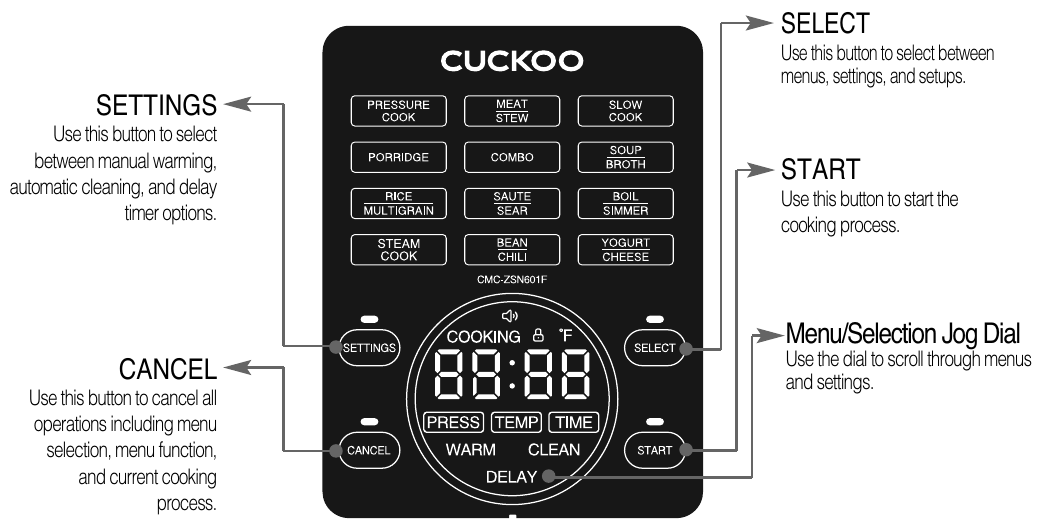
- 1
SETTINGS
- Use this button to select between manual warming, automatic cleaning, and delay timer options.
- 2
CANCEL
- Use this button to cancel all operations including menu selection, menu function, and current cooking process.
- 3
SELECT
- Use this button to select between menus, settings, and setups.
- 4
START
- Use this button to start the cooking process.
- 5
Menu/Selection Jog Dial
- Use the dial to scroll through menus and settings.
※ As soon as you plug the machine in, the machine will automatically be in standby mode (as seen in the image on the right).
※ Canceling will automatically send you back to Standby Mode.
※ If there is no button input for about 20 seconds during operation of all functions except the standby, the buzzer sounds 10 times and it switches to the standby after about 2 minutes. (This is not a malfunction.)
※ Please check press the button firmly until you hear a buzzer sound, and the design of this nameplate may be different from the actual product.
Error Code meanings
When the usage method is not correct or there is a problem with the product, the following indication appears and an alarm is generated.
- LId
- E1
- E2
- E3
- E4
- E5
- E6
| # | Display | Meaning |
|---|---|---|
| 1 | LId | Appears when the top cover is turned in the open direction during cooking or is not turned in the securely locked direction. Firmly turn the lock/unlock handle on the top cover in the locked direction. |
| 2 | E1 | Appears when there is a problem with the temperature sensor. → Please contact the customer service. |
| 3 | E2 | Appears when there is a problem with the temperature sensor. → Please contact the customer service. |
| 4 | E3 | Appears when there is a problem with the high pressure sensor. → Please contact the customer service. |
| 5 | E4 | Appears when there is a problem with the low pressure sensor. → Please contact the customer service. |
| 6 | E5 | Appears when there is a problem with the high pressure sensor. → Please contact the customer service. |
| 7 | E6 | Appears when there is a problem with the low pressure sensor. → Please contact the customer service. |
HOW TO USE
-
Turn the menu/selection jog dial to select the menu you want.
- Check if the inner pot is installed on the product. (Please use a product-specific inner pot.)
- Make sure that the detachable top cover is attached to the product.
- Before cooking, turn the pressure weight of the detachable top cover toward “SEALING” and adjust it horizontally.
- Each time you turn the SELECT button, the selection is repeated in the following order:
- PRESSURE COOK → MEAT/STEW → SLOW COOK → PORRIDGE → COMBO → SOUP/BROTH → RICE/MULTIGRAIN → SAUTE/SEAR → BOIL/SIMMER → STEAM COOK → BEAN/CHILI → YOGURT/CHEESE → PRESSURE COOK
- Ex) When pressure cooking is selected, the “PRESSURE COOK” menu blinks.
-
After selecting the desired menu by pressing the SELECT button, set the pressure/temperature/cooking time/preset time, and press the START button to start cooking.
- Please refer to the page for setting method.
- If you press the START button, the cooking process starts after preheating (PrE). (SLOW COOK, YOGURT/CHEESE menu has no preheating process)
- Ex) In case of cooking PRESSURE COOK, preheating process indication
-
Cooking
- After the preheating process has passed, the remaining cooking time is displayed on the display from the cooking process.
- The remaining time varies depending on the menu.
-
Cooking Complete
- When cooking is finished, a buzzer sounds and the automatic warming function starts. (Only for automatic warming menu)
▶ If you cook after cooking, the smell may be soaked. (Refer to page 11 and use after wiping the top cover cleanly.)
COOKING TIME AND SETTING STEPS FOR EACH MENU
Menu Options in detail
| Menu | Pressure | Temperatur | Basic cooking time (setting range) | Preset (DELAY) Off | Preset (DELAY) On — Default time (setting range) | COMBO Available menu | Automatic warming |
|---|---|---|---|---|---|---|---|
| PRESSURE COOK | Hi / Lo | - | 30 minutes (0 minute to 6 hours) | Off | 0 minute (0 minute to 24 hours) | O | O |
| Off | Lo/Nor/Hi | 2 hours (5 minutes to 99 hours 59 minutes) | Off | 0 minute (0 minute to 24 hours) | O | O | |
| Manual (210℉~298℉) | 30 minutes (5 minutes to 30 minutes) | O | O | ||||
| Manual (60℉~209℉) | 2 hours (5 minutes to 99 hours 59 minutes) | O | O | ||||
| MEAT/STEW | Hi / Lo | - | 40 minutes (0 minute to 4 hours) | Off | 0 minute (0 minute to 24 hours) | O | O |
| SLOW COOK | - | Lo/Nor/Hi/Manual (60℉~208℉) | 4 hours (30 minutes to 20 hours) | Off | 0 minute (0 minute to 24 hours) | O | O |
| PORRIDGE | Hi / Lo | - | 20 minutes (0 minute to 2 hours) | Off | 0 minute (0 minute to 24 hours) | O | O |
| SOUP/BROTH | Hi / Lo | - | 15 minutes (0 minute to 6 hours) | Off | 0 minute (0 minute to 24 hours) | O | O |
| RICE/MULTIGRAIN | Hi / Lo | - | 10 minutes (0 minute to 4 hours) | Off | 0 minute (0 minute to 24 hours) | - | O |
| SAUTE/SEAR | - | - | 20 minutes (5 minutes to 30 minutes) | - | - | - | |
| BOIL/SIMMER | Hi / Lo | - | 20 minutes (0 minute to 4 hours) | Off | 0 minute (0 minute to 24 hours) | - | O |
| STEAM COOK | Hi / Lo | - | 5 minutes (0 minute to 4 hours) | Off | 0 minute (0 minute to 24 hours) | - | - |
| BEAN/CHILI | Hi / Lo | - | 20 minutes (0 minute to 4 hours) | Off | 0 minute (0 minute to 24 hours) | - | O |
| YOGURT/CHEESE | - | Nor | 8 hours fixed | - | - | - | |
| Lo | 24 hours fixed | ||||||
| Manual (99℉~176℉) | 8 hours (1 hour to 48 hours) | ||||||
| WARM | - | Lo/Nor/Hi/Manual (99℉~199℉) | 4 hours (0 minute to 24 hours) | - | - | - | |
| CLEAN | Hi / Lo | - | 15 minutes fixed | - | - | - | |
▶ Initial display time and pressure/temperature/preset per menu are the basic cooking time, and set the desired time and pressure/temperature/preset according to your preference.
▶ After cooking is complete, the set time/pressure/temperature/ preset is not saved and returns to the basic setting stage.
▶ Use a detachable top cover according to the cooking method for each menu. (Refer to recipe book)
▶ After cooking is complete and before opening the top cover, turn the pressure weight toward “VENTING” to exhaust all the pressure and open it.
(Until the pressure is completely exhausted, the inner pot and top cover may not be separated, and there is a risk of burns due to sudden opening.)
SETTING THE COOKING TIME AND PRESSURE
How to set your cooking time
-
Twist the jog dial to desired menu option and press the SELECT button.
-
Once selected, twist the jog dial to TIME and press SELECT again.
-
Turn the jog dial to set the desired time.
-
Press the START button to start cooking immediately, or press the SELECT button once to complete other settings and then press the START button to start cooking.
How to set your pressure level
-
Twist the jog dial to desired menu option and press the SELECT button.
-
Once selected, twist the jog dial to PRESS and press SELECT again.
-
Turn the jog dial to set the desired pressure.
-
Press the START button to start cooking immediately, or press the SELECT button once to complete other settings and then press the START button to start cooking.
▶ There are differences in the items that can be set for each menu.
▶ After cooking is complete and before opening the top cover, turn the pressure weight toward “VENTING” to exhaust all the pressure and open it. (There is a risk of burns because the top cover may not open well or the top cover and inner pot may be separated suddenly until the pressure is completely exhausted.)
▶ Be careful not to touch the metal part of the top cover during cooking of the menu using the top cover or when removing the top cover after cooking is complete. There is a risk of burns due to the heat.
HOW TO SET THE TEMPERATURE AND DELAY TIMER
How to set your temperature
-
Twist the jog dial to desired menu option and press the SELECT button.
-
Once selected, twist the jog dial to TEMP and press SELECT again.
-
Turn the jog dial to set the desired temperature.
-
Press the START button to start cooking immediately, or press the SELECT button once to complete other settings and then press the START button to start cooking.
How to set your delay timer
-
Twist the jog dial to desired menu option and press the SELECT button.
- Menus that cannot be preset: SAUTE/SEAR, YOGURT/CHEESE, COMBO
-
After selecting your desired menu and selecting desired settings for your menu, press the SETTINGS button and DELAY and TIME will illuminate.
-
Turn the jog dial to the desired delay start time. For example, if you want cooking to start an hour later, select 1:00 using the jog dial.
- The default preset time is set to 0 minutes, and can be set from 0 minutes to 24 hours (See page 14).
- If you make a preset for a long time on a hot day, the food in the inner pot may go bad.
-
After deciding on a delay start time, press the START button to lock in the time. Cooking will start on the time selected.
▶ There are differences in the items that can be set for each menu.
▶ After cooking is complete and before opening the top cover, turn the pressure weight toward “VENTING” to exhaust all the pressure and open it. (There is a risk of burns because the top cover may not open well or the top cover and inner pot may be separated suddenly until the pressure is completely exhausted.)
▶ Be careful not to touch the metal part of the top cover during cooking of the menu using the top cover or when removing the top cover after cooking is complete. There is a risk of burns due to the heat.
HOW TO USE THE COMBO FUNCTION
What is COMBO function?
This function allows you to cook with SAUTE/SEAR menu first, then proceed with additional menus in succession.
Example) SAUTE/SEAR menu + PRESSURE COOK menu
How to set up COMBO function.
-
In the standby state, turn the jog dial to move to the position where the COMBO menu blinks, then press the SELECT button once. At this time, "COMBO" lights up in the DISPLAY window, and "SAUTE/SEAR", "TIME", and "Time (00:20)" blink together.
-
After setting the cooking time for the “SAUTE/SEAR” menu you want with the jog dial, press the SELECT button once.
- Menu with additional cooking settings: PRESSURE COOK, MEAT/STEW, SLOW COOK, PORRIDGE, SOUP/BROTH
- In “SAUTE/SEAR” cooking time setting mode, “COMBO” lights up, “SAUTE/SEAR”, “TIME”, “00:20” blinks.
-
After selecting the desired additional cooking menu using the jog dial, press the SELECT button once to enter the user setting mode of the selected menu.
- The basic cooking time of the “SAUTE/SEAR” menu is set to 20 minutes and can be set from 5 to 30 minutes. (See page 16)
- Refer to pages 17~18 for how to set cooking time/pressure/ temperature for the additional cooking menu.
-
Start cooking by pressing the START button.
- When setting additional cooking (COMBO function), preset setting is not possible.
- After heating until it reaches a certain temperature through the preheating process (Pre), cooking proceeds for the set time.
-
When starting additional cooking, close the detachable top cover and turn it in the locking direction.
- After the SAUTE/SEAR menu is completed, additional cooking starts immediately.
- When additional cooking starts, a buzzer sounds.
- If the lid is not turned firmly in the direction of locking, Lid error and buzzer will occur and additional cooking will be stopped. (In case of a lid error, all output is blocked and only the cancel button can be entered.)
- If the top cover does not close well due to the hot contents, turn the pressure weight to the "VENTING" direction to close the top cover. Then turn the pressure weight in the “SEALING” direction to align it so that it is horizontal.
-
After additional cooking is complete, turn the pressure weight toward “VENTING” to exhaust all the steam, then open the detachable top cover by turning it toward the open direction.
▶ Be careful not to burn yourself with hot steam or product.
▶ Do not open the top cover forcibly while the pressure indicator is up.
▶ Forcibly opening the top cover may cause product failure or accident.
HOW TO USE THE WARMING SETTING
How to set and use manual warming
The manual warming function keeps cooked food warm and keeps warm for a set time.
-
In the standby state, press the SETTINGS button once and when the “WARM” letter blinks, press the SELECT button once to enter the warming setting mode.
-
Press the SELECT button once to enter the warming temperature setting mode. At this time, "WARM", "TIME" lights up in the DISPLAY window, and "TEMP" and "HI" blinks.
-
Turn the jog dial to set the desired warming temperature and press the SELECT button once.
- The default temperature is set to “High Temperature (HI)”.
- Manual temperature control can be set with the jog dial after pressing the SELECT button once when 129℉ blinks. (After adjusting to the desired temperature, pressing the SELECT button once selects the temperature and enters the warming setting mode.)
- The default temperature for manual temperature is set to 129°F. (Manual temperature setting range: 99°F~199°F)
-
Turn the jog dial and press the SELECT button once while “TIME” is blinking to enter the warming time setting mode. Set the desired warming time with the jog dial.
- The default setting time is set to “4 hours”. (Settable time: 0 minutes to 24 hours)
-
Press the START button to start warming immediately, or press the SELECT button once and after completing other settings, press the START button to start warming.
- The temperature is kept warm for the set time, after completion, the buzzer sounds and goes back to the standby state.
Precautions when keeping warm
- When opening the top cover immediately after cooking or during warming, the top cover may not open well due to pressure. Turn the pressure weight in the direction of VENTING to completely exhaust the pressure and open it. The inner pot and the top cover may not be separated until the pressure is completely exhausted, and there is a risk of burns due to sudden opening.
- When keeping warm, be sure to turn the detachable top cover to the lock side. (This affects warming performance.)
- After cooking is complete, mix the contents evenly to the bottom and keep warm to improve the condition of the contents.
- If there is no content in the inner pot during warming or not in use, press the Cancel button to cancel the warming or disconnect the power cord from the outlet.
- Do not keep warm with a spatula in it. (Especially wooden spatulas, etc., generate bacteria and cause odor.)
- In case of keeping warm for a long time, it is recommended to keep warm within 1 hour as food may go bad or smell bad.
- In the case of mixed grains and brown rice, the warming condition is worse than that of white rice, so avoid warming as much as possible.
Troubleshooting
▼ If there is anything wrong with the product, check the following points before contacting the customer service center.
| Symptom | Checklist | Measures |
|---|---|---|
| When cooking doesn't work | • Did you press the START button? | • After selecting the desired menu, be sure to press the START button once and check if “Pre” is displayed on the display or “:” is blinking. |
| • Is there a power outage during cooking? | • The model does not have a power outage compensation function, so press the START button once to cook again. (If the internal pressure is full, the top cover may not open. Turn the pressure weight toward VENTING to exhaust the pressure sufficiently and open it.) | |
| • Did you turn the top cover to the locked position before cooking? | • Cooking will not start if you press the START button without firmly turning the top cover to the lock position. | |
| • Did you turn the top cover to the open position while cooking? | • If the top cover is suddenly turned in the open direction during cooking, a “Lid” error occurs on the display and cooking stops. | |
| When cooking is not completed for a long time or is no longer passed in the preheating process (Pre) stage | • Did you fasten the top cover? | • There is a preheating process (Pre) in the menu using pressure. If the top cover is not in use, there is no pressure inside the inner pot and the cooking stage does not proceed. Cook after locking the top cover. |
| • Is the pressure weight turned in the direction of VENTING? | • If there is no pressure inside the inner pot, it does not proceed to the cooking stage. Turn the pressure weight in the SEALING direction so that the pressure weight is horizontal. | |
| • Aren't there many contents in the inner pot? | • If there is a lot of contents inside the inner pot, it must be heated more than when the contents are small, and it takes a long time until sufficient pressure is filled. | |
| • Did you not use it for 220 V (power)? | • This product is for 120 V only. Use the power properly. | |
| When there is a smell during warming | • Did you close the top cover tightly? | • Lock the top cover completely. |
| • Did the power plug come out of the outlet during warming? | • Always connect the power plug during warming. | |
| • Have you kept warm for more than 1 hour or too little rice/food? | • Keep warming time within 1 hour as much as possible. | |
| • Have you put a spatula, cold rice/food, or other types of rice/food to keep warm? | • Do not keep cold rice or cold food warm. | |
| When the cook button does not work and the “LId” indication appears | • Did you turn the top cover in the locked direction? | • Turn the top cover to the fully locked direction. If the top cover is not fully tightened, the START button will not work. |
| When the “E1” indication appears | • Appears when there is a problem with the temperature sensor. | • Turn off the power and contact the customer service center. |
| When the “E2” indication appears | • Appears when there is a problem with the temperature sensor. | • Turn off the power and contact the customer service center. |
| When the “E3” indication appears | • Appears when there is something wrong with the high pressure detector. | • Turn off the power and contact the customer service center. |
| When the “E4” indication appears | • Appears when there is something wrong with the low pressure detector. | • Turn off the power and contact the customer service center. |
| When the “E5” indication appears | • Appears when there is something wrong with the high pressure detector. | • Turn off the power and contact the customer service center. |
| When the “E6” indication appears | • Appears when there is something wrong with the low pressure detector. | • Turn off the power and contact the customer service center. |
| When cooking or rice is heavily scorched | • Are there any foreign substances or rice grains severely scorched on the outside of the temperature sensor, hot plate, and inner pot? | • Remove foreign substances on the outside of the temperature sensor, hot plate, and inner pot. |
| When food and rice smells strange immediately after cooking or during warming | • Did you clean up after cooking with a lot of smell? | • Refer to page 11 and use after wiping the detachable top cover and pressure packing. |
| When the top cover cannot be closed | • Did you attach the top cover to the opening direction? | • Close the top cover according to the opening direction. |
| • Is there any hot food in the inner pot? | • Turn the pressure weight toward VENTING to tilt the pressure weight, then close the top cover. | |
| When the top cover does not move in the open direction | • Didn't you turn the top cover during cooking? | • If the pressure is full during cooking, the top cover will not open. Do not force open the top cover. If it is unavoidable, press the cancel button to cancel it, then turn the pressure weight toward the VENTING direction to completely exhaust the steam and open it. |
| • Didn't you turn the top cover when the steam was not fully exhausted? | • Turn the pressure weight in the direction of VENTING to completely exhaust the steam and open the top cover. | |
| If the top cover does not open even though the top cover is fully turned to the open direction | • This is due to pressure. • Turn the pressure weight in the direction of VENTING to completely exhaust the steam and open the top cover. Do not force open the top cover. There is a risk of burns if hot contents spill. |
|
| When steam leaks through the top cover or a “beep” whistle is heard | • Is there any foreign substances (rice grains, etc.) on the packing? | • Use after cleaning the packing with a dishcloth or soft cloth. • Always keep the area around the packing clean. • If steam leaks, immediately press the cancel button for 2 seconds, press the pressure release button to exhaust the steam, unplug the power plug, stop using it, and contact the customer service center. |
| • Isn't the packing worn out? | • Replace the packing after 1 to 3 years of use depending on the method and frequency of use. If the old packing is used continuously, steam may leak and pressure cooking may not be possible. | |
| When there is a “crackling” sound during cooking, or warming | • Isn't it the cooking relay sound? | • The “crackling” sound of the relay is a normal operation sound of ON and OFF. |
| • Is the water on the bottom of the inner pot wiped? | • If there is water on the bottom of the inner pot, it makes a “crackling” sound. Next time, wipe the water and put in the inner pot. |
SPECIFICATIONS
| Model name | CMC-ZSN601F |
| Power supply | 120V~/60Hz |
| Power consumption | 1000W |
| Menu | PREUSSRUE COOK, MEAT/STEW, SLOW COOK, PORRIDGE, COMBO, SOUP/BROTH, RICE/MULTIGRAIN, SAUTE/SEAR, BOIL/SIMMER, STEAM COOK, BEAN/CHILI, YOGURT/CHEESE |
| Power cord length | 2.46ft(0.75m) |
| Pressure | HIGH PRESSURE : 11.6psi (80kPa) LOWER PRESSURE : 5.8psi (40kPa) |
| Weight | 12.2lbs. (5.5kg) |
| Dimension — Width | 13.7 in (34.6cm) |
| Dimension — Length | 12.8 in (32.3cm) |
| Dimension — Height | 12.4 in (31.1cm) |
LIMITED WARRANTY
CUCKOO ELECTRIC MULTI PRESSURE COOKER LIMITED WARRANTY
KEY Company, P&K USA TRADING CORP and Cuckoo Trading Canada will repair at its option replace, without charge, your product which proves to be defective in material or workmanship under normal use, during the warranty period listed below from the date of original purchase. This warranty is good only to the original purchaser of the product during the warranty period. P&K USA TRADING CORP. covers the east and the central districts, KEY Company covers the west and the central districts, Cuckoo Trading Canada covers the whole Canada.
WARRANTY PERIOD
| MODEL# | #LABOR | PARTS | HOW SERVICE IS HANDLED |
|---|---|---|---|
| CMC-ZSN601F | 1YEAR | 1YEAR | The East and the Central Districts Call : 718 888 9144 Address : 5-48 46th Road Long Island City, NY 11101 USA The West and the Central Districts. Call : 323 780 8808 Address : 1137 E. 1st Street, L.A, CA 90033, USA Canada (TORONTO) Call : 905 707 8224 Address : #D8-7398 Yonge Street Thornhill Ontario Canada L4J 8J2 Canada (VANCOUVER) Call : 604 540 1004 Address : 945 Lougheed Hwy Coquitlam BC Canada V3K 3T4 |
No other express warranty is applicable to this product. THE DURATION OF ANY IMPLIED WARRANTIES, INCLUDING THE IMPLIED WARRANTY OF MERCHANTABILITY, IS LIMITED TO THE DURATION OF THE EXPRESS WARRANTY HEREIN. CUCKOO ELECTRONICS CO.,LTD, SHALL NOT BE LIABLE FOR THE LOSS, THE USE OF THE PRODUCT, INCONVENIENCE, LOSS OR ANY OTHER DAMAGES, DIRECT OR CONSEQUENTIAL, ARISING OUT OF THE USE OF, OR INABILITY TO USE, THIS PRODUCT OR FOR ANY BREACH OF ANY EXPRESS OR IMPLIED WARRANTY, INCLUDING THE IMPLIED WARRANTY OF MERCHANTABILITY APPLICABLE TO THIS PRODUCT.
Some states do not allow the exclusion or limitation of incidental or consequential damages or limitations on how long an implied warranty lasts : so these limitations or exclusions may apply to you. This warranty gives you specific legal rights and you may also have other rights which vary from state to state.
THE ABOVE WARRANTY DOES NOT APPLY IN THESE CASES:
- To damages problems which result from delivery or improper installation.
- To damages problems which result from misuse, abuse, accident, alteration, or incorrect electrical current or voltage.
- To serve call which do not involve defective workmanship or material and explaining the operation of the unit.
Therefore, these costs are paid by the consumer. Customer assistance numbers :
To Prove warranty Coverage : ▶ Retain your Sales Receipt to prove date of purchase
▶ Copy of your Sales Receipt must submitted at the time warranty service is provided.
To Obtain Product, Customer, or Service Assistance and Nearest Authorized service center.
| Region | Contact |
|---|---|
| The East and the Central Districts | Call : 718 888 9144 Address : 5-48 46th Road Long Island City, NY 11101 USA |
| The West and the Central Districts. | Call : 323 780 8808 Address : 1137 E. 1st Street, L.A, CA 90033, USA |
| Canada (Toronto) | Call : 905 707 8224 Address : #D8-7398 Yonge Street Thornhill Ontario Canada L4J 8J2 |
| Canada (Vancouver) | Call : 604 540 1004 Address : 103-4501 North Road Burnaby BC Canada V3R 4R7 |