

CUCKOO
User Manual
CMC-QSB501S
CMC-QSB501S User Manual
NAME OF EACH PART
Name of each part
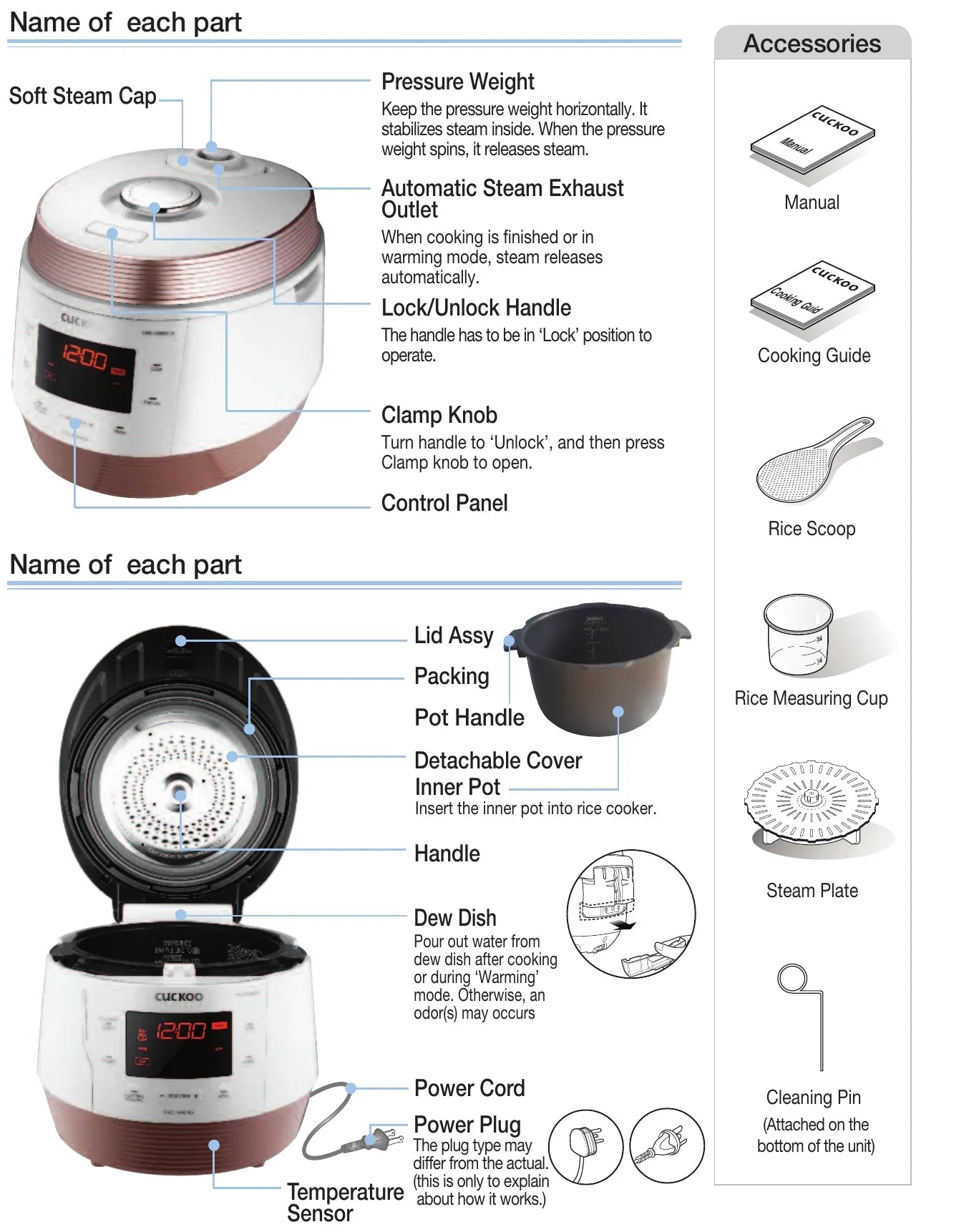
- Soft Steam Cap
- —
- Pressure Weight
- Keep the pressure weight horizontally. It stabilizes steam inside. When the pressure weight spins, it releases steam.
- Automatic Steam Exhaust Outlet
- When cooking is finished or in warming mode, steam releases automatically.
- Lock/Unlock Handle
- The handle has to be in ‘Lock’ position to operate.
- Clamp Knob
- Turn handle to ‘Unlock’, and then press Clamp knob to open.
- Control Panel
- —
- Lid Assy
- —
- Packing
- —
- Pot Handle
- —
- Detachable Cover
- —
- Inner Pot
- Insert the inner pot into rice cooker.
- Handle
- —
- Dew Dish
- Pour out water from dew dish after cooking or during ‘Warming’ mode. Otherwise, an odor(s) may occurs
- Power Cord
- —
- Power Plug
- The plug type may differ from the actual. (this is only to explain about how it works.)
- Temperature Sensor
- —
Accessories
- Manual
- Cooking Guide
- Rice Scoop
- Rice Measuring Cup
- Steam Plate
- Cleaning Pin(Attached on the bottom of the unit)
IMPORTANT SAFEGUARDS
- Read all instructions before using this appliance.
- Do not touch hot surfaces. Use handles or knobs.
- To protect against fire, electric shock and / or injury to persons do not immerse cord, plugs, or Pressure Cooker Body in water or any other liquids.
- Close supervision is necessary when this appliance is used by or near children. This appliance is not intended for use by young children without supervision.
- Unplug cord from outlet when not in use and before cleaning. Allow appliance to cool before putting on or taking off parts, and before cleaning the appliance.
- Do not operate any appliance with a damaged cord or plug, after the appliance malfunctions, or has been damaged in any manner. Return the appliance to the nearest authorized service facility for examination, repair or adjustment.
- The use of accessory attachments not recommended by the appliance manufacturer may result in fire, electric shock, and / or injury to persons.
- If the supply cord is damaged, it must be replaced by a special cord or assembly available from the manufacturer or your service agent.
- Do not use outdoors.
- Do not let the cord hang over the edge of a table or counter, or touch hot surfaces.
- Do not place on or near a hot gas, electric burner, or in a heated oven.
- Always attach the plug to the appliance first, then plug the cord into the wall outlet. To disconnect, or set all control to “off”, then remove the plug from the wall outlet.
- Do not use this appliance for other than its intended use.
- Extreme caution must be used when moving an appliance containing hot oil or any hot liquids.
- Oversized foods, metal foil packages, or utensils must not be inserted into the appliance as they are a risk of fire or electric shock.
- Fire may occur if the appliance is covered or touching flammable material, including curtains, draperies, walls, etc while in operation.
- To reduce the risk of electric shock, cook only in the provided removable container.
- This appliance cooks under pressure. Improper use may result in scalding injury. Before operating the unit, properly secure and close the unit. See “Operating Instructions.”
- Before use always check the pressure releasing device for clogging.
- Do not use this pressure cooker to fry in oil.
- This appliance is not intended for use by persons (including children) with reduced physical, sensory or mental capabilities, or lack of experience and knowledge, unless they have been given supervision or instruction concerning use of the appliance by a person responsible for their safety.
- Never immerse the appliance in water while cleaning.
SAVE THESE INSTRUCTIONS
THIS APPLIANCE IS FOR HOUSEHOLD USE ONLY
ADDITIONAL IMPORTANT SAFEGUARDS
WARNING
This appliance generates heat and releases steam during use. Use proper precaution to prevent risk of burns, fires, other injuries, or damage to property.
- Keep hands and face away from the Pressure Release Valve when releasing pressure.
- Take extreme caution when opening the Lid after cooking. Severe burns can result from steam inside.
- Never open the Lid while the unit is in operation.
- Do not use without the inner Pot in place.
- Do not cover the Pressure Valve with anything as an explosion may occur.
- Do not touch the inner pot nor any heating parts, immediately after use. Allow the unit to cool down completely first.
This appliance is intended to be used in household and similar applications such as :
- staff kitchen areas in shops, offices and other working environments;
- farm houses;
- by clients in hotels, motels and other residential type environments;
- bed and breakfast type environments.
HOW TO USE EXTENSION CORD
Note:
- A. A short power-supply cord (or cord set) is provided to reduce the hazards from entanglement by a longer cord.
- B. Extension cord should be used properly.
- C. Extension cord usage for the rice cooker:
-
The correct rated voltage should be used for the rice cooker.
-
If the appliance is set on the ground, the extension cord should also be set on the ground.
-
The cord wires and extension cord should always be arranged to prevent hazards to children.
"This appliance has a polarized plug (one blade is wider than the other). To reduce the risk of electric shock, this plug is intended to fit into a polarized outlet only one way. If the plug does not fit fully into the outlet, reverse the plug. If it still does not fit, contact a qualified electrician. do not attempt to modify the plug in any way."
SAFETY PRECAUTIONS
- Read the following product safety guide carefully to prevent any accidents and/or serious danger.
- ‘Warning’ and ‘Caution’ are different as follows.
| Symbol Type | Description |
|---|---|
| Warning | This means that the action it describes may result in death or severe injury. |
| Caution | This means that the action it describes may result in injury or property damage. |
| Triangle Alert Icon | This sign is intended to remind and alert that something may cause problems under the certain situation. Please read and follow the instruction to avoid any harmful situation. |
| Do not | Indicates a prohibition |
| Instruction | Indicates an instruction |
Warning — Do not
WarningDo not
Do not cover the automatic steam outlet or pressure weight with your hand or face.
- It can cause burns.
- Especially be careful to keep it out of children’s reach.
WarningDo not
Do not use the cooker near hot things such as stove, gas stove or direct ray of light.
- It can cause an electric shock, fire, deformation, malfunction, or discoloration. Please check the power cord and plug frequectly.
WarningDo not
Do not alter, reassemble, disassemble or repair.
- It can cause fire, electricshock or injury.
- For repair, contact dealeror the service center.
WarningDo not
Use a single socket with the rated current above 15A.
- Using several lines in one socket can cause overheating or fire. Please check the power cord and plug frequently.
- Use an extension cord with the rated current above 15A.
WarningDo not
Please pay careful attention against water and chemicals
- It can cause an electric shock or fire.
WarningDo not
Do not use a rice cooker at a place where dust is trapped or chemical material is located.
- Do not use any combustible gas or flammable materials nearby a product.
- It can cause explosion or fire.
WarningDo not
Do not use damaged power cord, plug, or loose socket.
- Please check the power cord frequently for damage.
- Serious damage can cause electric shock or fire.
- If the plug is damaged, contact the dealer or a service center.
WarningDo not
Do not clean the product with water or pour water in the product.
- It can cause an electric shock or fire.
- If it contacts water, please separate power cord and contact dealer and service center.
WarningDo not
Do not cover the automatic steam outlet or pressure weight with a duster, a towel, or apron, etc.
- It can cause deformation or a breakdown.
- It can cause an explosion by pressure.
WarningDo not
Do not use pots that are not designed for the cooker. Do not use abnormal pot and do not use without the inner pot.
- It can cause an electric shock or fire.
WarningDo not
Do not bend, tie, or pull the power cord by force.
- It can cause an electric shock or short circuit resulting in fire. Please check the power cord and plug frequently.
WarningDo not
Do not use it without the inner pot.
- It can cause electric shock or malfunction.
- Do not pour rice or water without the inner pot.
- If rice or water gets in then do not turn the product over or shake it, please contact the dealer or service center.
WarningDo not
Do not turn the Lock/Unlock Handle to “Unlock” while cooking.
- The hot steam or any hot content within the cooker can cause burns.
- After you finish the cooking do not try to open the cooker by force until the steam is completely exhausted.
WarningDo not
Do not over unplug and plug the power cord over and over.
- It can cause an electric shock or fire.
WarningDo not
Do not insert metal objects such as pins and wires or any other external substances in the automatic steam exhaust outlet or any other slot.
- It can cause an electric shock or fire.
- Especially be careful to keep it out of reach of children.
WarningDo not
Keep the cooker out of reach of children.
- It can cause burns, electric shock or injury.
WarningDo not
Don’t spray or put any insecticides or chemicals.
- It can cause an electric shock or fire.
- If cockroaches or any insects get inside the cooker, please call a dealer or a service center.
WarningDo not
Don’t let foreign substances such as needle, cleaning pin, or metal get in or block the in let/out let pipe or gape.
- It can cause an electric shock or fire.
- Do not put a cleaning pin in a gap or a hole of the product except when dearing a steam outlet.
WarningDo not
Do not open the top cover while in heating and cooking.
- It can cause burns.
- If you need to open the lid while cooking, keep pressing the cancel button for 2 seconds and confirm internal steam released completely turning the pressure weight over.
WarningDo not
Remove a foreign substance on the cord and plug with a clean cloth.
- It can cause fire. Please check the power cord and plug frequently.
WarningDo not
Be careful that both the plug and power cord are not to be shocked by animal attack or sharp metal materials.
- Damages by impact can cause an electric shock or fire. Please check the power cord and plug frequently.
Caution — Do not
CautionDo not
Do not use it on a rice chest or a shelf.
- Do not place the power cord between furniture. It can cause an electric shock resulting in fire. Please check the power cord and plug frequently.
- When using on furniture be cautious of steam release As it can cause damage, fire and and/or electric shock.
CautionDo not
Do not press heavy things on the power cord.
- It can cause an electric shock or fire.
- Please check the power cord and plug frequently
CautionDo not
Do not change, extend or connect the power cord without the advice of a technical expert.
- It can cause an electric shock or fire.
CautionDo not
Clean any dust or external substances off the temperature sensor and inner pot.
- It can cause a system malfunction or fire.
CautionDo not
Do not plug or pull out the power cord with wet hands.
- It can cause an electric shock.
CautionDo not
Do not move the product by pulling or using the power cord.
- Electric short might cause fire.
CautionDo not
Please contact a dealer or service center when there is a strange smell or smoke.
- First pull out the power cord. And contact dealer or the service center.
CautionDo not
Do not fill the Inner Pot for more than its maximum capacity.
- It may cause a malfunction leading to issues such as overflow of contents or poor cooking.
CautionDo not
Do not touch the metallic surface of the inner pot and pressure weight after cooking or warming.
- It can cause burns.
- Remaining hot steam can cause burns when you tilt the pressure weight while and right after the cooking.
CautionDo not
Don’t use the cooker near a magnetic field.
- It can cause burns or breakdown.
CautionDo not
Do not drop or impact the cooker.
- It can cause a safety problem.
CautionDo not
Please surely pull out the plug when not in use.
- It can cause electric shocks or fire.
- Use AC 120V only.
CautionDo not
Use product on a flat surface. Do not use on a cushion. Please avoid using it on an unstable location prone to falling down.
- It can cause malfunction or a fire. Please check the power cord and plug frequently.
CautionDo not
Don’t use for various purpose for inner pot. And do not heat up the inner pot on the gas stove.
- It can cause deformation of the inner pot.
- It can cause to spill the inner coating.
CautionDo not
Please pull out the plug when not in use.
- It can cause electric shocks or fire.
CautionDo not
Please use the cooker for it’s intended purpose.
- It can cause malfunction or smell.
CautionDo not
After you finish cooking, do not try to open the cooker by force until the steam is completely exhausted.
- The hot steam or any hot content within the cooker can cause burns.
- Cautiously open the top cover after cooking is done to avoid dangerous steam and burns.
CautionDo not
Do not place on rough top or tilted top.
- It can cause burns or breakdowns.
- Be careful to install the power cord to pass without disruption.
CautionDo not
Please call customer service if the inner pot coating peels off.
- Inner pot coating may wear awayafter long use.
- When cleaning the inner pot, do not use tough scrubber, metallic scrubber, brush, abrasive metallic etc.
CautionDo not
Do not hold the cooker by the inner pot handle.
- It can cause problems and danger. There are portable handles on the bottom right and left side of the cooker. Hold the handles with both hands and move it carefully.
CautionDo not
Always turn the Lock/Unlock Handle to "Lock" when not in use.
- It can cause deformation by remaining pressure.
CautionDo not
Wipe off any excessive water on the cooker after cooking.
- It can cause odor and discoloration. Wipe off water that is left behind from dew.
CautionDo not
Please contact dealer or service center when either a button of a product or a product itself is not working properly.
CautionDo not
In case of a blackout during cooking, steam from a rice cooker will be released automatically. Thus, the quality of rice is lower than normal.
- Please start cooking with an indicated amount of rice and water.
- Water can overflow if the amount of water in a pot exceeds the indicated level of water usage.
- Please start cooking in a status that steam control cap is installed completely.
CautionDo not
Please clean the body and other parts after cooking.
- If you cook rice or use the Keep Warm function after cooking other food, the rice or the food may smell or stink.
- Clean the oven packing, top heater plate, and inner pot every time you cook any of those.
- It can cause alteration or smell.
- Use dry kitchen cleaner or sponge to clean the inner pot, since rough scrub or metallic ones are abrasive to the coating.
- Depending on the using methods or user's circumstances inner pot coating might rise. Please call the customer service for those cases.
- Please, do not pull out the clean steam vent by force.
CautionDo not
Be cautious when steam is being released.
- When the steam is released don’t be surprised.
- Please keep the cooker out of reach of children.
CautionDo not
As the food could go bad, please avoid using the Keep Warm mode for a long time.
CautionDo not
When you pull out the power plug, don’t pull the power cord. Please, safely pull out the power plug.
- If you inflict impact on power cord, it can cause an electric shock or fire.
HOW TO CLEAN
- INNER POTWipe the inner, upper, and outer parts of the inner pot of any alien substance.
- OVEN PACKINGWipe the top cover with a damp cloth. Be careful when cleaning the top heater
- INNER BODYIf there are foreign substances stuck on the temperature sensor, remove them without damaging the metal plate. Cleanly wipe the foreign substances or moist on the heat plate.
- MAIN UNITWipe the main unit with a damp cloth.
- TOP COVERIf there is rice water left on the lid, please wipe it out with a wet towel. The center of the lid is made out of metal so beware when cleaning.
- Moisture dish of the main bodyThis part is designed to gather the moisture coming through the steam vent during cooking. Once cooking finished, wipe it clean with a well wrung dish cloth.
- CONTROLIn case the cauldron is stained with cooked rice broth or foreign matter, wipe the cauldron with a damp dishcloth. Using a rough scouring pad, brush, or etc. may damage cauldron surface. If the buttons are not functioning correctly, please contact our customer care service.
- LID OPEN BUTTONBefore or after use, please wipe around the Lid Open button and remove rice water or any other foreign substances using a wet towel. Before or after use, if the Lid Open button does not work, please contact customer service.
※ Caution
Do not clean the inner pot with any sharp cutlery inside (fork, spoon, chopsticks, etc.).
- The coating of the inner pot may peel off.
How to Clean Dew Dish
-
Separate the dew dish.
-
Separate the drain ditch cap by pushing it down.
-
Clean the drain ditch cap and dew dish with a neutral detergent.
-
Securely put in the dew dish after cleaning
-
Insert the dew dish firmly by pressing it in direction of the arrow.
How to Clean The Pressure Weight Nozzle
If the valve hole of the pressure weight part is clogged, puncture it with the cleaning pin
- The valve hole of the pressure weight allows steam to release. Check regularly to ensure that it is not blocked. If the valve hole of the pressure weight is blocked, the hot steam and hot content within the cooker can cause serious injury.
※ Do not use the cleaning pin for any other use except to clean the valve hole of the pressure weight.
※ Cleaning Pin : Attached on the bottom of the unit
How to Disassemble the Pressure Weight
- Under the Lock/Unlock handle is the steam cap that guards the pressure weight. To remove the pressure weight, remove the steam cap, turn the pressure weight counter-clockwise while pulling it up, and keep turning until it comes out.
- Puncture the clogged valve hole with the cleaning pin and reassemble it by turning it clockwise.
- When the pressure weight is properly assembled, it can freely be turned.
Detachable Cover & Pressure Packing
After cleaning detachable cover, put it back on the lid.
Unless detachable cover is mounted, preset cooking cannot be done. (Alarm may sound while keeping warm.)
- Clean the detachable cover to prevent odors.
- Clean the body and cover with a dry dishtowel. Do not use metallic scrubbers
- Do not put materials like screws into the holes on the detachable cover. Check the back cover and front cover.
-
If you pull out the detachable cover, indicated by the arrow, it can be easily separated.
-
When cleaning the detachable cover, hold and pull out the both side wing of the cover, and then separate the handle and the rubber packing.
-
Frequently, clean the cover with a sponge and a neutral detergent.
-
Please put the detachable cover.
-
When you fix the rubber packing into the detachable cover, hold it between and put it in the edge of the detachable cover by turning it.
-
When putting the cover into the lid, press the cover handle after fitting the handle into the groove indicated by the arrow.
※ Do not put substances like a screw into hole of detachable cover.
※ Look in the back cover and the front cover.
How to install the Double Motion Packing (Pressure Packing)
The all-stainless cover is not only delamination-free and easy to clean, but it also lasts long, In addition, CUCKOO’s special stainless CSV-a CUCKOO’s patented technology, improves the product’s durability and makes it easier to clean.
- proper maintenance of the pressure packing helps keep high airtightness, adds durability to packing and ensures the taste of the food.
- Read the directions below carefully to install your packing properly.
1. How to remove and clean the pressure packing
-
Unplug the power cord and wait until the pot cools down before opening the Top Cover.
-
To remove the pressure packing, hold it as shown in the picture above and pull it out.
-
After hand washing it with a neutral cleaning liquid and a sponge, wipe it clean with a well wrung dish cloth.
2. How to reassemble the pressure packing
First match the standard notches on the Inner Pot lid with the standard points on the pressure packing following the numerical order (1, 2, 3, 4, 5, 6). Then, press the outer rim of the packing to insert it into the groove. To reassemble the pressure packing follow the order described below:
-
As the Figure 1 shows, put the point #1 on the pressure packing with the standard notch #1 on the Inner Pot lid together before pressing the outer rim of the packing to insert it into the groove. Repeat with points #2 to # 6.
-
After matching the standard points 1 to 6, press the rest of the packing into the groove by pushing on its outer rim.
3. How to double check whether the packing is well assembled
Since a badly assembled packing can cause the rice to be half-cooked or burned by steam leakage, double check the packing thoroughly as described below.
-
Visual inspection
- check the entire circumference carefully for any crack or damage between the Inner Pot lid and the pressure packing.
- Abnormal assembly: look for parts sticking out of the inner / outer rim / damaged parts
-
Physical inspection
- Check if the pressure packing is thoroughly put into the groove by rubbing the inside rime of the packing with a finger around the entire circumference as shown in the picture above.
- Check if the pressure packing is properly put into the groove of the Inner Pot lid by pushing the outer rim with a finger around the entire circumference as shown in the picture.
- Check if the pressure packing is thoroughly put into the groove by pushing the inside of the rim packing with a finger around the entire circumference as shown in the picture.
-
Water boiling test
- Pour water in the Inner Pot up to water level 2 (for “Rice”) and press the Menu/Selection button to select the self-cleaning mode. Then push the Pressure Cook/Turbo button.
- Within 10 minutes, the pressure regulator weight will start rattling and hissing while emitting stream. If there is no steam coming out from the pot other than through the pressure regulator weight the packing has been properly installed.
- If steam comes out from other parts, stop the test and pull out the power cord. Wait until the pot cools down before removing the pressure packing from the lid. Once reinstalled repeat the boiling test.
- For a more precise water boiling test, you can wrap plastic around the circumference of the closed Top Cover. By doing so, you can easily check where the steam leakage is.
• If you still have a problem with reassembling the packing, please contact our Customer Service.
How to clean the soft steam cap
※ Do not touch the surface of the soft steam cap right after cooking. You can get burned.
-
Peel off the soft steam cap as shown in the image above by grasping the dented part with your fingers and pulling to the side while lifting gently.
-
Disassemble soft steam cap in the rear by pressing in the direction of arrow and ash it frequently with an neutral detergent of sponge.
- ※ Carefully insert the packing the correct way.
-
When you are putting the soft steam cap together, match the bump on the bottom, press it towards the arrow and make sure the hook in the front is locked.
-
When installing the soft steam cap, insert the cap firmly by pressing it in the direction as shown above.
How to use the handle
-
After cooking, turn the handle from “Lock” to “Unlock” to open
-
After cooking, turn the handle from “Lock” to “Unlock” turn the handle to open.
- If there is unreleased steam in the Inner pot it might be hard to turn the handle. In this case twist the pressure weight and let the excess steam out. Do not open by force.
-
Handle must be turned to “Unlock” when opening and closing.
• If the lamp does not turn on, it would not operate the “Cook” and “Preset” buttons. Make sure the handle is located in “Lock”.
When top cover does not close perfectly
Do not try to close the top cover by force. It can damage your cooker and cause problems.
-
Check to make sure the inner pot is place correctly inside the main body.
-
To close the top cover turn the handle to unlock shown in the picture on the right.
-
If there is excess steam inside the inner pot it might be difficult to lock the handle. Twist the pressure weight and allow the excess steam to release. Then try to turn the handle again.
NAMES AND FUNCTIONS ON CONTROL PANEL / MALFUNCTION INSPECTION OF DISPLAY PANEL
Names and Functions on Control Panel
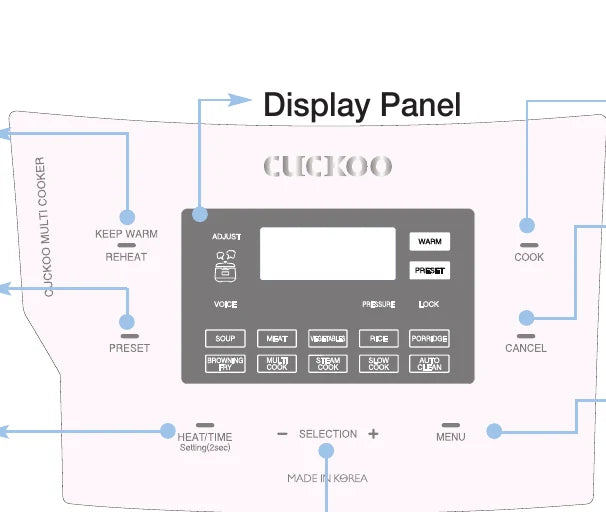
- 1
KEEP WARM / REHEAT button
- Used to keep warm or heat up food right before your meal (Refer to page 24)
- 2
PRESET button
- Used to preset cooking (Refer to page 18)
- 3
HEAT / TIME button
- Used to set the heating level or the cooking time. Language setting (Raper to page 17), Voice volume setting (Raper to page 17), Setting of temperature for keeping warm (Refer to page 17)
- 4
SELECTION - , + buttons
- Used to set the heating level and the cooking time (Refer to page 22, 23). Used to change the preset time (Refer to page 18)
- 5
COOK button
- Used to start cooking (Refer to page 21)
- 6
CANCEL button
- Used to cancel a selected function or to automatically discharge steam(Press the button for two seconds to cancel during cooking.)
- 7
Menu button
- Used to select among SOUP, MEAT, VEGETABLES, RICE, PORRIDGE, BROWNING FRY, MULTI COOK, STEAM COOK, SLOW COOK, and AUTO CLEAN
- 8
Display Panel
※ When the product is plugged in and no operation is conducted with the screen in the image showing is the Standby mode.(The options of the Standby mode display and presence of the voice are different according to user setting.)
※ When operating functions, press the CANCEL button to enter the Standby mode.
※ Press the button until you hear the buzzer sound. The design of the plate may differ in reality.
Error Inspection Function of Display Panel
For any incorrect use or when it does not work properly, the Display Panel will display the below signs to alert. If a sign keeps showing even in a normal condition for use or after proper action has taken, please contact our customer service center.
- LJ
- E_ _
- E01
- Edo
- E_P
- EEP
- EuF
- E03
| # | Display | Meaning |
|---|---|---|
| 1 | LJ | This appears when the Inner Pot is not mounted. |
| 2 | E_ _ | This indicates that the Temperature Sensor fails to work. Contact our customer service center. |
| 3 | E01 | This appears when you press the COOK or PRESET button without completely turning the Cover Handle. Completely turn the Cover Handle to “(Lock)”. |
| 4 | Edo | This appears when the Cover Handle is not turned to “(Open)” in the Keep Warm mode after cooking is done and you press the COOK or the PRESET button again after entering in the Standby mode. This function is to check the operation of the Cover Fastening Sensor. Turn the Cover Handle to “(Open)” and then turn it to “(Lock)”. If the problem persists, contact our customer service center. |
| 5 | E_P | This indicates that the Environmental Sensor fails to work. Contact our customer service center. |
| 6 | EEP | This indicates that there is an error with the internal memory of MICOM. Contact our customer service center. |
| 7 | EuF | This indicates that there is an error with the external memory of MICOM. Contact our customer service center. |
| 8 | E03 | This appears when you boil only water continuously or there is a malfunction with the product. Contact our customer service center. |
HOW TO SET FUNCTION(LANGUAGE, VOLUME, KEEP WARM TEMPERATURE)
How to Set Language
You can select the preferred language proper English and Chinese. The initial default voice setting is in English.
-
When you press the SETTING button for 2 seconds or longer in the standby mode, you will enter the language setting mode as shown in the Display Panel in the image.
- If you press the CANCEL button or 7 seconds have elapsed without any button input, the function is canceled without being set, and it returns to the standby mode
-
Press the COOK button or the KEEP WARM /REHEAT button after selecting the preferred language, and the function is set and the product returns to the Standby mode.
How to Adjust Voice Volume (To reset the Voice function or adjust the voice volume)
- Enter the Language Setting mode by pressing the SETTING button for two seconds or longer in the Standby mode, and press the SETTING button once, then you can enter the Voice Volume Setting mode.
- Press the SELECTION -, + buttons to set the voice volume from “1” to “5”.
▶ After setting the desired voice volume, press the COOK button or the KEEP WARM / REHEAT button, and the function is set with the voice indicating "Voice volume has been set" and the product returns to the Standby mode.
▶ If you press the CANCEL button or 7 seconds elapsed without any button pressed, the voice indicates "Function setting has been canceled with over time" and no function is set but the product returns to the Standby mode. (When you press the SETTING button, you will enter the Keep Warm Temperature setting mode without saving the changed value.)
If you press the SELECTION -, + buttons to set “OFF”, the voice says function has been canceled” and the voice function is released with “VOICE” and “OFF” blinking.
How to Adjust Keep Warm Temperature
Food may go bad or smell if the Keep Warm temperature is not proper, so adjust the Keep Warm temperature.
-
Press the SETTING button for 2 seconds in the Standby mode to enter the Voice Volume mode. Then, press the SETTING button twice to enter the Keep Warm Temperature Setting mode. The Display Panel will show as the image. Here, 164F means the current Keep Warm temperature.
-
Press the SELECTION -, + buttons to change the Display Panel like
- 164F → 166F → 168F → 170F → 172F → 174F → 176F → 154F → 156F → 158F → 160F → 162F
-
Set the desired temperature and press the COOK button or the KEEP WARM / REHEAT button, and the set temperature is automatically entered and the product returns to the Standby mode. (If you press the CANCEL button or 7 seconds elapse without any button pressed, the function is canceled and the product returns to the Standby mode.)
HOW TO PRESET COOKING
-
If you press the Cover Handle to “(Lock)” and the Lock lamp is turned on, press the MENU button to select the desired menu.
- When the set time is longer than 60 minutes, the preset time is set as 2 hours. (excluding the RICE menu)
- If you don't set a specific menu, SOUP will be preset automatically.
- For the RICE menu, set the steam time instead of the cooking time.
-
Press the SELECTION -, + buttons to set the cooking time.
-
Press the HEAT / TIME button to enter the heating level Setting mode, and then press the SELECTION -, + buttons to set the heating level.
- It is applied to the menus of BROWNING FRY, MULTI COOK, STEAM COOK, and SLOW COOK.
- If you press the PRESET button with the Cover handle unlocked, the cook will not be preset.
-
Press the PRESET button.
- Press the PRESET button, and the voice says "Set PRESET TIME with TIME button then press COOK button" with the Display showing the set time and the PRESET sign blinking.
- Set the preset time in 7 seconds after pressing the PRESET button.
- When you set PRESET during Keep Warm mode, press the CANCEL button to cancel the Keep Warm function, and then set the preset time.
- In the Standby mode, the PRESET button won't work.
-
Press the SELECTION -, + buttons to set the preset time.
- Each time you press the SELECTION -, + buttons, 10 minutes are added to the preset time.
- Preset time ranges from 1 hour to 12 hours and 50 minutes.
-
Press the PRESET button or the COOK button, and the product presets cooking.
- Here, the preset starts with the voice saying “SOUP(the set menu) has been reserved.”.
- After pressing the PRESET button, if you don't press any button in 7 seconds, the Preset mode will start automatically.
- When the Preset mode begins, the Preset lamp will stop blinking and the preset time will decrease by a minute until it starts the preset cooking. (While the preset cooking continues, the “:” sign between the hour and the minute blinks.)
▶ The preset time is the time remaining until the preset cooking will be completed.
▶ If you want to change the preset time, press the CANCEL button to cancel the preset cooking, and then start all over again. (The time of completion may differ according to the quantity of food and conditions for use.)
COOKER SETTINGS OVERVIEW
| SETTING | MENU | SUITABLE FOR | RANGE | PRESET |
|---|---|---|---|---|
| PRESSURE COOK | SOUP | Creamy Cauliflower And Potato Soup French Onion Soup Ginger & Butternut Squash Soup Black Bean Soup |
80kPa Up to 1H 30M |
12H 50M |
| MEAT | Baby Back Ribs One-Pot Beans, Sausage, And Greens Teriyaki Pork Loin |
80kPa Up to 1H 30M |
12H 50M | |
| VEGEATABLES | Eggplant And Roasted Red Pepper Dip Quick Zuccini Ratatouille Brown Butter Fingerling Potatoes Horseradish Mashed Patatoes |
80kPa Up to 1H 30M |
12H 50M | |
| PORRIDGE | Savory Breakfast Porridge Purple Yam Barley Porridge |
80kPa Up to 1H 30M |
12H 50M | |
| RICE | Jasmine Rice | 80kPa Up to 30 MINS (Steam time) |
12H 50M | |
| MULTI COOK | MULTI COOK | Sausage And Cheese Frittata Classic Mashed Potatoes Easy Chile Colorade Smothered Burritos Creme Brulee New England Clam Chowder Red Lentil Chili |
0 ~ 80kPa Up to 1H 30M |
12H 50M |
| STEAM COOK | STEAM COOK | Steamed Artichokes With Dipping Sauce. Crab Legs With Lemon And Garlic Butter Sauce Steamed Ribs With Glutinous Rice Turnip Cake Korean Steamed Rib Multi-Flavor Glutinous Rice |
80kPa Up to 1H 30M |
12H 50M |
| SLOW COOK | SLOW COOK | Heating Milk Pomegranate Sauce Sour cream Yogurt |
80kPa Up to 1H 30M |
12H 50M |
| BROWNING FRY | BROWNING FRY | — | Up to 30 MINS | — |
PREPARATION BEFORE COOKING
-
Wash the inner pot and wipe out the moisture.
- Use a soft dishcloth when washing the inner pot.
- If you use a strong scrubber, the inner surface of the inner pot may peel off.
- Do not wash the inner pot with sharp utensils (fork, spoon, or chopsticks, etc) left inside. - The coating of the inner pot may be peeled off.
-
Put food in the container by using the measuring cup.
- One cup of food means the measuring cup filled with food up to its top. (There are gradations of ¼, ½, and ¾ on an external surface of the measuring cup.)
-
Adjust the water volume in accordance with the dish you want to prepare.
- Put the inner pot on a flat surface, and adjust the water volume by using the gradations on the inner pot.
- The liter gradations on the inner pot show the gradations for water when water is poured in.
- The cup gradations on the inner pot show the gradations for water when jasmine rice and water are added together.
- ① When you cook old rice or want the rice watery: Add more water than the standard.
- ② In case of four portions of rice (four measuring cups of rice), pour water up to the 4-cup gradation on the inner pot. (We recommend cooking four servings or less of rice at one time)
- ③ When you have soaked rice enough in water or want the rice hard-boiled: Put less water than the standard.
- The quality of cooking may vary according to the type of rice, so adjust the water volume or the steaming time.
-
Please make sure to plug in the product before placing the inner pot in the main body. Put the inner pot completely in the main body.
- If there are foreign substances on the bottom of the inner pot, this may lead to a problem in cooking or a malfunction.
- If the inner pot is not precisely put in the main body, the cover won't be able to be closed. (Put the handle of the inner pot into the groove of the main body.)
-
After closing the cover, “(lock)” the cover handle.
- If the display panel shows “LOCK", it means that the cover is properly locked.
HOW TO COOK
-
Press the MENU button to select a desired menu.
- Before cooking, ensure that the Pressure Weight is properly aligned horizontally.
- Each time you press the button, a function is selected in the order of
- SOUP → MEAT → VEGETABLES → RICE → PORRIDGE → BROWNING FRY → MULTI COOK → STEAM COOK → SLOW COOK → AUTO CLEAN repeatedly.
- If you keep pressing the button, it constantly changes in the order of menus.
- e.g.) When SOUP is selected ▶ The voice says "SOUP".
- If cooking is completed once, the menu is remembered. So if you use the same menu repeatedly, you don't need to select the menu.
- Do not fill 2/3 or more of the Inner Pot with cooked food or liquid food such as meat broth and soup.
- Do not fill two-thirds or more of the Inner Pot with dry food such as rice and beans
- Do not fill 2/3 or more of the Inner Pot with food.
- ※ Do not put excess food in the Inner Pot that goes over its maximum capacity.
-
Press the SELECTION -, + buttons to set the cooking time.
- You can set the steam time in case of RICE menu. (Adjust the steam time according to your taste.)
-
Press the HEAT / TIME button to enter the heating level Setting mode, and press the SELECTION -, + buttons to set the heating level.
- It is applied to the menus of BROWNING FRY, MULTI COOK, STEAM COOK, and SLOW COOK.
-
Press the COOK button to start cooking.
- Before cooking, always turn the Cover Handle to “(Lock)”. Then, Press the COOK button, and the product begins cooking with the Voice Guide saying "Starting the soup."
- If you press the COOK button without turning the Cover Handle to “(Lock)”, “E01” appears with a warning sound and the voice saying“Turn the handle to the lock position”, and the product won't work.
- The “LOCK” lamp is turned on during cooking.
-
Cooking Completed
- When the cooking ends, an ending alarm rings, and the Keep Warm function begins with the voice saying “SOUP has been completed”.
- If you don't want the Keep Warm function, press the CANCEL button to cancel the Keep Warm function.
- If the Cover Handle won't turn smoothly, bend the Pressure Weight to completely discharge the inside steam. Then, turn the Cover Handle again.
- Do not press the CANCEL button during cooking. Cooking is canceled.
How to Use Auto Clean
-
Put 3 cups of water in the Inner Pot, close the Cover, and turn the Cover Handle to “(Lock)”.
-
Select the Auto Clean menu with the MENU button, and press the COOK button.
HOW TO COOK — Pressure Cook
Pressure Cook (SOUP, MEAT, VEGETABLES, PORRIDGE)
-
Turn the Cover Handle to “(Lock)”, and press the MENU button to select the desired menu.
- The selected Menu's lamp blinks.
-
Press the SELECTION -, + buttons to set the cooking time.
- Each time you press the button, the cooking time is adjusted by one minute.
- In the Cooking Time Setting mode, the Adjust lamp blinks.
-
Press the COOK button.
- Press the COOK button, and the product starts cooking. When cooking begins, the remaining time will be displayed.
| Type | SOUP | MEAT | VEGEATABLES | PORRIDDGE |
|---|---|---|---|---|
| Cooking Time Setting | 30~90min (Def: 50 min) | 25~90min (Def: 40 min) | 15~90min (Def: 20 min) | 65~90min (Def: 70 min) |
Pressure Cook (RICE)
-
Turn the Cover Handle to “(Lock)”, and press the MENU button to select RICE.
- The RICE menu blinks.
-
Press the SELECTION -, + buttons to set the steam time.
- Each time you press the button, the steam time is adjusted by one minute.
- You can set the steam time from 3 minutes to 30 minutes. (Def: 8 min)
- Adjust the steam time for your taste.
- In the Steam Time Setting mode, the Adjust lamp blinks.
-
Press the COOK button.
- Press the COOK button, and the RICE cooking begins.
HOW TO COOK — Multi, Steam, Slow Cook & Browning Fry
MULTI COOK, STEAM COOK, SLOW COOK
-
Turn the Cover Handle to “(Lock)”, and press the MENU button to select the desired menu.
- The selected Menu's lamp blinks.
-
Press the SELECTION -, + buttons to set the time.
- Each time you press the button, the cooking time is adjusted by one minute.
- In the Cooking Time Setting mode, the Adjust lamp blinks.
-
Press the HEAT / TIME button to enter the heating level Setting mode.
- In the heating level Setting mode, the Adjust lamp blinks.
- Press the HEAT / TIME button again, and the product returns to the Time Setting mode.
-
Press the SELECTION -, + buttons to set the heating level.
- Each time you press the button, the heating level is adjusted by one step.
-
Press the COOK button.
- Press the COOK button, and the product starts cooking. When the product starts cooking, the remaining time is displayed.
- The Adjust lamp is turned off. If you press the HEAT / TIME button during cooking, the product displays the heating level and the cooking time.
- In case of Multi Cook, if you press down the Preset button for two seconds within 10 seconds after cooking begins (while the Pressure lamp blinks), the product can cook with no pressure.
BROWNING FRY
The BROWNING FRY menu is used for stir-frying or roasting food.
-
Open the Cover and prevent pressure from being applied into the Inner Pot.
-
Turn the Cover Handle to “(Lock)”, and press the MENU button to select BROWNING FRY.
- The BROWNING FRY menu lamp blinks.
-
Press the SELECTION -, + buttons to set the time.
- Each time you press the button, the BROWNING FRY time is adjusted by one minute.
- In the Cooking Time Setting mode, the Adjust lamp blinks.
-
Press the HEAT / TIME button to enter the heating level Setting mode.
- In the heating level Setting mode, the Adjust lamp blinks.
- Press the HEAT / TIME button again, and the product returns to the Time Setting mode.
-
Press the SELECTION -, + buttons to set the heating level.
- Each time you press the button, the heating level is adjusted by one step.
-
Press the COOK button.
- Press the COOK button, and the BROWNING FRY cooking begins. When the BROWNING FRY cooking begins, the remaining time is displayed.
- For the BROWYING FRY menu, the Adjust lamp is turned on during cooking, and while the Adjust lamp is turned on, you can adjust the heating level and the cooking time.
※ Please be careful when using the Browning Fry function with the cover open, the food may splatter.
| Type | BROWNING FRY | MULTI COOK | STEAM COOK | SLOW COOK |
|---|---|---|---|---|
| Cooking Time Setting | 15~90min (Def: 10 min) | 15~90min (Def: 20 min) | 15~90min (Def: 20 min) | 15 min~12 hr (Def: 2 hr) |
| Heating Level Setting | LE1~LE6 (Def: Level 4) | LE1~LE9 (Def: Level 7) | LE1~LE6 (Def: Level 3) | LE1~LE6 (Def: Level 3) |
KEEP WARM / REHEAT FUNCTION AND VOLTAGE SAG PROTECTION FUNCTION
When you serve your meal
- If you want to serve your meal during the Keep Warm mode and want the food hot, press the KEEP WARM / REHEAT button, and then the Keep Warm / Reheat function begins with the voice saying “REHEATing is starting”. Then, in 9 minutes, you can eat the heated food.
| <Keep Warm> | <Reheat> | <Reheat Complete> |
|---|---|---|
| “3” of the Display Panel means that the time elapsed for the Keep Warm function is 3 hours. | The remaining reheat time will show in minutes while the Keep Warm lamp is blinking with the sign on the Display going round and round. | When the Reheat function ends, the voice says "REHEAT has been completed" and the product starts the Keep Warm function again, displaying the time elapsed. |
- If you use the Reheat function too often, the food may burn or become dry.
- If you want to keep leftover food or other food by using the Keep Warm function, put the food in the Pot and press the KEEP WARM / REHEAT button once.
- If you press the HEAT / TIME button during the Keep Warm mode, the Keep Warm temperature is displayed for 2 seconds.
Cautions for Keeping Warm
- When you open the cover right after cooking or during the Keep Warm function, the cover may not open properly due to pressure. Always bend back the pressure weight to completely remove the pressure before opening the cover.
- Always lock the cover handle when keeping warm or reheating food. (If not, there may be damage caused to the Cover Open button and the Keep Warm function.)
- If there is no food in the inner pot during the Keep Warm function or if you are not using the product, press the Cancel button to cancel the Keep Warm function or remove the power cord from the power outlet.
- Do not use the Keep Warm function with a rice spatula left in the inner pot. In particular, a wooden spatula may generate germs and odors.
When it smells during The Keep Warm mode
- Clean the product often. In particular, if the Cover is not cleaned completely, germs may grow, which can cause smell during the Keep Warm mode.
- Even if the product looks clean outside, germs may grow anywhere, which can cause smell during the Keep Warm mode. Thus, if the product smells, clean the product by using the Auto Clean menu.
- If you don't wash the Inner Pot after cooking and then use the Keep Warm function, the food may smell or stink. After the Auto Clean function is completed, the Inner Pot must be washed completely.
Voltage Sag Protection Function?
- This product remembers its status even when a blackout occurs, so if electricity gets back again within around 2 minutes, this product will normally work again. (There may be differences according to the product.)
- If cooking is canceled because of a blackout, you need to press the COOK button again to resume cooking.
- If a blackout occurs during cooking, the cooking time is delayed for the duration of the blackout, and the status of cooking may differ to some extent according to the time of the blackout.
- If a blackout occurs The Keep Warm function and when the food becomes cold, the Keep Warm function is canceled.
PLEASE CHECK BEFORE CALLING FOR SUPPORT
▼ When there is a malfunction with the product, check the following matters before contacting our customer service center.
| Problem | Checklist | Recommended Actions |
|---|---|---|
| When food is not cooked | • Did you press the PRESSURE COOK button? | • After selecting the desired menu, always press the PRESSURE COOK button once to check if “[ _ ]” appears in the Display Panel. |
| • Did a blackout occur during cooking? | • Refer to page 24 for the Voltage Sap Protection function. | |
| When beans (mixed rice/brown rice) are half-cooked | • Are the beans (mixed rice/brown rice) too dry? | • Soak the beans (mixed rice/brown rice) in water or boil them before cooking. The mixed rice may be half-cooked according to their type. |
| When the food is half-cooked or scorched | • Did you properly select the menu? | • Properly select the desired menu. |
| • Did you precisely adjust the quantity of ingredients? | • Adjust the time and the heating level for cooking. (See pages 22 and 23.) | |
| • Did you open the Cover during steaming? | • After the complete cooking alarm rings and the pressure is completely removed, open the Cover and blend the food. | |
| When the food overflows during cooking | • Did you use a measuring cup? • Did you precisely adjust the quantity of ingredients? • Did you precisely select the menu? |
|
| When it smells during the Keep Warm mode | • Is the Cover closed completely? | • Close the Cover completely. |
| • Is the power cord pulled out from the socket during the Keep Warm mode? | • Always keep the product plugged in during the Keep Warm mode. | |
| • Did you use the Keep Warm mode for 12 hours straight or longer? | • Use the Keep Warm mode only for 12 hours or less. | |
| When “E_ _” appears | • This indicates that the Temperature Sensor fails to work properly. | • Shut off the power supply, and contact our customer service center. |
| When the Keep Warm Time sign blinks during the Keep Warm mode | • Have 24 hours elapsed since the Keep Warm mode began? | • After 24 hours have elapsed since the Keep Warm mode began, the Keep Warm Time sign blinks to let you know that the Keep Warm mode has been used for too long. |
| When “Edo” appears | • Did you press the PRESSURE COOK button with the Keep Warm mode canceled and the product in the Standby mode without turning the Cover Handle to “(Open)” after cooking is completed with the power supplied? | • Turn the Cover Handle to “(Open)” and then turn it to “(Lock)”. |
| When the warning alarm rings during the Keep Warm mode or the Reheat function won't work during the Keep Warm mode | • Is the Removable Cover mounted? | • Mount the Removable Cover. (See page 12.) |
| When cooking is not completed even in a long time and when “E03” appears | • Did you use the power properly? • Did you use the proper power voltage? |
• This appears when there is a malfunction with the product (heater disconnection, insufficient quantity of heat, etc.) and cooking is not completed in a long time. Shut off the power supply, and contact our customer service center. • If you just put in water and heat it for a long time, it is normal that “E03” appears. • This product is exclusively for 120V. Use the power properly. |
| When “LJ” appears when you press a button | • Is the Inner Pot mounted? | • The buttons will not work without the Inner Pot inside in the product. Put the Inner Pot inside the product. |
| • Did you use the proper power supply? | • This product is exclusively for 120V. Use the proper power voltage. | |
| When a button such as the PRESSURE COOK button or the PRESET button won't work and “E01” appears | • Did you turn the Cover Handle to “(Lock)”? • Is the Lock lamp turned on? |
• Completely turn the Cover Handle to “(Lock)”. If the Cover Handle is not completely fastened, the PRESSURE COOK button and the PRESET button will not work. use the proper power voltage. |
| When the product smells odd right after cooking or during the Keep Warm mode | • Did you completely clean the product after cooking? | • Refer to page 12, 13 and completely clean the Removable Cover and the pressure packing before use. |
| When the Cover won't be closed | • Is the Cover handle completely turned to “(Open)”? | • Completely turn the Cover Handle to “(Open)” and then close the Cover again. |
| • Is there hot food in the Inner Pot? | • Bend the Pressure Weight, and then close the Cover. | |
| • Is the Inner Pot completely in the Main Frame? | • Turn the Inner Pot Handle attached to the Inner Pot to both left and right sides, and secure it on the Main Frame completely. | |
| When “E_P” appears | • This indicates that the Environmental Sensor fails to work. | • Shut off the power supply, and contact our customer service center. |
| When “EEP” appears | • This indicates that there is an error with the internal memory of MICOM. | • Shut off the power supply, and contact our customer service center. |
| When “EuF” appears | • This indicates that there is an error with the internal memory of MICOM. | • Shut off the power supply, and contact our customer service center. |
| When the Cover Handle won't “(Open)” | • Did you turn the Cover Handle during cooking? | • The Cover won't open during cooking. Do not forcibly open the Cover. If you have to open the Cover, press the CANCEL button for 2 seconds to cancel, bend the Pressure Weight to completely discharge the steam, and then open the Cover. |
| • Did you turn the Cover Handle without completely discharging the steam? | • Bend the Pressure Weight to completely discharge the steam, and then open the Cover. | |
| When the Cover Handle is completely turned to “(Open)” but the Cover won't open | • It is because of the pressure. • Bend the Pressure Weight to completely discharge the steam, and then open the Cover. |
|
| When the steam is leaked through the Cover and a the product makes a whistle-like sound | • Are there any foreign substances (rice, etc.) on the packing? | • Wipe out the packing with a dishcloth or a soft cloth before using it. • Always keep the parts around the packing clean. • If steam is leaked, immediately press the CANCEL button for 2 seconds to discharge the steam, and pull out the power cord. Then discontinue using the product, and contact our customer service center. |
| • Is the packing worn out? | • Use packing for 1 to 3 years according to the method or frequency of use and then replace it with a new one. If you continue to use worn-out packing, steam may be leaked out during use, and the pressure cooking won't be operated. | |
| When the CANCEL button won't work during cooking | • Is the Inner Pot hot inside? | • If you have to cancel during cooking and the temperature in the Inner Pot is high, you need to press the CANCEL button for 2 seconds to cancel cooking for safety purposes. • If cooking is canceled, the steam is discharged through the Auto Steam Discharger, and the content may spill or splatter. Thus, please be cautious since you might get burned in your face or on your hands. |
SPECIFICATIONS
| Model name | CMC-Q5 Series |
| Power supply | AC120V~, 60Hz |
| Power consumption | 1150W |
| Menu | Soup, Meat, Vegetables, Rice, Porridge, Steam Cook, Multi Cook, Slow Cook, Browning Fry, Auto Clean |
| Power cord length | 1.3m |
| Pressure | 78.4KPa(0.8kgf/cm²) |
| Weight | 7.5kg |
| Dimension — Width | 30.4cm |
| Dimension — Length | 39.5cm |
| Dimension — Height | 28.2cm |