

CUCKOO
User Manual
CRP-MHTR0309F
CRP-MHTR0309F User Manual
NAME OF EACH PART
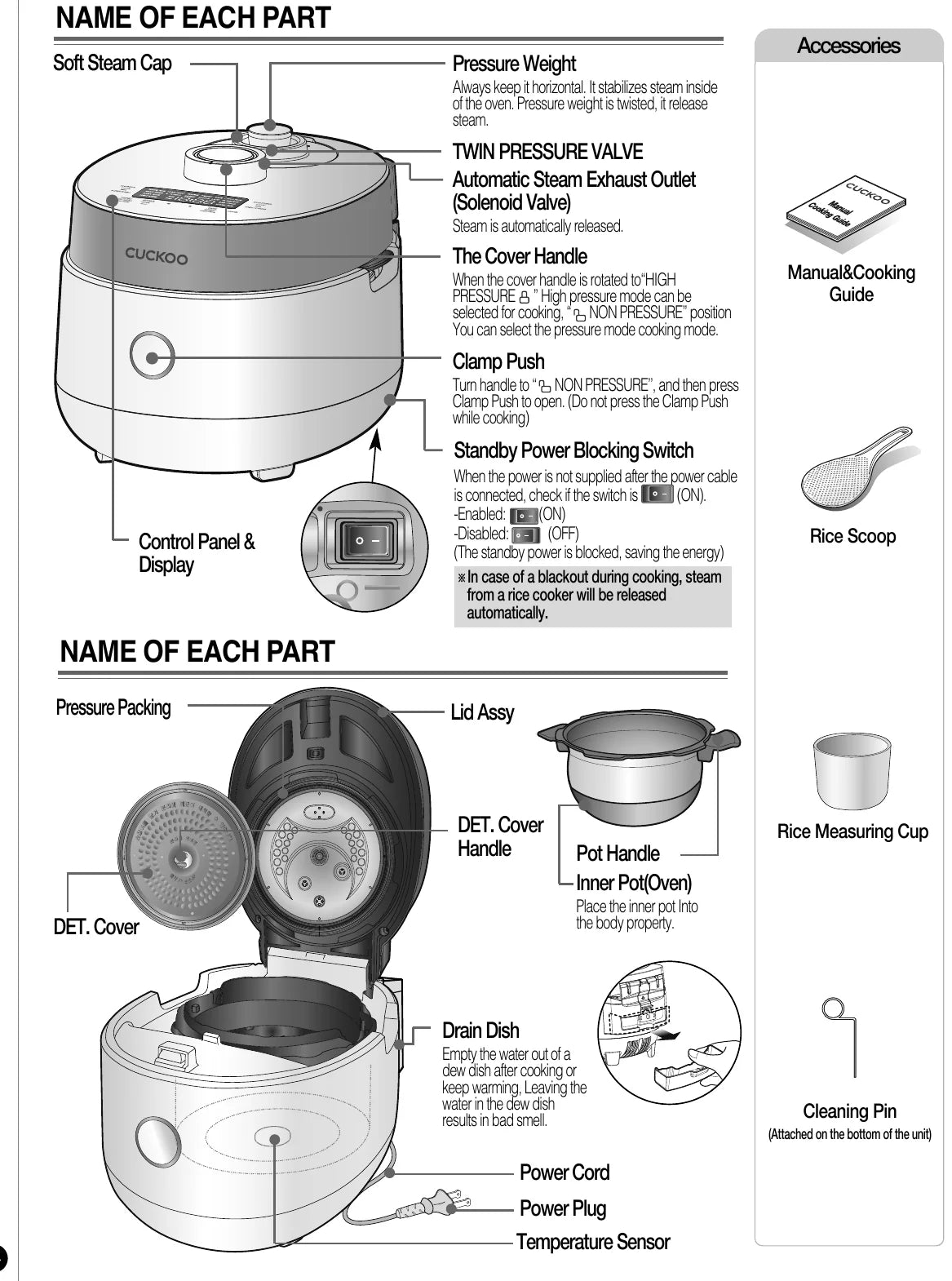
- Pressure Weight
- Always keep it horizontal. It stabilizes steam inside of the oven. Pressure weight is twisted, it release steam.
- TWIN PRESSURE VALVE — Automatic Steam Exhaust Outlet (Solenoid Valve)
- Steam is automatically released.
- The Cover Handle
- When the cover handle is rotated to “HIGH PRESSURE” High pressure mode can be selected for cooking, “NON PRESSURE” position You can select the pressure mode cooking mode.
- Clamp Push
- Turn handle to “NON PRESSURE’’, and then press Clamp Push to open. (Do not press the Clamp Push while cooking)
- Standby Power Blocking Switch
- When the power is not supplied after the power cable is connected, check if the switch is (ON).
-Enabled: (ON)
-Disabled: (OFF)
(The standby power is blocked, saving the energy)
※ In case of a blackout during cooking, steam from a rice cooker will be released automatically. - Inner Pot (Oven)
- Place the inner pot Into the body property.
- Drain Dish
- Empty the water out of a dew dish after cooking or keep warming, Leaving the water in the dew dish results in bad smell.
- Cleaning Pin
- (Attached on the bottom of the unit)
Accessories
- Manual & Cooking Guide
- Rice Scoop
- Rice Measuring Cup
- Cleaning Pin(Attached on the bottom of the unit)
IMPORTANT SAFEGUARDS
- Read all instructions before using this appliance.
- Do not touch hot surfaces. Use handles or knobs.
- To protect against fire, electric shock and / or injury to persons do not immerse cord, plugs, or Pressure Cooker Body in water or any other liquid.
- Close supervision is necessary when this appliance is used by or near children. This appliance is not intended for use by young children without supervision.
- Unplug cord from outlet when not in use and before cleaning. Allow appliance to cool before putting on or taking off parts, and before cleaning the appliance.
- Do not operate any appliance with a damaged cord or plug, after the appliance malfunctions, or has been damaged in any manner. Return the appliance to the nearest authorized service facility for examination, repair or adjustment.
- The use of accessory attachments not recommended by the appliance manufacturer may result in fire, electric shock, and / or injury to persons.
- If the supply cord is damaged, it must be replaced by a special cord or assembly available from the manufacturer or your service agent.
- Do not use outdoors.
- Do not let the cord hang over the edge of a table or counter, or touch hot surfaces.
- Do not place on or near a hot gas, electric burner, or in a heated oven.
- Always attach the plug to the appliance first, then plug the cord into the wall outlet. To disconnect, or set all control to “off”, then remove the plug from the wall outlet.
- Do not use this appliance for other than its intended use.
- Extreme caution must be used when moving an appliance containing hot oil or any hot liquids.
- Oversized foods, metal foil packages, or utensils must not be inserted into the appliance as they are a risk of fire or electric shock.
- Fire may occur if the appliance is covered or touching flammable material, including curtains, draperies, walls, etc while in operation.
- To reduce the risk of electric shock, cook only in the provided removable container.
- This appliance cooks under pressure. Improper use may result in scalding injury. Before operating the unit, properly secure and close the unit. See “Operating Instructions.”
- Do not cook foods such as applesauce, cranberries, cereals, macaroni, spaghetti, or other foods. These foods tend to foam, froth, and sputter, and may block the pressure releasing device
- Before use always check the pressure releasing device for clogging.
- Do not open the pressure cooker until the unit has cooled and internal pressure has been reduced. See “Operating Instructions.”
- Do not use this pressure cooker to fry in oil.
SAVE THESE INSTRUCTIONS
THIS APPLIANCE IS FOR HOUSEHOLD USE ONLY
ADDITIONAL IMPORTANT SAFEGUARDS
WARNING
This appliance generates heat and releases steam during use. Use proper precaution to prevent risk of burns, fires, other injuries, or damage to property.
- Keep hands and face away from the Pressure Release Valve when releasing pressure.
- Take extreme caution when opening the Lid after cooking. Severe burns can result from steam inside.
- Never open the Lid while the unit is in operation.
- Do not use without the inner Pot in place.
- Do not cover the Pressure Valve with anything as an explosion may occur.
- Do not touch the inner pot nor any heating parts, immediately after use. Allow the unit to cool down completely first.
This appliance is intended to be used in household and similar applications such as :
- staff kitchen areas in shops, offices and other working environments;
- farm houses;
- by clients in hotels, motels and other residential type environments;
- bed and breakfast type environments.
HOW TO USE EXTENSION CORD
Note:
- A. A short power-supply cord (or detachable power-supply cord) is provided to reduce the risk resulting from becoming entangled in or tripping over a longer cord.
- B. Longer detachable power-supply cords or extension cords are available and may be used if care is exercised in their use.
- C. If a longer detachable power-supply cord or extension cord is used:
-
The marked electrical rating of the cord set or extension cord should be at least as great as the electrical rating of the appliance;
-
The cord should be arranged so that it will not drape over the countertop or tabletop where it can be pulled on by children or tripped over unintentionally; and
-
If the appliance is of the grounded type, the cord set or extension cord should be a grounding-type 3-wire cord
This appliance has a polarized plug : (one blade is wider than the other). As a safety feature, this plug will fit in a polarized outlet only one way. If the plug does not properly fit in the outlet, turn the plug over. If it still does not fit, contact a qualified electrician. Do not attempt to modify the plug in any way. Please, keep this safety feature.
SAFETY PRECAUTIONS
- Read the following product safety guide carefully to prevent any accidents and/or serious danger.
- ‘Warning’ and ‘Caution’ are different as follows.
| Symbol Type | Description |
|---|---|
| Warning | This means that the action it describes may result in death or severe injury. |
| Caution | This means that the action it describes may result in injury or property damage. |
| Triangle Alert Icon | This sign is intended to remind and alert that something may cause problems under the certain situation. Please read and follow the instruction to avoid any harmful situation. |
| Do not | Indicates a prohibition |
| Instruction | Indicates an instruction |
Warning — Do not
WarningDo not
Do not cover the automatic steam outlet or pressure weight with your hand or face.
- It can cause burns.
- Especially be careful to keep it out of children’s reach.
WarningDo not
Do not use the cooker near hot things such as stove, gas stove or direct ray of light.
- It can cause an electric shock, fire, deformation, malfunction, or discoloration. Please check the power cord and plug frequecntly.
WarningDo not
Do not alter, reassemble, disassemble or repair.
- It can cause fire, electricshock or injury.
- For repair, contact dealeror the service center.
WarningDo not
Use a single socket with the rated current above 15A.
- Using several lines in one socket can cause overheating or fire. Please check the power cord and plug frequently.
- Use an extension cord with the rated current above 15A.
- Use AC 120V only.
WarningDo not
Please pay careful attention against water and chemicals
- It can cause an electric shock or fire.
WarningDo not
Do not use a rice cooker at a place where dust is trapped or chemical material is located.
- Do not use any combustible gas or flammable materials nearby a product.
- It can cause explosion or fire.
WarningDo not
Do not use damaged power cord, plug, or loose socket.
- Please check the power cord frequently for damage.
- Serious damage can cause electric shock or fire.
- If the plug is damaged, contact the dealer or a service center.
WarningDo not
Do not clean the product with water or pour water in the product.
- It can cause an electric shock or fire.
- If it contacts water, please separate power cord and contact dealer and service center.
WarningDo not
Do not cover the automatic steam outlet or pressure weight with a duster, a towel, or apron, etc.
- It can cause deformation or a breakdown.
- It can cause an explosion by pressure.
WarningDo not
Do not use pots that are not designed for the cooker. Do not use abnormal pot and do not use without the inner pot.
- It can cause an electric shock or fire.
- Depending on the model, the capacity, shape, material and water scale of the inner pot are different. When purchasing an inner pot, please check the model name of the product.
WarningDo not
Do not bend, tie, or pull the power cord by force.
- It can cause an electric shock or short circuit resulting in fire. Please check the power cord and plug frequently.
WarningDo not
Do not use it without the inner pot.
- It can cause electric shock or malfunction.
- Do not pour rice or water without the inner pot.
- If rice or water gets in then do not turn the product over or shake it, please contact the dealer or service center.
WarningDo not
Do not turn the cover handle to “Non Pressure” while cooking.
- The hot steam or any hot content within the cooker can cause burns.
- After you finish the cooking do not try to open the cooker by force until the steam is completely exhausted.
WarningDo not
Do not over unplug and plug the power cord over and over.
- It can cause an electric shock or fire.
WarningDo not
Do not insert metal objects such as pins and wires or any other external substances in the automatic steam exhaust outlet or any other slot.
- It can cause an electric shock or fire.
- Especially be careful to keep it out of reach of children.
WarningDo not
This device is not intended for use by people who lack physical, sensory, and mental abilities or lack the experience and knowledge to safely use the device without supervision or instruction, including children.
- Keep device out of reach of children.
- Device may cause electric shock, burns, etc
WarningDo not
Don’t spray or put any insecticides or chemicals.
- It can cause an electric shock or fire.
- If cockroaches or any insects get inside the cooker, please call a dealer or a service center.
WarningDo not
Don’t let foreign substances such as needle, cleaning pin, or metal get in or block the in let/out let pipe or gape.
- It can cause an electric shock or fire.
- Do not put a cleaning pin in a gap or a hole of the product except when dearing a steam outlet.
WarningDo not
Do not open the LID while in heating and cooking. Never open the lid first, even if it boils over or the steam leaks.
- If you need to open the lid while cooking, keep pressing the cancel button for 2 seconds and confirm internal steam released completely turning the pressure weight over.
WarningDo not
Remove a foreign substance on the cord and plug with a clean cloth.
- It can cause fire. Please check the power cord and plug frequently.
WarningDo not
Be careful that both the plug and power cord are not to be shocked by animal attack or sharp metal materials.
- Damages by impact can cause an electric shock or fire. Please check the power cord and plug frequently.
Caution — Do not
CautionDo not
Do not use it on a rice chest or a shelf.
- Do not place the power cord between furniture. It can cause an electric shock resulting in fire. Please check the power cord and plug frequently.
- When using on furniture be cautious of steam release As it can cause damage, fire and and/or electric shock.
CautionDo not
Do not press heavy things on the power cord.
- It can cause an electric shock or fire.
- Please check the power cord and plug frequently
CautionDo not
Do not change, extend or connect the power cord without the advice of a technical expert.
- It can cause an electric shock or fire.
CautionDo not
Clean any dust or external substances off the temperature sensor and inner pot.
- It can cause a system malfunction or fire.
CautionDo not
Do not plug or pull out the power cord with wet hands.
- It can cause an electric shock.
CautionDo not
Please contact a dealer or service center when there is a strange smell or smoke.
- First pull out the power cord. And contact dealer or the service center.
CautionDo not
Do not use over the maximum capacity.
- It can cause overflow or breakdown.
- Do not cook over stated capacity for cooking of chicken soup and congee.
CautionDo not
Do not touch the metallic surface of the inner pot and pressure weight after cooking or warming.
- It can cause burns.
- Remaining hot steam can cause burns when you tilt the pressure weight while and right after the cooking.
CautionDo not
Don’t use the cooker near a magnetic field.
- It can cause burns or breakdown.
CautionDo not
Do not drop or impact the cooker.
- It can cause a safety problem.
| Available | Unavailable |
|---|---|
| Cotton wool, Sponge wool, Microfiber, Mesh wool | Blue, Green scrubber (Abrasive material), Iron, Stain wool, Other metallic materials |
• If you do not use a suitable scrubber for cleaning, the inner pot coating may be damaged and peeled off.
CautionDo not
Use product on a flat surface. Do not use on a cushion. Please avoid using it on an unstable location prone to falling down.
- It can cause malfunction or a fire. Please check the power cord and plug frequently.
CautionDo not
Don’t use for various purpose for inner pot. And do not heat up the inner pot on the gas stove.
- It can cause deformation of the inner pot.
- It can cause to spill the inner coating.
CautionDo not
Please pull out the plug when not in use.
- It can cause electric shocks or fire.
CautionDo not
Please use the cooker for it’s intended purpose.
- It can cause malfunction or smell.
CautionDo not
After you finish cooking, do not try to open the cooker by force until the steam is completely exhausted.
- The hot steam or any hot content within the cooker can cause burns.
- Cautiously open the top cover after cooking is done to avoid dangerous steam and burns.
CautionDo not
Do not place on rough top or tilted top.
- It can cause burns or breakdowns.
- Be careful to install the power cord to pass without disruption.
CautionDo not
Please call customer service if the inner pot coating peels off.
- Inner pot coating may wear away after long use.
- When cleaning the inner pot, do not use tough scrubber, metallic scrubber, brush, abrasive metallic etc.
CautionDo not
Do not hold the cooker by the inner pot handle.
- It can cause problems and danger. There are portable handles on the bottom right and left side of the cooker. Hold the handles with both hands and move it carefully.
CautionDo not
Always turn the cover Handle to “High Pressure” when not in use.
- It can cause deformation by remaining pressure.
CautionDo not
Wipe off any excessive water on the cooker after cooking.
- It can cause odor and discoloration. Wipe off water that is left behind from dew.
CautionDo not
Do not move the product by pulling or using the power cord.
- Electric short might cause fire.
CautionDo not
In case of a blackout or Standby power blocking switch (TURN OFF) during cooking, steam from a rice cooker will be released automatically. Thus, the quality of rice is lower than normal.
- Make sure that the standby power blocking switch is set to (ON) before cooking.
- Please start cooking with an indicated amount of rice and water.
- Water can overflow if the amount of water in a pot exceeds the indicated level of water usage.
- Please start cooking in a status that steam control cap is installed completely.
CautionDo not
Please clean the body and other parts after cooking.
- After cooking chicken soup, multi cook dishes, and etc., the smell may be absorbed.
- Clean the oven packing, top heater plate, and inner pot every time you cook any of those.
- It can cause alteration or smell.
- Use dry kitchen cleaner or sponge to clean the inner pot, since rough scrub or metallic ones are abrasive to the coating.
- Depending on the using methods or user's circumstances inner pot coating might rise. Please call the customer service for those cases.
- Please, do not pull out the clean steam vent by force.
CautionDo not
Be cautious when steam is being released.
- When the steam is released don’t be surprised.
- Please keep the cooker out of reach of children.
CautionDo not
If possible, only use warming function when cooking white rice. Other foods are easily discolored.
CautionDo not
When you pull out the power plug, don’t pull the power cord. Please, safely pull out the power plug.
- If you inflict impact on power cord, it can cause an electric shock or fire.
FUNCTION OPERATING PART / ERROR CODE AND POSSIBLE CAUSE
Function Operating Part
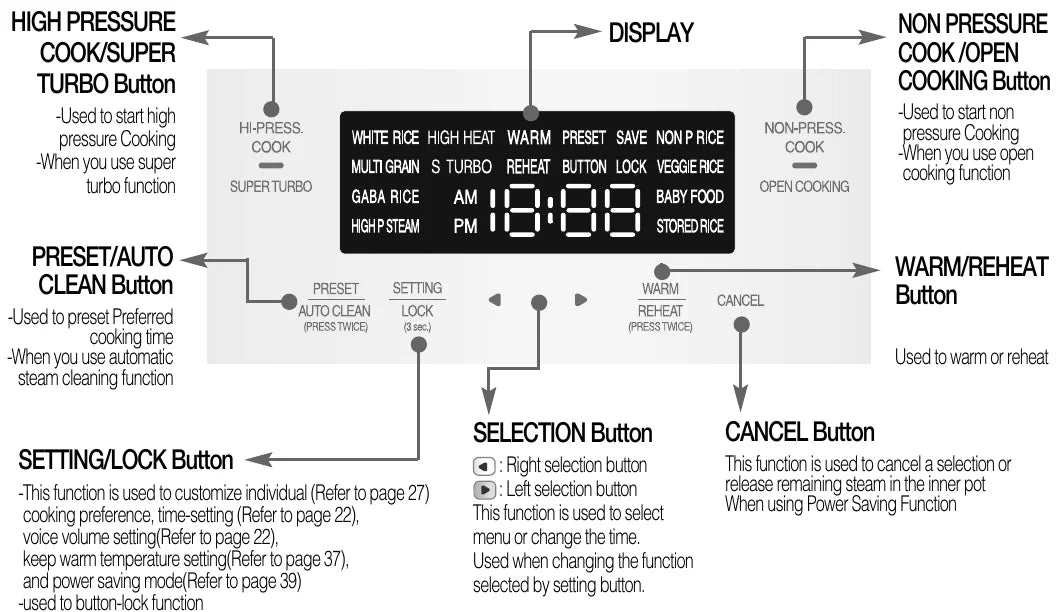
- 1
HIGH PRESSURE COOK/SUPER TURBO Button
- Used to start high pressure Cooking
- When you use super turbo function
- 2
NON PRESSURE COOK/OPEN COOKING Button
- Used to start non pressure Cooking
- When you use open cooking function
- 3
PRESET/AUTO CLEAN Button
- Used to preset Preferred cooking time
- When you use automatic steam cleaning function
- 4
WARM/REHEAT Button
- Used to warm or reheat
- 5
SETTING/LOCK Button
- This function is used to customize individual cooking preference (Refer to “Cuckoo customized cooking function”), time-setting (Refer to “How to set current time”), voice volume setting (Refer to “Voice guide volume control”), keep warm temperature setting (Refer to “Controlling Method of Warming Temperature”), and power saving mode (Refer to “What is POWER SAVE mode?”)
- used to button-lock function
- 6
SELECTION Button
- ◀ : Left selection button / ▶ : Right selection button
- This function is used to select menu or change the time.
- Used when changing the function selected by setting button.
- 7
CANCEL Button
- This function is used to cancel a selection or release remaining steam in the inner pot
- When using Power Saving Function
- 8
DISPLAY
※ When you see an image like one in the right side on your display, it means the rice cooker is in ‘stand-by’ mode.
※ Press ‘Cancel’ button to enter the 'stand-by' mode.
※ Press the button until you hear the buzzer sound. The image of the plate may different.
Error Code and Possible Cause
When the product has any problems or used it inappropriately, you can follow the below marks. If error persistently shows up even in normal using conditions or after taking measure, inquire with customer service.
- LJ
- E10
- E_ _ / E_P / E_t
- 13Ho
- EL1
- EL2
- E01
- Edo
- E_u
- EuF
- IHP_ / IHF_
- E_E
- UrF / UtF
| # | Display | Possible Cause |
|---|---|---|
| 1 | LJ | When the inner pot is not placed into the unit. |
| 2 | E10 | This error code is shown when power is disconnected for 10 minutes while cooking. Press “Cancel” button to reset to Stand-by mode. |
| 3 | E_ _ / E_P / E_t | Problem on temperature sensor. (“E_ _” mark, “E_P” mark, “E_t” mark blink.) |
| 4 | 13Ho | When setting preset time longer than 13 hours Set the preset time within 13 hours. |
| 5 | EL1 | This error code is displayed when the smart locking system has failed. |
| 6 | EL2 | This error code is displayed when the smart locking system has failed. Please do not open the lid until cooking is completely finished. If error occurs during warming or stand by mode, please open the lid after turn off the power. Please contact Service center for service inquiry. |
| 7 | E01 | This error code is displayed when either High Pressure Cooking, Non Pressure Cooking, Keep Warm/Reheat, Reservation, or Auto Clean button is selected while the Lock/Unlock handle is not firmly adjusted to “High Pressure” or “Non Pressure”. Firmly turn the Lock/Unlock handle to either “High Pressure” or “Non Pressure” as applicable. |
| 8 | Edo | It is appears on the display when you press ‘PRESSURE COOK’ or ‘PRESET/AUTO CLEAN’ button again, or if the cooking has finished and you've never ever turned the handle to “NON PRESSURE”, It can be solved by turning handle to “NON PRESSURE” and then turn to “HIGH PRESSURE”. |
| 9 | E_u | Problem on micom power. |
| 10 | EuF | Problem on micom memory. |
| 11 | IHP_ / IHF_ | This code indicates the function of checking for abnormality of power of product. |
| 12 | E_E | Problem on environment sensor. |
| 13 | UrF / UtF | This appears when an internal system error occurs. |
HOW TO CLEAN
Detachable cover & Pressure packing
After cleaning detachable cover, put it back on the lid
Unless detachable cover is mounted, preset cooking cannot be done. (Alarm may sound while keeping warm.)
- Clean the detachable cover to prevent odor.
- Clean the body and cover with a dry towel. Do not use bentol while using the rice cooker. Starch may be remain, however there is no health risks.
- Do not put materials like screws into holes on the detachable cover. Check the back cover and front cover.
-
If you pull out the detachable cover, indicated by the arrow, it can be easily separated.
-
When cleaning the detachable cover, hold and pull out the both sides of the cover, then separate the handle and the rubber packing.
-
Frequently clean the cover with a sponge using with a neutral detergent.
-
Please put the detachable cover.
-
When you put rubber packing back in to the detachable cover, hold rubber packing by two side and put in the edge of the detachable cover first by turning it.
-
Put back the pressure cover by pressing the cover handle after fitting the handle into the groove indicated.
※ Do not put any other objects like screws into hole of detachable cover.
※ Check the back cover and front cover.
- LIDIf there is rice water left on the lid, please wipe it out with a wet towel. The center of the lid is made out of metal so beware when cleaning.
- Inner PotWipe the inner, upper, and outer parts of the inner pot of any alien substance.
- MAIN UNITWipe the main unit with a damp cloth.
- DRAIN DISHRice water from cooking is designed to gather to the dish through the steam outlet so please wipe it clean with a wet towel after cooking.
- INNER BODYIf there are foreign substances stuck on the temperature sensor, remove them without damaging the metal plate. Cleanly wipe the foreign substances or moist on the heat plate.
- OVEN PACKINGWipe the top cover with a damp cloth. Be careful when cleaning the top heater
- Cleaning Soft Steam CapSeparate the cap and wash it with a sponge and neutral detergent. Wipe out any remaining water or moisture on the lid with a cloth.
※ Caution
Do not clean the inner pot with any sharp cutlery inside (fork, spoon, chopsticks, etc.).
- The coating of the inner pot may peel off.
Wash the Inner Pot and accessories with neutral detergent and a sponge. (Do not use: Tough scrubber, Metallic scrubber, Abrasive Material, Brush)
How to Clean Drain Dish
-
Separate the drain dish.
-
Separate the drain dish cap by pushing it down.
-
Clean the drain dish cap and drain dish with a neutral detergent.
-
Securely put in the drain dish cap after cleaning.
-
Insert the drain dish firmly by pressing it in direction of the arrow.
How to clean the Pressure Weight nozzle
The cooker might not function properly if the steam valve and the double motion valve are clogged, be sure to remove any foreign substances in the valve with the cleaning pin before and after cooking. In order to remove any foreign substances in the double motion valve, please regularity use the Automatic Sterilization. (refer to “Cuckoo customized cooking function”)
Please regularly check if the hole of steam exhaust outlet is clogged or not.
How to clean the Pressure Weight and Steam Valve
-
Turn the Lock/Unlock Handle to “high pressure” and turn the Pressure Weight counter-clockwise while pulling it up until it comes out.
-
Puncture the clogged valve hole with the cleaning pin (Attached on the bottom on the unit).
-
Reassemble the Pressure Weight by turning it clockwise.
-
When the Pressure Weight is properly reassembled, it will revolve freely.
※ Never use the cleaning pin for any other uses and do not attempt to poke any other holes of the cooker with the cleaning pin. They are safety device.
※ The appearance of the Pressure Weight may differ from the picture.
How to install the Double Motion Packing (Pressure Packing)
The all-stainless cover is not only delamination-free and easy to clean, but it also lasts long, In addition, CUCKOO’s special stainless CSV-a CUCKOO’s patented technology, improves the product’s durability and makes it easier to clean.
- proper maintenance of the pressure packing helps keep high airtightness, adds durability to packing and ensures the taste of the food.
- Read the directions below carefully to install your packing properly.
1. How to remove and clean the pressure packing
-
Unplug the power cord and wait until the pot cools down before opening the Top Cover.
-
To remove the pressure packing, hold it as shown in the picture above and pull it out.
-
After hand washing it with a neutral cleaning liquid and a sponge, wipe it clean with a well wrung dish cloth.
2. How to reassemble the pressure packing
First match the standard notches on the Inner Pot lid with the standard points on the pressure packing following the numerical order (1, 2, 3, 4, 5, 6). Then, press the outer rim of the packing to insert it into the groove. To reassemble the pressure packing follow the order described below:
-
As the Figure 1 shows, put the point #1 on the pressure packing with the standard notch #1 on the Inner Pot lid together before pressing the outer rim of the packing to insert it into the groove. Repeat with points #2 to # 6.
-
After matching the standard points 1 to 6, press the rest of the packing into the groove by pushing on its outer rim.
3. How to double check whether the packing is well assembled
Since a badly assembled packing can cause the rice to be half-cooked or burned by steam leakage, double check the packing thoroughly as described below.
-
Visual inspection
- check the entire circumference carefully for any crack or damage between the Inner Pot lid and the pressure packing.
- Abnormal assembly: look for parts sticking out of the inner / outer rim / damaged parts
-
Physical inspection
- Check if the pressure packing is thoroughly put into the groove by rubbing the inside rime of the packing with a finger around the entire circumference as shown in the picture above.
- Check if the pressure packing is properly put into the groove of the Inner Pot lid by pushing the outer rim with a finger around the entire circumference as shown in the picture.
- Check if the pressure packing is thoroughly put into the groove by pushing the inside of the rim packing with a finger around the entire circumference as shown in the picture.
-
Water boiling test
- Pour water in the Inner Pot up to water level 2 (for “Rice”) and press the MENU/SELECT button to select the self-cleaning mode. Then push the Pressure Cook/Turbo button.
- Within 10 minutes, the pressure regulator weight will start rattling and hissing while emitting stream. If there is no steam coming out from the pot other than through the pressure regulator weight the packing has been properly installed.
- If steam comes out from other parts, stop the test and pull out the power cord. Wait until the pot cools down before removing the pressure packing from the lid. Once reinstalled repeat the boiling test.
- For a more precise water boiling test, you can wrap plastic around the circumference of the closed Top Cover. By doing so, you can easily check where the steam leakage is.
• If you still have a problem with reassembling the packing, please contact our Customer Service.
How to clean the soft steam cap
※ Do not touch the surface of the soft steam cap right after cooking. You can get burned.
-
Pull off the soft steam cap as shown in the image above by grasping the dented part with your fingers and pulling to the side while lifting gently.
-
Disassemble the hook on the front by pressing in the direction of the arrow and wash it with a sponge and neutral detergent. After cleaning, please assemble the parts in order.
- ※ Be sure that the inserted side of the Packing is the correct side of it.
-
To reassemble the Soft Steam Cap, fit the cap to the bump part, and then press the hook in the direction of the arrow.
-
When installing the soft steam cap, insert the cap firmly by pressing it in the direction as shown above.
How to use the handle
-
Make sure to close the lid and turn the Lock/Unlock handle to “NON PRESSURE” or “HIGH PRESSURE” while cooking.
- You can select cooking with high pressure when you turn the handle to “HIGH PRESSURE”. This is the function of safety device which indicates that the cooker is properly locked, and cooking with high pressure is available.
- If you turn the handle to “NON PRESSURE” you can choose to cook without pressure or select cooking. Then “NON PRESSURE” signal is displayed on the Display.
- If “HIGH PRESSURE” or “NON PRESSURE” does not appear on the Display, Preset/Auto Clean button does not work.
-
When cooking with high pressure is done, turn the Lock/Unlock handle from “HIGH PRESSURE” to “NON PRESSURE,” and then open up the lid with “Unlock” button.
- If steam is not completely exhausted after cooking, the handle might not be easily turned from “HIGH PRESSURE” to “NON PRESSURE.” In such a case, allow remaining steam to escape by tilting the Pressure weight.
-
Make sure that the Lock/Unlock handle is completely turned to “NON PRESSURE” when opening and closing the lid.
When the lid does not close
Do not try to close the LID by force. It can damage your cooker and cause problems.
-
Check to make sure the inner pot is placed correctly inside the main body.
-
To close the lid, turn the handle to unlock as shown in the picture on the left.
-
If there is excess steam inside the inner pot it might be difficult to lock the handle. Twist the pressure weight and allow the excess steam to release. Then try to turn the handle again.
HOW TO SELECT HIGH PRESSURE MODE OR NON PRESSURE MODE
Select High Pressure Mode
Turn the cover handle to “HIGH PRESSURE”.
- When the LED of the cover handle lights up in white, you are in the high pressure mode.
- In high pressure mode, you can select only the high pressure menu options.
- HIGH PRESSURE MENU : White Rice, High Heat White Rice, Super Turbo White Rice, Multi Grain Rice, High Heat Multi Grain Rice, Super Turbo Multi Grain Rice, GABA Rice, High-pressure Steam.
-
If you want to change the pressure mode from non pressure mode to high pressure mode, turn the cover handle from “NON PRESSURE” to “HIGH PRESSURE”.
- When the pressure mode is turned from non pressure mode to high pressure mode, only the high pressure menu options will flash for three seconds and the saved high pressure menu will be turned on.
Select Non Pressure Mode
Turn the cover handle to “NON PRESSURE.”
- When the LED of the cover handle lights up in blue, you are in the non pressure mode.
- In non pressure mode, you can select only the non pressure menu options.
- NON PRESSURE MENU : Non Pressure White Rice, Veggie Rice, Baby Food, Frozen Stored Rice
-
If you want to change the pressure mode from high pressure mode to non pressure mode, turn the cover handle from “HIGH PRESSURE” to “NON PRESSURE.”
- When the pressure mode is turned from high pressure mode to non pressure mode, only the non pressure menu options will flash for three seconds and the saved non pressure menu will be turned on.
-
If you don’t precisely turn the cover handle to “NON PRESSURE” or “HIGH PRESSURE” (if you set it to neutral position), you cannot select a menu or cook.
Precautions
- Precautions when using NON PRESSURE STEAM.
- Do not cook over the specified capacity.
- If the specified capacity is exceeded, it will overflow.
HOW TO SET CURRENT TIME / VOICE GUIDE VOLUME CONTROL
How to set current time
ex) 8:25 am now
-
Press ‘SETTING’ button 2 times.
- ‘SETTING’ button needs to be pressed for over 1 second at the first time.
-
Set 8’clock and 25minute as pressing ‘SELECTION’ button.
- 1 min up “▶” button / 1 min down “◀” button
- 10 min up or down “◀”, “▶” keep pressing.
- Careful of setting am,pm.
-
Press the SET button when the setting is completed.
- If it is over 7sec without ‘SETTING’ button, setting time will be canceledwith “Function setting has been canceled with overtime.”, it is canceled due to overtime.
About lithium batteries
- Lithium batteries are built into this product for power outage compensation function and watch function, and the batteries have a life span of about 3 years, but may vary depending on their performance.
- If the current time is reset to 12:00 when you remove and plug the power plug, there is a problem with the batteries (discharge, etc.), so contact the customer service center and exchange the batteries at the designated service center.
What is Power Outage Function
- This product memorizes the current condition and program when power outage occur. It operates immediately after power resume.
- If outage happens during cooking, the cooker will suspend depends on the outage time.
- When the cooker is under the keep warm functions, the functions will be cancelled.
Voice guide volume control (the function which can control volume and cancel)
To enter this function, press ‘SETTING’ button 3 times. ‘SETTING’ button needs to be pressed for over 0.3 second at the first time.
-
A volume sign is displayed when entered volume control mode by pressing ‘SETTING’ button 3 times.
-
If set value became “OFF” by pressing ‘SELECTION’ button, voice guide function is off.
-
Press ‘SELECTION’ button to change the volume level.
Night Voice Volume Reduction
Set the function of night voice volume reduction, the function to reduce the volume of voice during night time (10:00PM-05:59AM) on need-to-do basis. This function works only during night time.
| Progress bar | Voice volume |
|---|---|
| Step 1 | Zero volume |
| Step 2 | 20% of voice volume |
| Step 3 | 40% of voice volume |
| Step 4 | 60% of voice volume |
| Step 5 | 80% of voice volume |
| Step 6 | 100% of voice volume |
-
Press ‘SETTING’ button 12 times in standby status, and you will enter Night Voice Volume Reduction mode. When pressing ‘SETTING’ button initially, press the button for 0.3 second or longer to enter Night Voice Volume Reduction mode.
-
Press ‘SELECTION’ button, and as process progress bar change, voice volume will change. Select desired voice volume, and press ‘SETTING’ button.
-
Once process progress bar reach full condition through adjustment of ‘SELECTION’ button, a voice will come saying “Night time volume has been canceled.” Inactivate the function by pressing 'SETTING' button.
-
If 'Set' button is pressed or no button is pressed for 7 seconds after you enter Night Voice Volume Reduction mode, the function will be inactivated along with voice “Function setting has been cancelled with overtime.”, and the system will be back to standby mode.
Voice Setting Function
This function helps you select Auto voice for either English, Chinese And Korean. With this function , you can set to your desired voice. The product’s default voice is set to English.
-
Press ‘SETTING’ button 1 times in standby status, and you will enter Voice mode.
-
When you enter voice setting mode, a voice comes up saying “Setting mode for voice guide. Set voice with ‘MENU/SELECTION’ button then press ‘SETTING’ button.
-
After setting Auto voice with 'MENU/SELECTION' button, Korean or English or Chinese, and press 'SETTING' button.
PREPARATION BEFORE COOKING
-
Clean the inner pot and wipe the water on the inner pot.
- Use the soft cloth to wash the inner pot.
- Tough scrubber can make the coating of inner pot come off.
- Do not clean the inner pot with sharp utensils (forks, spoons, chopsticks, etc.) in it.
- - The coating of the inner pot may be peeled off.
- - In the event of scratches or peeling of the inner pot coating due to customer negligence, it will be charged even within the free service period.
-
Measure the amount of rice you want to cook using the measuring cup.
- Make the rice flat to the top of measuring cup and it is serving for 1 person. (ex: for 1 servings → 1 cups, for 3 servings → 3 cups)
-
Wash thoroughly until clear water comes out.
-
The washed rice is transferred to the inner pot.
-
Adjust the amount of water according to the menu.
- Put the inner pot on a flat surface and adjust the amount of water according to the scale marked on the inner pot.
- The scale marked on the inner pot indicates the water scale when rice and water are poured together.
- Regarding water height adjustment
- • White Rice, High Heat White Rice, Super Turbo White Rice, Frozen Stored Rice : Set the water scale to "White Rice". You can cook up to 3 servings in White Rice and High Heat White Rice modes, 2 servings in Super Turbo White Rice mode, and 2.5 servings in Frozen Stored Rice mode.
- • Multi Grain Rice, High Heat Multi Grain Rice, Super Turbo Multi Grain Rice : Set the water scale to "Multi Grain Rice". You can cook up to 2.5 servings in Multi Grain Rice, High Heat Multi Grain Rice and Super Turbo Multi Grain Rice modes.
- • Non Pressure White Rice, Veggie Rice : Set the water scale to "Non Pressure White Rice / Low Pressure White Rice / Soft White Rice". You can cook up to 2.5 servings in Non Pressure White Rice and Veggie Rice modes.
- • GABA Rice : Set the water scale to "Brown Rice". You can cook up to 2.5 servings in GABA Rice mode.
- ① When you want the soft rice: Pour more water than the measured scale.
- ② White rice for 3 persons (3 cups) : Set the water to scale 3 of “White RIce”
- ③ When the rice is soaked enough or when you want overcooked rice: Pour less water than the measured scale.
- ④ When the rice is undercooked or hardboiled: It occurs due to differences in rice varieties or moisture content (old rice). In this case, increase the amount of water by 1 - 10% compared to the measured scale.
- ※ Hard grains such as beans and red beans should be soaked or boiled, then cooked in the Multi Grain Rice, High Heat Multi Grain Rice or Super Turbo Multi Grain Rice menu. Depending on the type of multi grain, the rice may be half-cooked.
- ※ For the amount of cooking by menu, refer to “Cooking time by Menu”.
- ※ This model is not available for cooking with Non Pressure White RIce and Soft White RIce menus.
-
Plug in the power plug and put the inner pot in the main body.
- Make sure that the detachable cover is attached.
- If foreign substances such as rice are stuck on the bottom of the inner pot, cooking may not work well or there is a risk of malfunction.
- The lid will not close unless the inner pot is correctly mounted on the main body. (Make sure that the handle of the inner pot goes into the groove of the main body.)
-
After closing the lid, turn the Lock/Unlock handle to the “Lock” or “Unlock” position.
- If the LED on the Lock/Unlock handle lights up in white, it is in high pressure mode, and when the LED on the Lock/Unlock handle lights up in blue, it is in non--pressure mode.
- If you press the Non Pressure Cook button in the high pressure mode or if you press the High Pressure Cook button in the non-pressure mode, you will hear “beep beep” sound, “E01” will be displayed on the LCD, and cooking will not work.
- Cooking proceeds only when you press the High Pressure Cook button in the high pressure mode or when you press the Non Pressure Cook button in the Non pressure mode.
- ※ During warming, press the Cancel button to cancel warming and select the desired function.
- Other than this case, if “Edo” is displayed, turn the Lock/Unlock handle in the direction of “Unlock” and then turn it to “Lock” to operate normally. (Lid lock detection sensor checks the state of the lid.)
- ※ This instruction is not applicable if the Lock/Unlock handle is turned from Locked to "Unlock" more than once after cooking is complete.
HOW TO COOK
-
Select the desired pressure mode with the lid engagement knob.
- Make sure that a removable cover is installed.
- Adjust the pressure level before cooking.
- If the correct pressure mode is not selected, the menu can not be selected.
- When the lid fitting is in the high pressure mode, only the high pressure menu is selected. In the non pressure mode mode, only the non pressure mode menu is selected
- < HIGH PRESSURE MODE > Every time you press the selection button,
- White Rice → High Heat White Rice → Super Turbo White Rice → Multi Grain Rice → High Heat Multi Grain Rice → Super Turbo Multi Grain Rice → GABA Rice → High-pressure Steam
- < NON PRESSURE MODE > Every time you press the selection button,
- Non Pressure White Rice → Veggie Rice → Baby Food → Frozen Stored Rice
- In the cases of White Rice, High Heat White Rice, Multi Grain Rice, High Heat Multi Grain Rice, GABA Rice, Non Pressure White Rice, Veggie Rice, Frozen Stored Rice, the menu remains memorized once each.
-
Press the High pressure cook or Non pressure cook button to start cooking.
- Before cooking, in the case of the high-pressure menu, turn the lid-fitting knob to “HIGH PRESSURE” and press the high-pressure cook button. In the case of the non pressure menu, turn the lid-fitting knob to “NON PRESSURE” and press the non pressure cook button.
- After selecting the high pressure menu, press the non pressure cook button and E01 will appear with a warning sound. After selecting the non pressure menu, press the high-pressure cooking button and E01 will appear with a warning sound.
- The estimated cooktime is shown for one minute after start.
- Actual cooking time may vary depending on cooking capacity, water temperature and cooking conditions.
- From one minute after starting, the remaining cooktime is displayed for 10 seconds in a regular interval.
-
Steaming
- The cooktime remaining on the display is shown from cooking thoroughly.
- The cook time is different according to the menu.
- Be careful not to burn yourself from the automatic steam outlet.
-
The end of cooking
- When cooking is completed, warming will start with the voice "White rice has been completed".
- If you want to stop warming, Push ‘CANCEL’ button for more than 0.3 seconds.
- When cooking ends, stir rice equally and immediately. If you don't stir rice at once and keep it stagnant, rice will go bad and smell bad.
- If the lid handle is not working well, take out the steam completely out of inner pot by turning over pressure weight.
- While cooking, do not press cancel button.
Cooking time by Menu
| Menu | Capacity | Cooking time |
|---|---|---|
| WHITE RICE | 0.5~3 PERSONS | Approx. 22~28 min |
| HIGH HEAT WHITE RICE | 0.5~3 PERSONS | Approx. 22~29 min |
| SUPER TURBO WHITE RICE | 0.5~2 PERSONS | Approx. 9~13 min |
| MULTI GRAIN RICE | 0.5~2.5 PERSONS | Approx. 40~44 min |
| HIGH HEAT MULTI GRAIN RICE | 0.5~2.5 PERSONS | Approx. 41~45 min |
| SUPER TURBO MULTI GRAIN RICE | 0.5~2.5 PERSONS | Approx. 21~27 min |
| GABA RICE (0H) | 0.5~2.5 PERSONS | Approx. 40~48 min |
| NON PRESSURE WHITE RICE | 0.5~2.5 PERSONS | Approx. 28~36 min |
| VEGGIE RICE | 0.5~2.5 PERSONS | Approx. 30~38 min |
| FROZEN STORED RICE | 0.5~2.5 PERSONS | Approx. 23~27 min |
| BABY FOOD / HIGH PRESSURE STEAM | See detailed guide to cooking for 'White Rice' by the menus | — |
| AUTO CLEAN (STEAM CLEANING) | Pour water up to the line 1.5 | Approx. 22 min |
How to use the cooking menu
| Menu | Description |
|---|---|
| WHITE RICE | Use this function to cook white rice. |
| NON PRESSURE WHTE RICE | It is used for soft non-pressure rice without sticking. |
| MULTI GRAIN RICE | Used to cook a variation of mixed or brown rice. |
| GABA RICE (0H) | Used to cook variation of brown rice. |
| GABA RICE (3H) | Used to cook germinated brown rice. |
| HIGH PRESSURE STEAM | Set the steamed time manually and cook at high pressure (2.0 atm). |
| HIGH HEAT (WHITE RICE, MULTI GRAIN RICE) | Use when cooking more sticky and soothing Cooked Rice. (Melanozing effect could be increased.) |
| VEGGIE RICE | Used this function to cook rice mixed with vegetables. |
| BABY FOOD | This menu cooks baby food automatically. |
| FROZEN STORED RICE | This function is used to make rice that is meant to be frozen and stored for later. |
| AUTO CLEAN (STEAM CLEANING) | This menu is used to eliminate small soaked after cooking or warming. |
| SUPER TURBO WHITE RICE | • If selected super turbo white rice, total cooking time will be reduced. (It takes about 9 minutes 30 seconds when you cook the white rice for 0.5 persons.) • Use this super turbo cooking function only for cooking rice for less than 2 persons. • The result of super turbo white rice is less than that of ordinary white rice, thus only use super turbo white rice for 2 cups or less. • If you soak the rice in water for about 20minutes before cooking the rice and then cook the rice in super turbo cooking course, the rice will taste good. |
| SUPER TURBO MULTI GRAIN RICE | • If selected super turbo mixed rice, total cooking time will be reduced. (It takes about 21 minutes when you cook the multi grain rice for 2.5 persons.) • The result of super turbo multi grain rice is less than that of ordinary multi grain, thus only use super turbo multi grain for 2.5 cups or less. |
※ After cooking in white rice turbo mode or cooking of small serving, discard water.
How to use AUTO CLEAN (Steam Cleaning)
Put water until water scale AUTO CLEAN, make sure to close and turn the cover handle to the “HIGH PRESSURE.” or “NON PRESSURE”.
-
Coupling Handle toward “HIGH PRESSURE”, or “NON PRESSURE”
-
During Stand-by mode, press the PRESET/AUTO CLEAN button 2times to select auto clean, and then press "High Pressure Cooking" button for High Pressure Mode or "Non Pressure Cooking" button for Non Pressure Mode to start cleaning.
Simple Soft Function
You can soak grains before stating cooking by setting a desired time with this function.
-
White Rice, High Heat White Rice, Super Turbo White Rice, Multi Grain Rice, High Heat Multi Grain Rice, Super Turbo Multi Grain Rice, Non Pressure White Rice, Veggie Rice, Frozen Stored Rice
-
To change the soaking time, press'PRESET'button in simple Soft Function: the time setting can change from 10 to 30 minutes, 60 minutes, and No Soaking Time.
-
If you do not press any button for more than 5 seconds while setting the soaking time, it will be automatically set back to the current soaking time, After the soaking time is over, the cooking will start.
※ Soaking time is counted by 1 minute unit.
※ If you unlock the lid Handle during the simple Soaking Function, the cooking will be canceled.
※ The longer the soaking time, the melanoizing phenomenon.
Melanoizing phenomenon
The cooked rice can be light yellow at the bottom of the oven, because this product is designed to improve pleasant flavor and taste. Especially, melanoizing is more serious at the “Preset cooking” than just “Cooking”. It does not mean malfunction.
※ When mixing other rice with White rice, Melanoizing phenomenon could increase more than “White rice” setting.
CUCKOO CUSTOMIZED TASTE FUNCTION
Cuckoo customized cooking function
While cooking you can control the heating temperature (both high an low) depending on, your prefenence. Initialization is set up the middle step and get step by step as the case may be.
- High step : for cooking cereals, old rice and soft-boiled rice.
- Low step : for cooking the year’s crop of rice.
How to use Cuckoo Customized cooking function
-
If you press the ‘SETTING’ button 6times, customized cooking function is setup.
-
“MENU” setting screen — Make the menu changed by pressing ‘SELECTION’ button.
-
High level mode / Low level mode — Push the ‘SELECTION’ button, then the screen will be changed.
-
Setting completed screen — If you press the ‘SET’ button to complete your customizedcooking. (If you press ‘CANCEL’ or do not press a button with in 7seconds, the function will deactivate and return to the standby mode.)
1. 'CUCKOO customized cooking function' applies to White Rice, High Heat White Rice, Super Turbo White Rice, Multi Grain Rice, High Heat Multi Grain Rice, Super Turbo Multi Grain Rice, GABA Rice, Non Pressure White Rice, Veggie Rice, Frozen Stored Rice.
2. Set up the step of customized cooking function to taste. The scorch can occur when cooking in high level mode.
3. Cook is subject to be set differently depending on the percentage of water content and the condition of rice.
HOW TO USE “GABA RICE (BROWN RICE)”
Using ‘Brown GABA’ Menu
-
In order to promote germination, soak brown rice for 16 hours in water.
- Method of Pre-germination
- Put washed brown rice in an appropriate container, pour sufficient water to soak the rice.
- Pre-germination shall not exceed 16 hours. Make sure to wash rice clean with flowing water before using ‘Brown GABA’ menu. Be careful that hard washing may take off embryos which generate the germination.
- Unique smell may be generated according to the soaking time of pre-germination.
- When pre-germination has been completed, wash the rice and put it into inner pot. Pour appropriate amount of water and use ‘GABA Rice’ menu.
- In summer or hot temperature environment, odor may be generated. Reduce germination time and wash clean when cooking.
-
Turn the Lock/Unlock handle in the “Lock” direction and press the Select button to select the Brown Rice/ GABA Rice.
- When you select the Brown Rice/ GABA Rice menu, it is displayed on the display.
- The set button will flash and the Cancel and High Pressure Cook button will turn on. (You will hear the voice saying “Brown rice or GABA rice, please press the Set button.”)
-
Press the Set button and set the time with the Select button.
- You can set the brown rice germination time (0 hour or 3 hours) with the right select button and the left select button.
- The High Pressure Cook button will flash, and the Cancel button will turn on.
- If you eat brown rice without germination, select 0H for Brown Rice/ GABA Rice and cook.
-
Press the High Pressure Cook button.
- ※ 3 more hours for germination
- If you press the High Pressure Cook button or press it after pressing the Set button, brown rice germination starts for the set time and cooking starts immediately after germination is completed.
- During brown rice germination, “cooking” mark is displayed and the remaining time is displayed. (You will hear the voice saying “Brown rice or GABA rice, Cuckoo will start delicious cooking after 0 hours (set time).”)
Precautions for ‘Brown GABA’ Cooking
-
If smaller germ is preferred, omit pre-germination process. Select ‘Brown GABA’ menu, set-up appropriate germination time, and start cooking(nutrient ingredients do not vary significantly by the size of germ).
-
During hot seasons, longer germination time may generate odor. Reduce germination time.
-
GABA Rice cooking is allowed up to 6 persons.
-
Tap water can be used for germination. However, spring water is recommended. Germination may not be properly performed in hot or boiled water even after cooling.
-
Germination rate, germ growth may differ by the Brown rice type, condition or period of storing, etc.
- Germinated brown rice is sprouted brown rice. Germination rate and growth may differ by the Brown rice type. The brown rice should be within 1 year from harvest, and not long since pounded.
-
In GABA mode, preset on 3H may not be possible.
-
The taste of rice could be different as depending on a kind of brown rice. Use customized taste function or control the amount of water for your taste.
-
Depending on the state of the surrounding environment or the condition/type of rice, the sprouts of rice may not be visible or appeared.
HOW TO SET UP THE HIGH PRESSURE STEAMING
How to Set up the High Pressure Steaming and the Reservation
-
Turn the Lock/Unlock handle in the direction of “Lock” and press the Select button to select High Pressure Steaming.
- The Set button will blink, and the Cancel and High Pressure Cook buttons will turn on.
-
Press the Set button and set the cooking time with the Select button.
- Cancel button will turn on and High Pressure Cook button will blink. You will hear a voice saying “Please press the High Pressure Cook button after setting the cooking time with the Select button.”
- Press the right Select button to increase the high pressure steaming time by 5 minutes. (After 90 minutes, it increases by 10 minutes.) Press and keep holding the button and the set time changes continuously.
- Press the left Select button to reduce the high pressure steaming time by 5 minutes. (After 90 minutes, it decreases by 10 minutes.) Press and keep holding the button and the set time changes continuously.
- High pressure steaming time can be set from 10 to 120 minutes.
- When you select the desired time and press the Set button, you will hear “Please press the High Pressure Cook button or Reservation button.”
-
Press the High Pressure Cook button.
- Press the High Pressure Cook button to start high pressure steaming. When the high pressure steam cooking starts, the remaining time is displayed.
-
How to Set the Reservation for High Pressure Steaming
- 1. Check if the current time is correct.
- 2. Turn the Lock/Unlock handle toward “Unloc” and press the Reservation button.
- 3. Press the Select button to set the cooking completion time and then press the Set button.
- 4. Press the Select button to select High Pressure Steaming and press the Set button.
- 5. Press the Select button to select the cooking time for high pressure steaming, press the Set button, and then press the High Pressure Cook button.
HOW TO OPEN COOK
What is open cooking?
Open cooking is a function that allows the user to release the smart locking device, during a non pressure cooking process, and add ingredients or stir the contents in the pot.
How to use open cooking function.
-
During a non pressure menu cooking, select the Non Pressure Cook/Open Cooking button.
-
Wait until the smart locking device is released.
- It takes 5 to 60 seconds for the smart locking device to be released.
-
Once the add ingredient indication appears, open the lid and add ingredients or stir the contents.
- Do not press the Open Lid button when the smart locking device remaining time is displayed or during cooking. Only press the Open Lid button when the Add Ingredients Indicator is activated.
-
After opening the lid, close the lid within 3 minutes.
- Cooking will be canceled if the lid is kept open for more than 3 minutes.
CAUTION
- Do not exceed the designated capacity.
- If the designated capacity is exceeded, the appliance may overflow due to boiling.
- While the lid is open, the inner pot will not be heated.
- Burn Hazard! Do not remove the detachable cover.
- Close the lid only when the inner pot and detachable cover are properly assembled.
- Pressing lid clamp knob when the smart locking device is activated may cause damage to the appliance. Only press the Open Lid button when the Add Ingredients Indicator is activated.
Contact Cuckoo Customer Service center when the appliance does not properly work.
- When the lid does not open after open cooking or non pressure cooking is completed. Press the cover as shown on the right to unlock the smart locking device, and then push the clamp knob to open.
- When "EL1" error code occurs, please contact with Customer Service for service inquiry.
- When "EL2" error code occurs, please do not open the lid until cooking is completely finished. If error occurs during warming or stand by mode, please open the lid after turn off the power. Please contact Service center for service inquiry.
HOW TO COOK BABY FOOD
HOW TO USE BABY FOOD MENU
-
Turn the Cover Coupling Handle toward “NON PRESSURE”, and press the selection button to select Baby food.
- When the BABY FOOD menu is selected, the time is displayed on the Display.
-
Press the SET button, and set the cooking time with the SELECTION button.
- Press the right selection button, And the time for Baby food will be increased by five minutes. If you keep pressing it, the time turns into Nonstop.
- Press the left selection button, And the time for Baby food will be decreased by five minutes. If you keep pressing it, the time turns into Nonstop.
- The time for highpressure steaming is adjustable from 10 to 120 minutes.
- Select the desired time, and press the SET button. Then, the Voice Guide will say, “Press the none pressure cook or preset button.”
-
Press the NON PRESSURE COOK button.
- Press the NON PRESSURE COOK button and starts the BABY FOOD. When the BABY FOOD cooking begins, the remaining time is displayed.
-
How to PRESET BABY FOOD
- 1. Check if the current time is correct.
- 2. Turn the Cover Coupling Handle toward “NON PRESSURE”, and press the PRESET button.
- 3. Press the sel button, adjust the cooking finish time, and press the SET button.
- 4. Press the selectiong button, select the BABY FOOD, and press the SET button.
- 5. Press the selection button, select the time for the BABY FOOD, and press the SET button. Then, press the non pressure Cook button.
Precautions
- Precautions when using baby foods
- Do not cook over the specified capacity.
- If the specified capacity is exceeded, it will overflow.
- Please do not open the lid because there is a risk of burns.
HOW TO COOK FROZEN STORED RICE
What is Frozen Stored Rice?
This function is used to make rice that will taste freshly cooked after being frozen and thawed.
How to use Frozen Stored Rice menu
-
First, turn the lid handle to the "Non Pressure" position. Next, after pressing the function button, select the Frozen Stored Rice menu. Lastly, press the "Non Pressure Cook" button to start cooking.
-
When cooking is complete, open the lid and stir the cooked rice thoroughly. Next, move the cooked rice into a microwavable container and place it in a freezer to preserve. (To remove from display, press the "Cancel" button.)
Precautions when cooking frozen stored rice
-
When using the Frozen Stored Rice menu, refer to the water level used when cooking white rice. The maximum cooking capacity for Frozen Stored Rice is 2.5 servings.
-
When the rice has been completely cooked, open the lid and stir the rice thoroughly.
-
Move the cooked rice into microwavable containers in single serving portions (210g), and place them into the freezer for preservation.
-
When microwaving your Frozen Stored Rice, open the lid of the microwavable container slightly and heat for 3 min 30 sec (per serving). (Heating time may differ due to amount of rice, size of container, microwave output, etc.)
-
Please note that the quality of your rice may be affected as the storage period increases.
Precautions
- Precautions when using the Frozen Stored Rice:
- Do not cook beyond the recommended amount.
- Cooking beyond the recommended may result in overflowing.
- Do not remove the detachable cover as it may cause burns.
HOW TO PRESET TIMER FOR COOKING / REHEATING FUNCTION
How to preset timer for cooking
For example, if it is nine o’clock in the evening and you want to have warm breakfast at seven forty the next morning.
-
Make sure that the current time is correct.
- If the current time is not set correctly, the presetting time will also be incorrect.
- Please be careful not to change from AM to PM.
-
Turn the lid handle to “HIGH PRESSURE” or “NON PRESSURE” and press the PRESET button.
- The preset time is set to 06:30 AM when the product is delivered from the factory.
- In the high pressure mode, the preset timer function is not set for GABA RICE(3H), TURBO WHITE RICE, SUPER TURBO WHITE RICE, SUPER TURBO MULTI GRAIN RICE.
- ※ To select a preset timer for cooking during Keep Warm mode, press the Cancel button to abort Keep Warm and configure the preset timer.
-
Press the SET button, and press the SELECTION button to set the preset time.
- The preset time is increased by 10 minutes each time you press the “▶” Button
- The preset time is increased by 10 minutes each time you press the “◀” Button
- ※ Please be careful not to change from AM to PM.
-
Press the SELECTION button to select the desired menu.
-
Press the HIGH PRESSURE COOK or NON PRESSURE COOK button.
- Once cook is completed with preset time, preset time is stored in the memory. Don't need to set up time again.
- ※ If a small amount of rice is cooked, it could be finished earlier than time you programmed it.
How to use Preset Reheating function
- Use this function when the cooked rice is not kept warm in the rice cooker but you still want to enjoy a hot meal at your convenience.
- It takes 50minutes before it's fully warmed up: Please use the function at least 50minutes before you enjoy your meal.
For example, if it is nine o’clock in the evening and you want to have warm breakfast at seven forty the next Morning.
-
Make sure that the current time is correct
- Please make sure that the current time is correct so that the reheating process ends on time.
- Do not get confused between morning and afternoon.
-
Set the lid handle at “HIGH PRESSURE” and press ‘PRESET/AUTO CLEAN’ button.
- Precisely turn the cover handle to select the high pressure mode before using the ‘PRESET/AUTO CLEAN’ function.
-
Press the ‘KEEP WARM/REHEAT’ button and Preset Reheating mode begins.
- The Preset time is set to 06:30 AM when the product is delivered from the factory. If you want to preset reheating to this time, it is not required for you to set the time.
-
Press the ‘MENU/SELECTION’ button to preset the completion time of reheating.
- The completion time is increased by 10 minutes each time you press the “▶” button.
- The completion time is decreased by 10 minutes each time you press the “◀” button. If you keep pressing the button and the time changes continuously (repetition is allowed).
- ※ Do not get confused between morning and afternoon.
-
Press the ‘SET’ button.
-
Press the ‘KEEP WARM/REHEAT’ button.
- Reheating is completed as scheduled.
- The cooker memorizes the hour that you have preset: You may press the ‘KEEP WARM/REHEAT’ button directly without having to preset the time again from the beginning.
Precautions for PRESET / PRESET REHEATING Cooking
1. Precautions for Preset Cooking
- If the rice is old and dry, the result may not be good.
- If the rice is not well cooked, add more water by about half-scale.
- If the preset time is longer, melanization could be increased.
- Washed rice has a lot of settled starch, and crust can be made in case of preset cooking. If you wash the washed rice in running water before cooking or make the quantity of rice small, the crust will be less.
2. Precautions for preset reheating
- When leaving cooked rice at ambient temperature for a prolonged period of time, moisture is evaporated from cooked rice. In such a case, the reheating preset may cause dehumidifying or melanosing (slightly burnt) of cooked rice.
- If there is an excessive amount of cooked rice in the pot, it may not sufficiently be reheated. It is recommended to set reheating for no more than 5 people. (approx. half of the inner pot)
- Reheating of cold- or frozen-stored cooked rice may cause insufficient heating, dehumidifying or melanosing (slightly burnt) after completion of reheating.
- Put cold-stored cooked rice into the inner pot, beat rice with a scoop, and then reheat rice.
- Reheating of frozen-stored cooked rice shall be performed only after thawing the rice.
3. Changing preset time.
- Press ‘CANCEL’ button for more than 0.3 seconds and restart it to change the preset time.
4. If the preset time is shorter than available range.
- If the preset time is shorter than the available range, cooking/reheating will begin immediately.
5. In case the preset time is over 13 hours.
- “13Ho” will be displayed and the preset time will be changed to 13 hours automatically. If cooking is preset to AM07:00 of the following day at PM5:00 of the day, where preset time is 14 hours, “13Ho” will be displayed, and preset time automatically changes to AM06:00. (Maximum preset time is 13 hours)
※ If the preset time is over 13 hours, it can cause bad smell and discoloration. The limited preset time is set up to be under 13 hours because the rice spoils easily during the summer time.
※ When you want to finish presetting at 12:00 p.m., preset the time to be 12:00 p.m.
※ Use this function when you want to finish cooking between 1 hour to 13 hours after the current time.
※ During the preset cooking, if you want to check the current time, press the SET/MODE button. Then, the current time will appear for about two seconds.
Possible time setting for each menu
| Menu | Possible time setting |
|---|---|
| WHITE RICE | from 33minutes to 13hours |
| HIGH HEAT WHITE RICE | from 34minutes to 13hours |
| SUPER TURBO WHITE RICE | no preset function |
| MULTI GRAIN RICE | from 50minutes to 13hours |
| HIGH HEAT MULTI GRAIN RICE | from 51minutes to 13hours |
| SUPER TURBO MULTI GRAIN RICE | no preset function |
| GABA RICE (0H) | from 53minutes to 13hours |
| NON PRESSURE WHITE RICE | from 41minutes to 13hours |
| VEGGIE RICE | from 43minutes to 13hours |
| FROZEN STORED RICE | from 32minutes to 13hours |
| BABY FOOD / HIGH PRESSURE STEAM | from (my mode + 1minute) to 13 hours |
TO KEEP COOKED RICE WARM AND TASTY
Having a Meal
- If you want to have warm rice, press the ‘WARM/REHEAT’ button. Then ‘Reheat’ function will be started and you can eat fresh rice in 9 minutes.
- To use reheating in standby status after power is applied, turn lid combining hand grip to Locked location, press ‘WARM/REHEAT’ button, and the cooker will convert to Heat Preservation mode. Here press ‘WARM/REHEAT’ button once more.
| <Keep warming> | <Reheating> | <Finishing reheat> |
|---|---|---|
| The display indicates the time elapsed as warming time. | The lamp blinks and the indicator will show the reheat remaining time displayed in minutes with the mark going around clockwise. | When the reheat finishes with the beep sound, keep warming function will be operated and show the time elapsed. |
- The frequent use of the “Reheat” function may cause the cooked rice to be discolored or dried. Use it once or twice per day.
- If a separate heating appliance or gas burner is used to cook rice, put the cooked rice into the cooker and press the ‘WARM/REHEAT’ button to keep the rice warm. (Like this, transferring hot rice to a cold cooker may cause the rice to be discolored or develop an odor)
- After 24 hours of heat preservation, the lamp of heat preservation time lapse blinks, indicating that long time has passed in heat preservation condition.
- In case the lid combining hand grip is in open status during heat preservation, the cooker does not go for reheating. For reheating, lock the lid combining hand grip to (Locked) position, and then press ‘WARM/REHEAT’ button.
- If the lid combining hand grip is turned to open status during reheating, function display will show a warning. At this time, reheating will be cancelled, and heat preservation will proceed.
Cautions for Keeping Warm
- It will be hard to open the lid during warming, or right after it has finished cooking, So push the pressure weight to the side and allow the steam to release.
- Make sure the handle is in the ‘HIGH PRESSURE’ position during warming or reheating.
- It is recommended to evenly stir the cooked rice after cooking. The rice taste is improved. (For a small quantity of rice, pile up the rice on the center area of the inner pot to keep warm)
- Do not keep the scoop inside the pot while warming the rice. When using a wooden scoop it can create serious bacteria and odors.
- If the inner pot is empty during warming, or after it has finished cooking, please press the CANCEL button and unplug the power.
- It would be better to warm the rice for less than 12 hours because of odors and color change.
- The cooked rice, which cooked by pressure cooker is more prone to changing color than the rice cooked by general cooker.
- During warm mode, the rice can arise and turn white and rise. In this case, mix the rice.
- The mixed and brown rice cannot be in such good condition as white rice while in warm function due to their characteristics. Therefore do not keep mixed and brown rice in function for a long period of time.
- Do not mix small amount of rice or leftovers with the rice under keeping warm. Doing so may cause an odor. (Use a microwave oven for the cold rice.)
Controlling Method of Warming Temperature
If the temperature in the rice cooker is not set properly, an odor or the color of the rice may change even though it is cleaned frequently and boiled up. Temperature needs to be set.
Device Temperature Control
-
Press ‘SETTING’ button over 1 time during warming. It displays with buzzer. At the time, the display means current warming temperature.
-
Press ‘SELECTION’ button to change the temperature (▶ To raise temperature / ◀ To lower temperature).
-
Select the menu you want, then the press the ‘SETTING’ button and set-up time will be automatically entered with a buzzer. (If you press the ‘CANCEL’ button or do not press a button within 7 seconds, the function will be cancelled and returned to standby mode.)
1. When you smell bad odors and the rice is too watery: The keep warm temperature is too low. In this case, increase the “Keep Warm” temperature by 1-2℃.
2. When the rice has a yellowish color or is too dry: The Keep Warm temp is too high. In this case, decrease the “Keep Warm” temperature by 1-2℃.
How to Operate My Mode Function.
Use it while opening the lid when there is too much water or rice becomes too soft.
-
In standby mode, push the ‘SETTING’ button 5times. The voice says that it is programmed warming mode, control the temperature you want.
-
Press the right select button / Press the left select button.
-
If you set your desired temperature and press the SETTING button, the set temperature will be entered automatically. (When you press the CANCEL button or 7 seconds have passed without any button's being pressed, the function will be canceled.)
1. If a lot of water flows when you open the lid: Press the Select button to increase the setting value.
2. If rice spreading occurs on the edge of the rice: Press the Select button to decrease the setting value.
How to activate “SLEEPING KEEP WARM” mode.
When keeping rice warm for a long time, set up the temperature low to prevent the following quality of rice: smelly, dry, change of color; from PM10:00 ~ AM 04:00.
How to set up
-
Press the SETTING button in mode 7 to access the SLEEPING KEEP WARM mode settings.
-
if you press the CANCEL button or do not press a button within 7 seconds, the function will be cancelled and returned to standby mode.
How to release
-
Press the MODE button in mode 7 to access the SLEEPING KEEP WARM mode settings.
-
if you press the CANCEL button or do not press a button within 7 seconds, the function will be cancelled and returned to standby mode.
- If you need to keep the rice warm during sleeping, do not use this function. This function makes the rice cooler than normal. In summer, the rice can be spoiled and may smell bad because of high temperature. If possible, do not use the "SLEEPING KEEP WARM" mode while sleeping.
- This function is set up as cancel state.
When Odors are Rising During the Warming Mode
- Clean the lid frequently. It can cause growth of bacteria and odors.
- Even though exterior looks clean, there might be germs and it can cause odor so please be sure to use automatic sterilization (steam cleaning) menu for cleaning. Clean the inner pot completely after automatic cleaning function is done.
- Clean the inner pot properly to prevent rice from smelling after you cook soups and steamed dishes.
HOW TO USE POWER SAVE
What is POWER SAVE mode?
If power cord is not unplugged, little bit of electricity will be still wasted. It is called standby electric power. The power SAVE mode is technology which minimizes this electricity consumption.
Manual Method
How to start power saving
When ‘CANCEL’ button is pushed for 3 seconds at waiting state, Saving power function is set up.
How to end power saving
- Method 1) Push any button then it will be returned to waiting mode.
- Method 2) If lid handle is turned to open or close, power saving mode will be canceled and back to waiting Mode.
Automatic Method
If the standby time is chosen as number other than “OFF” at the automatic power saving mode, the automatic saving power function will be operative. If you move lid handle or push any button before passing waiting time, the waiting time which is reduced will go back to the setting.
How to set up
-
If you push ‘SETTING’ button 8 times at the standby state, automatic power saving mode is set up.
-
if you press the CANCEL button or do not press a button within 7 seconds, the function will be cancelled and returned to standby mode.
LOCK BUTTON / REMAINING COOKING TIME DISPLAY MODE
How to Set “LOCK BUTTON”
Lock can be set for touch button to prevent accidental touch during cleaning or by children.
How to set
-
Button will be locked if ‘SET’ button is pressed for 2 seconds or longer during cooking, presetting, warming, reheating or in standby condition.
-
When set, the Button Lock display will flicker on the screen.
How to release
-
Button will be released if ‘SET’ button is pressed for 2 seconds or longer during cooking, presetting, warming, reheating or in standby condition.
-
When released, the Button Lock display will disappear on the screen.
※ Any button other than ‘SET’ button is pressed while button lock is set, buzzer will sound.
※ Desired function can be set after cancelling button lock is set, buzzer will sound.
※ Button lock function is cancelled automatically when the power is OFF even though the button lock function is already set.
Remaining Cooking Time Display Mode
This mode sets on or off the remaining cooking time display which appears periodically during the cooking. (The displayed remaining cooking time may vary from the actual one depending on the cooking volume and process.)
-
In the Standby mode, press the ‘SETTING’ button 8 times to activate the Remaining Cooking Time Display mode.
-
If you press the CANCEL button or 7 seconds have passed without any button's being pressed, the function will be canceled.
Check Before Reporting a Malfunction
▼ If there is a problem with your cooker, please check the following before contacting the customer service office.
| Case | Check points | Check points |
|---|---|---|
| When the Lock/Unlock handle does not move in the “Unlock” direction | • Did you turn the Lock/Unlock handle during operation? | • The lid will not open during cooking. Do not force open the lid. If you inevitably need to open the lid, press the Cancel button for 0.3 seconds (1.5 seconds if the inner pot temperature is high) to cancel cooking, then tilt the pressure weight to completely release the steam and open the lid. |
| • Did turn the Lock/Unlock handle without the main body completely releasing the steam? | • Tilt the pressure weight to completely release the steam and open the lid. | |
| If the lid does not open even though the Lock/Unlock handle is fully turned in the “Unlock” direction | • This is because of the pressure in the inner pot. • Tilt the pressure weight to completely release the steam and open the lid. |
|
| When the “High Pressure” or “Non Pressure” mark flashes with a beep sound during reservation cooking | • Did you turn the Lock/Unlock handle fully in the direction of "Lock" or "Unlock"? | • Turn the Lock/Unlock handle fully in the direction of "Lock" or "Unlock". |
| When steam leaks through the lid or there is a “whoosh” whistle | • Are there any foreign substances (rice grains, etc.) on the packing? | • Clean the packing with a soft cloth before use. • Always keep the area around the packing clean. • If steam leaks, immediately press the Cancel button for 0.3 seconds (1.5 seconds if the inner pot temperature is high) to release the steam, disconnect the power plug, and contact the customer service center. |
| • Is the packing worn out? | • Replace the packing after 1 - 3 years of use depending on the method and frequency of use. If you continue to use the old packing, steam may leak and pressure cooking may not be possible. | |
| When the Cancel button does not work during cooking | • Is the inside of the inner pot hot? | • If you inevitably need to cancel cooking, you must press the cancel button for 0.3 seconds (1.5 seconds if the inner pot temperature is high) for safety to cancel cooking. • If cooking is canceled, the contents may scatter as the steam is released to the automatic steam discharge device, so be careful as it may cause burns on your face and hands. |
| • Is the button lock working? | • Press the Auto Wash/Lock button for 2 seconds or longer to disable the button lock function. | |
| When there is a strange noise during cooking or keeping warm | • Does it make a windy sound (“Bung”) when cooking? | • This is the sound of the blower motor running to cool the internal parts. There is no problem with the product. |
| • Do you hear a “bzz” sound during cooking or warming? | • “Bzz” sound during cooking or warming is the sound of the IH pressure cooker operating. There is no problem with the product. | |
| When brown rice does not germinate properly | • Did you germinate more than the rated amount of brown rice? | • Please put the brown rice of the rated amount. |
| • Did you use old brown rice? | • The germination rate may decrease when old brown rice or contaminated brown rice is used. | |
| When “LJ” is displayed when you press the button | • Is the inner pot inserted? | • Buttons does not work when the inner pot is not inserted. Please insert the inner pot. |
| • Did you use the product for 220V (power)? | • This product is for 120V only. Use the power properly. | |
| When buttons does not work, and “E01” is displayed | • Did you turn the Lock/Unlock handle fully in the direction of "Lock" or "Unlock"? • Is the “High Pressure” or “Non Pressure” mark displayed? |
• Turn the Lock/Unlock handle fully in the direction of "Lock" or "Unlock". If you do not fully turn the Lock/Unlock handle, the Cook and Reservation buttons will not work. |
| When the marks flash alternately | • Is the lid open? | • When making high-pressure/Non-pressure cooking, warming/reheating, or making reservations, please close the lid before proceeding. • If the lid is not closed during cooking, there is a risk of burns due to hot steam. |
| When “E10” sign shows up | • Was the power of the product cut off for more than 10 minutes during cooking? | • Press the Cancel button to release the “E10” mark and cook again. |
| When the rice is too sticky | • Are there any foreign substances or rice grains on the outside of the temperature sensor or inner pot? | • Remove foreign substances from the temperature sensor and the outer surface of the inner pot. (Refer to “HOW TO CLEAN”) |
| • Did you set the “Customized Cooking” function | • Cook after setting the customized cooking function as necessary. (Refer to “Cuckoo customized cooking function”) | |
| When cooking is not completed for a long time and an error mark is displayed | • Did you use the product for 220V (power)? | • This is the mark that appears when cooking is not completed for a long time due to product malfunction (heater disconnection, heating failure, etc.). Turn off the power and contact the customer service center. • This product is for 120V only. Use the power properly. |
| When the reserved cooking time is not correct | • Is the current time correct? • Did you choose AM or PM according to the current time? |
• If the current time is not set, cooking will not be completed at the reserved time. Set the current time. (Refer to “How to set current time”) • Please check the AM/PM status. |
| • Did you select a reservation time longer than 13 hours? | • The maximum reservation time is 13 hours. (Refer to “How to preset timer for cooking”) | |
| When the rice smells bad right after cooking or during warming | • Did you clean up the product after cooking braised chicken or braised ribs? | • Refer to “How to install the Double Motion Packing” and wipe the packing on the lid clean before using. |
| When the lid does not close | • Is the Lock/Unlock handle fully turned "Unlocked" direction? | • Turn the Lock/Unlock handle fully in the direction of "Unlock" and close the lid. |
| • Is there rice or hot food in the inner pot? | • Tilt the pressure weight and close the lid. | |
| • Did you put the inner pot in the main body? | • Turn the inner pot handle attached to the inner pot to the left or right to completely seat it on the main body. | |
| “E_u” are shown on the LCD by turns | • There is a problem with the power of the micom. | • Turn off the power and contact the customer service center. |
| “E_E” are shown on the LCD by turns | • There is a problem with the environmental sensor. | • Turn off the power and contact the customer service center. |
| When “EuF” sign shows up | • There is an error in the internal memory of the microcomputer. | • Turn off the power and contact the customer service center. |
| When “IHP_” / “IHF_” mark is displayed during the warming or when you press Cook button or Warming/Reheating; or during the cooking | • This is a function to check power or product abnormality. If this appears continuously, contact the customer service office. | |
| When the rice is not cooked | • Did you press the Cook button? • Was there a power outage during cooking? |
• Press the Cook button once and check the cooking sign on the display. • Refer to “What is Power Outage Function” for the power outage compensation function. |
| When the rice is undercooked or dry; or When only the bottom rice is cooked | • Did you use the measuring cup for the rice? • Did you put proper amount of water? • Did you rinse the rice before cooking? • Did you put rice in water for a long time? |
• Refer to “PREPARATION BEFORE COOKING” for proper use. |
| • Was the rice old or dry? | • Add water about half a scale and cook. | |
| • Did you run the automatic cleaning function regularly? | • Refer to “How to use AUTO CLEAN” for proper use. | |
| When “EL1” sign shows up | • There is a problem with the smart lock. | • Turn off the power and contact the customer service center. |
| When “EL2” sign shows up | • There is a problem with the smart lock. | • Do not open the lid until the cooking is complete. • If you want to open the lid while the warming function is on or in standby, turn off the power and open the lid. • Please contact the customer service office. |
| When the beans (mixed grain / brown rice) are half-cooked | • Are the beans (mixed grain / brown rice) too dry? | • Soak or boil beans (mixed grain / brown rice) and cook them in the Mixed Rice menu. Depending on the type of mixed grains, the rice may be half-cooked. |
| When the rice is too watery or stiff | • Did you choose the menu correctly? | • Select the desired menu correctly. |
| • Did you put proper amount of water? | • Adjust the water accurately. (Refer to “PREPARATION BEFORE COOKING”) | |
| • Did you open the lid before cooking was finished? | • After the cooking completion sound is heard and the pressure is completely released, open the lid and mix the rice. | |
| When the water overflows during cooking | • Did you use the measuring cup for the rice? • Did you put proper amount of water? • Did you choose the menu correctly? |
• Refer to “PREPARATION BEFORE COOKING” for proper use. |
| When you smell odors while warming | • Did you close the lid? | • Please close the lid completely. |
| • Did the power plug come out of the outlet while the warming function was operating? | • Always plug in the power plug during warming. | |
| • Did you keep the rice warm for more than 12 hours or keep too little rice warm? | • Keep warming time within 12 hours. | |
| • Did you keep warm with a rice paddle, cold rice, or other type of rice in the inner pot? | • Do not heat a menu other than white rice and cold rice. | |
| “E_ _”, “E_P”, “E_t” sign shows up | • Displayed when there is a problem with the temperature sensor. | • Turn off the power and contact the customer service center. |
| When the cooling fan error sign blinks | • Displayed when there is a problem with the cooling fan. | • Turn off the power and contact the customer service center. |
| When the warming time end mark blinks during warming | • Has 24 hours passed since you started keeping the rice warm? | • After 24 hours of warming, the warming time end mark is displayed in blinking to indicate that the warming has elapsed for a long time. |
| When the rice is cold or a lot of water is generated during warming | • Did you set the warming function to sleep warming mode? | • If necessary, turn off or on the sleep warming mode and keep rice warm. |
| When “Edo” sign shows up | • Did you ever press the Cook button in the state where warming was canceled (standby state) without turning the Lock/Unlock handle in the "Unlock" direction when the power was applied after cooking was completed? | • Turn the Lock/Unlock handle in the direction of “Unlock” and then turn it in the direction of “Lock”. |
| When the power does not turn on after connecting the power cable | • Is the standby power cut-off switch set to (ON)? | • Change the standby power cut-off switch from (OFF) to (ON). |
SPECIFICATIONS
| Model Name | CRP-MHTR0309F |
| Power Supply | 120V~(AC Only), 60Hz |
| Power Consumption | 1054W |
| Cooking Capacity — White Rice | 0.09~0.54L (0.5~3cups) |
| Cooking Capacity — Super Turbo White Rice | 0.09~0.36L (0.5~2cups) |
| Cooking Capacity — Multi Grain Rice | 0.09~0.45L (0.5~2.5cups) |
| Cooking Capacity — Super Turbo Multi Grain Rice | 0.09~0.45L (0.5~2.5cups) |
| Cooking Capacity — GABA Rice | 0.09~0.45L (0.5~2.5cups) |
| Cooking Capacity — Non Pressure White Rice | 0.09~0.45L (0.5~2.5cups) |
| Cooking Capacity — Stored Rice | 0.09~0.45L (0.5~2.5cups) |
| Power Cord Length | 1.2m |
| Pressure | 98.0kPa(1.0kgf/㎠) |
| Weight | 5.3kg |
| Dimension — Width | 24cm |
| Dimension — Length | 33.5cm |
| Dimension — Height | 22.7cm |
HOW SERVICE IS HANDLED
| Region | Contact |
|---|---|
| USA — The East and the Central Districts | Tel. No. 718 888 9144 |
| USA — The West and the Central Districts | Tel. No. 323 780 8808 |
| Canada — TORONTO | Tel. No. 905 707 8224 |
| Canada — VANCOUVER | Tel. No. 604 540 1004 |
LIMITED WARRANTY
CUCKOO ELECTRIC RICE COOKER/WARMER LIMITED WARRANTY
KEY Company, P&K USA TRADING CORP and Cuckoo Trading Canada will repair at its option replace, without charge, your product which proves to be defective in material or workmanship under normal use, during the warranty period listed below from the date of original purchase. This warranty is good only to the original purchaser of the product during the warranty period. P&K USA TRADING CORP. covers the east and the central districts, KEY Company covers the west and the central districts, Cuckoo Trading Canada covers the whole Canada.
WARRANTY PERIOD
| MODEL# | #LABOR | PARTS | HOW SERVICE IS HANDLED |
|---|---|---|---|
| CRP-MHTR0309F | 1YEAR | 1YEAR | The East and the Central Districts Call : 718-888-9143, 718-888-9144 Address : 5-48 46th Rd. Long Island City, NY 11101, USA The West and the Central Districts. Call : 323 780 8808 Address : 1137 E. 1st Street, L.A, CA 90033, USA Canada (TORONTO) Call : 905 707 8224 Address : #D8-7398 Yonge Street Thornhill Ontario Canada L4J 8J2 Canada (VANCOUVER) Call : 604 540 1004 Address : 945 Lougheed Hwy Coquitlam BC Canada V3K 3T4 |
No other express warranty is applicable to this product. THE DURATION OF ANY IMPLIED WARRANTIES, INCLUDING THE IMPLIED WARRANTY OF MERCHANTABILITY, IS LIMITED TO THE DURATION OF THE EXPRESS WARRANTY HEREIN. CUCKOO ELECTRONICS CO.,LTD, SHALL NOT BE LIABLE FOR THE LOSS, THE USE OF THE PRODUCT, INCONVENIENCE, LOSS OR ANY OTHER DAMAGES, DIRECT OR CONSEQUENTIAL, ARISING OUT OF THE USE OF, OR INABILITY TO USE, THIS PRODUCT OR FOR ANY BREACH OF ANY EXPRESS OR IMPLIED WARRANTY, INCLUDING THE IMPLIED WARRANTY OF MERCHANTABILITY APPLICABLE TO THIS PRODUCT.
Some states do not allow the exclusion or limitation of incidental or consequential damages or limitations on how long an implied warranty lasts : so these limitations or exclusions may apply to you. This warranty gives you specific legal rights and you may also have other rights which vary from state to state.
THE ABOVE WARRANTY DOES NOT APPLY IN THESE CASES:
- To damages problems which result from delivery or improper installation.
- To damages problems which result from misuse, abuse, accident, alteration, or incorrect electrical current or voltage.
- To serve call which do not involve defective workmanship or material and explaining the operation of the unit.
Therefore, these costs are paid by the consumer. Customer assistance numbers :
To Prove warranty Coverage : ▶ Retain your Sales Receipt to prove date of purchase
▶ Copy of your Sales Receipt must submitted at the time warranty service is provided.
To Obtain Product, Customer, or Service Assistance and Nearest Authorized service center.
| Region | Contact |
|---|---|
| The East and the Central Districts | Call : 718 888 9144 Address : 5-48 46th Road Long Island City, NY 11101 USA |
| The West and the Central Districts. | Call : 323 780 8808 Address : 1137 E. 1st Street, L.A, CA 90033, USA |
| Canada (Toronto) | Call : 905 707 8224 Address : #D8-7398 Yonge Street Thornhill Ontario Canada L4J 8J2 |
| Canada (Vancouver) | Call : 604 540 1004 Address : 103-4501 North Road Burnaby BC Canada V3R 4R7 |
Document Number
00383-0580C0 Rev.0