

CUCKOO
User Manual
CK-C170TW
CK-C170TW User Manual
Part Names and Accessories
Main Body
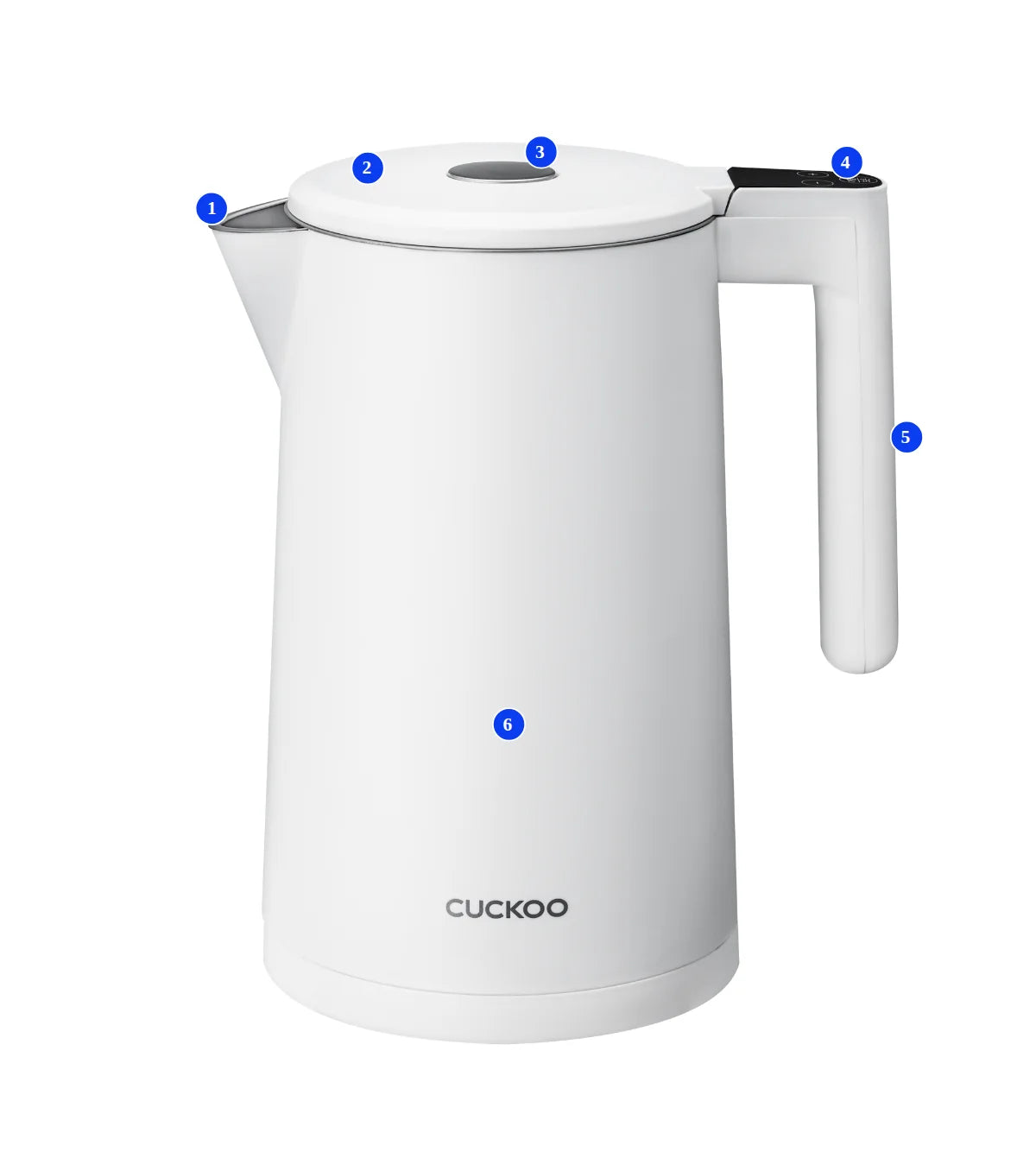
- 1Water Outlet
- 2Lid
- 3Open Button
- 4Control Panel
- 5Handle
- 6Body
Control Panel
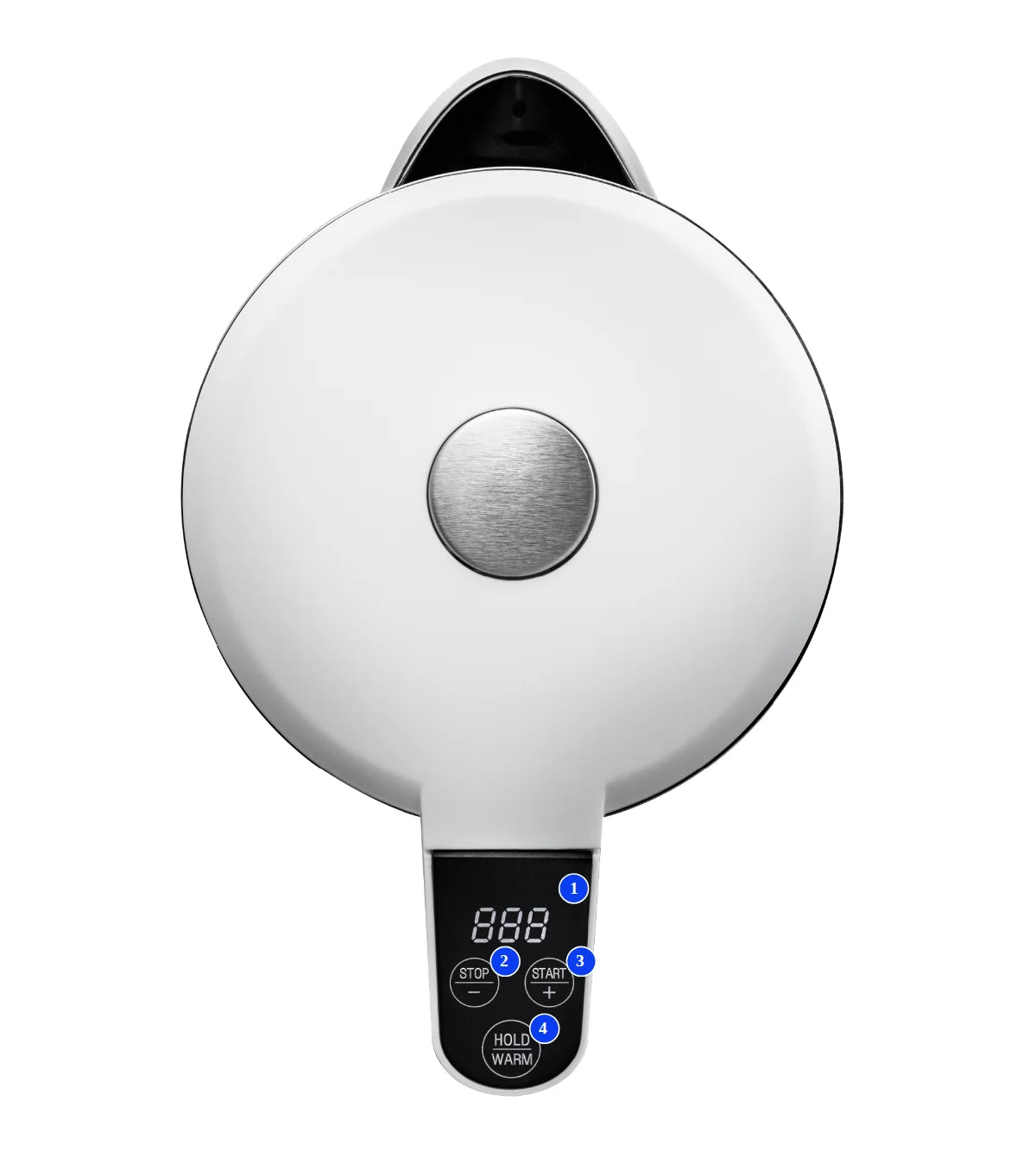
- 1Temperature Display
- 2Decrease / Stop Button
- 3Increase / Start Button
- 4Hold Warm Button
Accessories

※ The illustrations in this manual may differ from the actual product.
Key Features
Thank you for choosing Cuckoo Electric Kettle
Carefully read all instructions in this user manual before operating. Keep this manual in a handy location for future reference.
- Full Stainless Steel ContainerThe inside of the container is made of excellent stainless steel 304 material. It is easy to clean and hygienic.
- Temperature control in 9 °F incrementsIt is convenient because I can set it to the temperature I want.
- 12-Hour keep-warm functionWater temperature can be maintained for up to 12 hours.
- The LED colour changes depending on the operation status of the kettleStandby Mode: Blue
Heating Mode: Red
Warming Mode: Purple - Safe, energy-efficient double-layer bodyThe outer surface stays cool to the touch, reducing the risk of burns.
INFORMATION TO THE USER
NOTE
This equipment has been tested and found to comply with the limits for a Class B digital device, pursuant to Part 15 of the FCC Rules. These limits are designed to provide reasonable protection against harmful interference in a residential installation. This equipment generates, uses and can radiate radio frequency energy and, if not installed and used in accordance with the instructions, may cause harmful interference to radio communications. However, there is no guarantee that interference will not occur in a particular installation.
If this equipment does cause harmful interference to radio or television reception, which can be determined by turning the equipment off and on, the user is encouraged to try to correct the interference by one or more of the following measures:
- Reorient or relocate the receiving antenna.
- Increase the separation between the equipment and receiver.
- Connect the equipment into an outlet on a circuit different from that to which the receiver is connected.
- Consult the dealer or an experienced radio/TV technician for help.
Changes or modifications not expressly approved by the party responsible for compliance could void the user’s authority to operate the equipment.
Important Safeguards
- Read and follow all safety instructions provided in this manual to ensure safety and to protect the user and other individuals from physical harm and household damage.
- Safety instructions are classified and described according to the level of harm and damage caused by improper use, as shown below.
| Symbol Type | Description |
|---|---|
| Warning | Indicates a hazardous situation that could result in death or serious injury. |
| Caution | Potentially dangerous situation that can cause minor injuries if not avoided. |
| Triangle Alert Icon | Indicates a potentially hazardous situation which, if not avoided, could result in death or serious injury. |
| Prohibited | Indicates actions that must not be performed. |
| Instruction | Indicates instructions that must be followed. |
WARNING — CAUTION
WARNINGCAUTION
Repeated Plugging and Unplugging
- Do not insert or remove the power plug repeatedly.
- This may cause electric shock or fire.
- Plug the power plug into a 120V, 60Hz outlet with proper surge protection.
- Do not plug multiple devices into the same outlet or extension cord at the same time.
- When multiple devices share the same outlet, or when the product is connected to an incorrect power source, overheating, fire, or electric shock may occur.
- If there is moisture or any foreign substance on the plug, wipe it clean before inserting it into the outlet.
- Use an extension cord rated 10A or higher.
WARNINGCAUTION
Pulling the Power Cord
- Do not bend, twist, or pull the power cord by force.
- This may cause electric shock or fire due to a short circuit.
WARNINGCAUTION
Handling the Power Plug
- Make sure your hands are completely dry before inserting or removing the power plug.
- Hold the plug itself when unplugging. Do not pull the cord.
- Pulling the cord may damage it and cause electric shock or a short circuit.
WARNINGCAUTION
Cleaning the Power Plug
- Wipe off any foreign substance from the plug with a dry cloth.
- Dust or moisture on the plug may cause electric shock or fire.
WARNINGCAUTION
Children and Safe Use
- This product should not be used by children or by persons lacking physical or mental ability, experience, or knowledge to operate the product safely.
- Do not allow children to play with the product.
- Improper use may cause electric shock or injury.
WARNINGCAUTION
During Operation
- Do not press the unlock button or open the lid while the product is heating.
- Doing so may cause burns, fire, or other safety hazards.
WARNINGCAUTION
No Disassembly
- Do not disassemble, repair, or modify the product
- For repairs, contact the customer service center.
WARNINGCAUTION
Heat Sources
- Do not use the product near direct sunlight, gas burners, lighters, or other heating appliances.
- Exposure to heat may cause a short circuit, electric shock, deformation, discoloration, or fire.
- Do not place the power cord near heating appliances. The cord insulation may melt and cause fire or electric shock.
WARNINGCAUTION
Steam Vent Safety
- Do not touch the steam vent or the water supply vent.
- Hot steam may cause burns.
- Do not allow children to handle the product.
- The steam vent releases hot steam; keep your face and hands away from the product during use.
WARNINGCAUTION
Chemical Hazard
- Do not spray insecticides or chemical substances inside the product.
- This may cause fire.
WARNINGCAUTION
Foreign Objects
- Do not insert metal objects or any foreign matter into the steam vent or inside the product.
- This may contaminate the water, cause fire, or damage the inner coating.
WARNINGCAUTION
Proper Placement
- Do not place the product on an unstable, uneven, or slanted surface.
- Doing so may cause electric shock or injury.
WARNINGCAUTION
Unstable Surfaces
- Do not place the product on rugs, cushions, or laminated floors.
- This may cause electric shock or injury.
- This may cause deformation or malfunction of the product.
WARNINGCAUTION
Use the Correct Base
- Always use the base provided with this product.
- Using a base from another product may cause malfunction or damage.
WARNINGCAUTION
Toxic or Flammable Substances
- Do not store or use insecticides, combustible gas, flammable, or toxic substances near the product.
- This may cause fire or may result in deformation or malfunction of the product.
WARNINGCAUTION
Power Cord Safety
- If the power cord or plug is damaged or loose, stop using the product immediately.
- Contact the customer service center for inspection or repair.
WARNINGCAUTION
Chemical Hazard
- Do not spray insecticides or chemical substances inside the product.
- This may cause fire.
WARNINGCAUTION
Keep Water Out
- Do not wash or rinse the product in the sink.
- Make sure no water enters the product except the inner pot.
- Water entering the product may cause a short circuit, electric shock, or fire.
- If water has entered the product, unplug it immediately and contact customer service.
WARNINGCAUTION
Unplug the power cord when the product is not in use.
WARNINGCAUTION
Do not add water beyond the maximum capacity.
- If water exceeds the maximum level, hot water may overflow.
WARNINGCAUTION
Do not drop or apply impact to the product.
- Impact may cause damage or other safety issues.
WARNINGCAUTION
Do not place anything on top of the product or apply heavy weight.
- This may cause malfunction or injury due to the product falling or becoming damaged.
WARNINGCAUTION
Before moving the product, make sure the power is turned off.
- This may cause damage or other safety issues.
WARNINGCAUTION
If there is abnormal noise, smoke, or smell is emitted from the product, Immediately unplug the product and contact the customer service center.
- Failure to do so may result in fire, burns, or serious injury.
WARNINGCAUTION
Do not place the product or any heavy objects on the power cord.
- This may cause damage to the power cord that could lead to fire, electric shock.
WARNINGCAUTION
When pouring water, do not tilt the product too quickly.
- Hot water may spill and cause injury.
WARNINGCAUTION
This product is designed for boiling water only. Do not use it to heat or prepare milk, coffee, ramen, ice, green tea, barley tea, or any other liquids or substances.
- This may cause odour or defect.
WARNINGCAUTION
Do not use the product near heating devices.
- It may cause fire or electric shock.
Before First Use : Cleaning Instructions
During the manufacturing process, ultrasonic cleaning is used to remove impurities. However, small residual particles may remain. Before using the product for the first time, clean it as described below.
-
STEP 1 : Lightly apply a small amount of cooking oil to a paper towel and wipe the inside of the container.
-
STEP 2 : Using a damp sponge with baking soda, gently wipe the inside of the container.
-
STEP 3 : Wash the container thoroughly with a mild kitchen detergent and water.
-
STEP 4 : Dry the container with a clean paper towel and ensure no residue remains.
Important Safeguards (Basic Safety Precautions)
When using electrical appliances, basic safety precautions should always be followed, including the following :
- Read all instructions.
- Do not touch hot surfaces. Use handles or knobs.
- To protect against fire, electric shock and injury to persons, do not immerse cord, plugs, or appliance in water or other liquid.
- Close supervision is necessary when any appliance is used by or near children.
- Unplug from outlet when not in use and before cleaning. Allow it to cool before putting on or taking off parts, and before cleaning the appliance.
- Do not operate any appliance with a damaged cord or plug or if the appliance malfunctions, or has been damaged in any manner. Return appliance to the nearest authorized service facility for examination, repair or adjustment.
- The use of accessory attachments not recommended by the appliance manufacturer may result in fire, electric shock or injury to persons.
- Do not use outdoors.
- Do not let cord hang over the edge of a table or counter, or touch hot surfaces.
- Do not place on or near a hot gas or electric burner, or in a heated oven.
- Always attach plug to appliance first, then plug cord into the wall outlet. To disconnect, turn any control to off, then remove plug from wall outlet.
- Do not use appliance for other than its intended use.
- This appliance is not intended for use by persons (including children) with reduced physical, sensory or mental capabilities, or lack of experience and knowledge, unless they have been given supervision or instruction concerning use of the appliance by a person responsible for their safety.
- Children should be supervised to ensure that they do not play with the appliance.
- The appliance is only to be used with the stand provided.
- Household use only.
- Save these Instructions.
Extension cord
- a) A short power-supply cord is provided to reduce risks resulting from becoming entangled in or tripping over a longer cord.
- b) Longer detachable power-supply cords or extension cords are available and may be used if care is exercised in their use.
- c) If a long detachable power-supply cord or extension cord is used :
-
The marked electrical rating of the detachable power-supply cord or extension cord should be at least as great as the electrical rating of the appliance ;
-
The extension cord should be a grounding-type 3-wire cord; and
-
The longer cord should be arranged so that it will not drape over the counter top or table top where it can be pulled on by children or tripped over.
Before Using the Product
-
Open the lid and fill the container with water.
-
Caution
- Do not fill with water while the product is on the base.
- Do not exceed the maximum water level.
-
-
Please close the lid.
- Failure to do so may result in burns from steam or boiling water.
- Close the lid securely.
-
Place the product onto the base, ensuring it is properly aligned with the power connector.
-
Caution
- Wipe any remaining water from the base.
- Damage caused by using bases not included with this product is not covered under warranty.
-
-
Plug in the power plug.
Standby Mode
-
When the product is placed on the base with electricity flowing, 888 will be displayed on the display window, and the Heat/Warm button will blink in LED.
-
The unit will then beep and enter Standby mode after one second.
-
In Standby mode, the current water temperature is displayed at all times, and the LED remains blue.
| Mode | Description |
|---|---|
| Standby Mode | • After the power cord is plugged in and before setting up the product's features • After water has been boiled • After the warming feature has stopped |
Adjusting the Temperature
-
Press the STOP (−) button once to lower the temperature by 9°F (5°C).
-
Press the START (+) button once to raise the temperature by 9°F (5°C).
-
Range of temperature adjustment
- Heating mode: 104°F – 212°F (40°C – 100°C)
- Keep Warm mode: 104°F – 194°F (40°C – 90°C)
LED colour
The LED colour changes depending on the operation status of the electric kettle.
- Standby mode : Blue
- Heating mode : Red
- Warming mode : Purple
Operation - Heating Mode
Caution
- The set temperature may vary depending on the amount of water and may differ from the actual water temperature.
- During heating, the Keep Warm function cannot be activated. Stop heating to switch to Keep Warm mode.
Heat to 212°F (100°C)
When the START (+) button is pressed and held for 3 seconds after touching the HOLD WARM button once in Standby mode, the unit is heated to 212°F (100°C) with a beep sound. Once complete, the unit will make 3 beep sounds and then enter Standby mode.
Tip
The initial temperature of Heating mode is always 212°F (100°C).
Touch the Heat button once to heat water to 212°F (100°C), regardless of the current water temperature.
Heat to a Temperature Other than 212°F (100°C)
-
In Standby mode, select your desired temperature using the START (+) or STOP (−) button, and then press and hold the START (+) button for 3 seconds to confirm. A beep sound will be heard, and the unit will start heating.
-
When the set temperature is reached, the unit will make 3 beep sounds and then enter Standby mode.
Heating Mode Completed
-
When heating is completed, the unit will automatically enter Standby mode.
-
During heating, press and hold the STOP (−) button for 3 seconds to turn off the heat.
Operation - Warming Mode
Caution
- The set temperature depends on the water capacity and thus may not be consistent with actual temperature.
- Do not operate the unit without water. Always ensure the water level reaches at least the minimum mark (0.5 L) before operation.
Warming to 104°F (40°C)
Press and hold the HOLD WARM button for 3 seconds in Standby mode. You will hear a beep sound, and the unit will enter Keep Warm mode and maintain the water temperature at 104°F (40°C).
※ The water will be kept warm for up to 12 hours after reaching the set temperature.
※ If the power cord is unplugged or the product is removed and then placed on the base again, the Keep Warm temperature will reset to 104°F (40°C).
Warming to Temperatures Other than 104°F (40°C)
In Standby mode, select your desired temperature using the START (+) or STOP (−) button. Within 3 seconds, press and hold the HOLD WARM button for 3 seconds. You will hear a beep sound, and Keep Warm mode will begin.
- When the set temperature is lower than the current water temperature
The temperature display window indicates the set temperature only. When the water temperature first reaches the set temperature, you'll hear 3 beep sounds and warming will begin for 12 hours.
Caution
- At this time, the temperature display window does not indicate the current water temperature. The water may be hotter than the displayed temperature. Use caution to avoid burns.
- When the set temperature is higher than the current water temperature, the unit will heat the water until it reaches the set temperature.
- When the water temperature first reaches the set temperature, you will hear three beep sounds and Keep Warm mode will begin for up to 12 hours.
※ The temperature change is displayed while the water is heating, but after reaching the set temperature, only the set temperature is displayed.
Warming Mode Completed
-
When the 12-hour warming is completed, the unit will automatically enter Standby mode.
-
When the Warm button is held again for 3 seconds during warming, a beep sound will be heard and the unit will enter Standby mode.
Memory Feature
During warming, if the product is removed from the base and placed back on it again within 5 minutes, Warming mode will continue.
• During Warming mode, all buttons except the Hold Warm button are disabled. To exit Warming mode, press and hold the Hold Warm button for 3 seconds.
• When the water temperature drops 9°F (5°C) below the set temperature, the unit will automatically reheat the water to maintain the set temperature.
Cleaning and Maintenance
Caution
- Do not remove water scale deposits using methods other than those recommended in this instruction manual.
- Wipe the outer surface of the base and product with a soft cloth and cleaning solution, avoiding contact with water as much as possible.
Using Vinegar to Remove the Water Scale Deposits
-
Fill the kettle with water to the 1.7L mark and heat.
-
Turn off the unit and allow the water to cool. Add at least 10 cc of vinegar to the water.
-
Leave it overnight.
-
The next day, empty the kettle and thoroughly wash the inside.
-
Fill the kettle with clean water, and heat it.
-
Empty the kettle and wash the inside with clean water.
※ Repeat the above process for any remaining scale deposits or residue.
Using citric acid to remove water scale deposits
-
Fill the kettle with water to the 1.7L mark.
-
Add 30- 40g of citric acid to the water in the kettle.
-
Close the lid and heat the citric acid solution.
-
After heating is complete, turn off the unit, unplug the power cord, and allow the solution to cool inside the kettle. Do not open the lid while hot.
-
Caution
- When cooling the water, pull out the power plug from the outlet.
-
-
After the solution has cooled completely, close the lid and heat again.
-
Repeat steps 4 and 5 two to three times. Then empty the kettle, fill it with clean water, boil once, and rinse thoroughly.
Troubleshooting
▼ If the unit does not operate properly, please review the information below. If the issue cannot be resolved, contact Cuckoo customer service.
| Problems | Cause | Solutions |
|---|---|---|
| The water is lukewarm or not heating. | • Has the power cord been damaged? • Is the power plug connected? • Is the proper voltage being used? |
• Check that the power cord is securely connected. • If the power cord is damaged, contact Cuckoo customer service. • Ensure the product is connected to a 120 V AC power supply. |
| Water is flowing out of the outlet during heating. | • Did you put in water above the maximum water level mark? • Did you put a damp towel or other items around the outlet? • Is the outlet being blocked by foreign substances? |
• Take out water so that the level is below the maximum water level mark. • Remove the items before using the product. • Remove the foreign substances before use. |
| The water smells. | • Does your tap water smell? • Is this your first time using the product? • Have you used it with liquids other than water? |
• Check if your tap water smells. • The water may smell during the first use of the product. Boil water a couple of times and discard it before use. • Do not use the unit with liquids other than water. |
| The water does not heat to the selected temperature. | • Is the current temperature of the filled water high? | • Check if the temperature of the water in the kettle is higher than the selected temperature. If the water temperature is higher than the selected temperature, add cold water. |
| The kettle turns off even when I try to turn it on. | • Is the kettle filled with water? | • Fill the kettle with water above the minimum water level mark. |
| There were 5 beeps, and an error occurred. | • E1 : The temperature sensor is short-circuited. | • Sufficiently cool the inside of the kettle before operating it again. • If the unit does not operate, contact the customer centre for a part replacement. |
| • E2 : The temperature sensor is disconnected. | ||
| • E3 : Over-temperature protection activated. | • Allow the kettle to cool completely before operating it again. | |
| • E4 : This is a heating failure of the heater. (This occurs when water has boiled for 20 minutes at a temperature lower than 68°F (20°C), or when water has boiled for 11 minutes at a temperature higher than 68°F (20°C)) | • Sufficiently cool the inside of the kettle before operating it again. |
Product Specifications
| Category | Electric Kettle |
| Model | CK-C170TW, CK-C170TB |
| Rated Voltage | 120V / 60Hz |
| Rated Power Consumption | 1500W |
| Temperature Control Range | 104°F~212°F (40°C ~ 100°C) |
| Warm Temperature | 104°F (40°C) ~ 194°F (90°C) |
| Capacity | Max : 1.7L / Min : 0.5L |
| Weight | Approx. 1.14 kg (base included) |
| Size | 220 (W) x 135 (D) x 267 (H) mm (8.66 (W) x 5.31 (D) x 10.51 (H) in) |
※ For household use only.
※ The information (design and specifications) provided in this user manual is subject to change without prior notice.
CUCKOO
CUCKOO ELECTRONICS AMERICA, INC.
For service inquiries, contact us at info@cuckooamerica.com
www.cuckooamerica.com
Document Number
Z0383-0420A0 Rev.0