

CUCKOO
User Manual
CAC-K1910FW
CAC-K1910FW User Manual
Name of Parts / Accessories
Part names
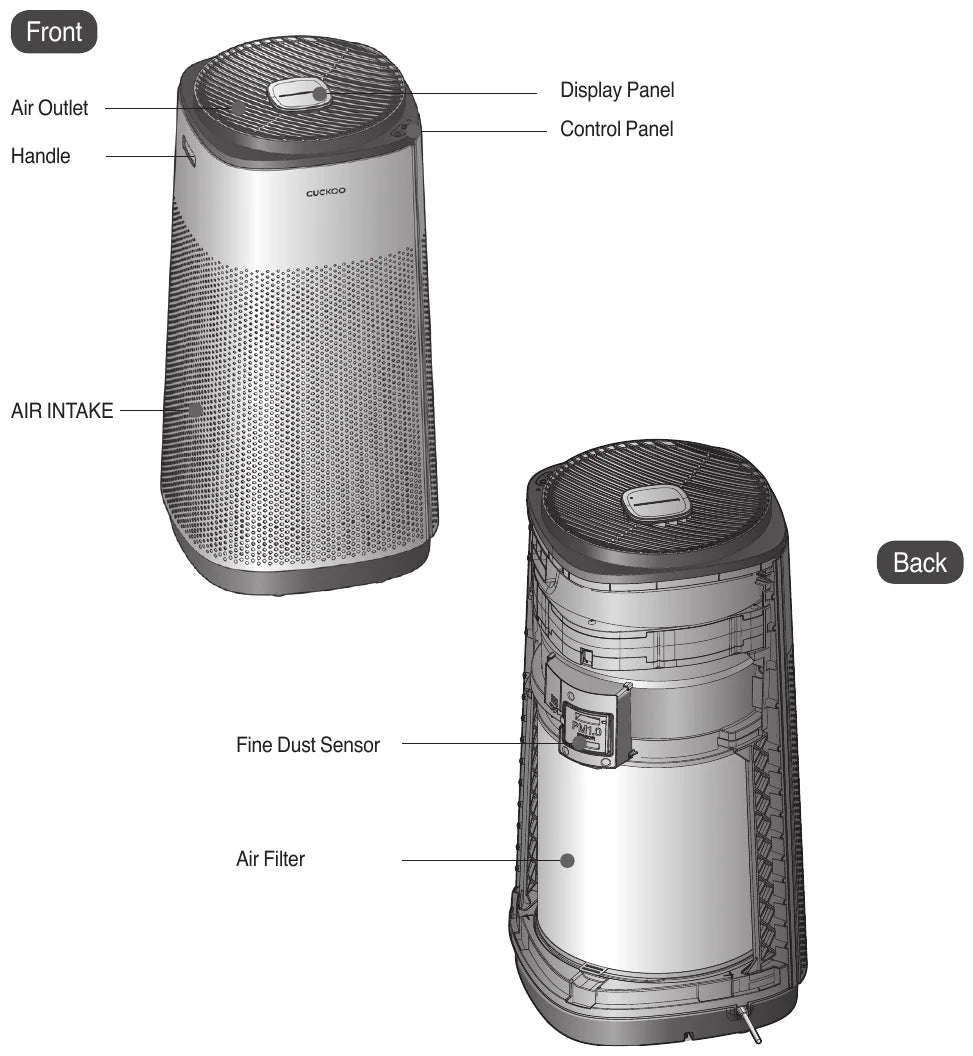
- 1Air Outlet
- 2Handle
- 3Display Panel
- 4Control Panel
- 5AIR INTAKE
- 6Fine Dust Sensor
- 7Air Filter
Accessories
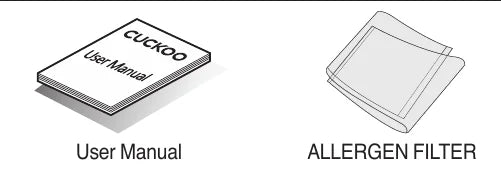
※ The picture may differ from the actual product.
Part Description — Air Purifying

| Section | Ultra-Deo PM 2.5 Filter |
|---|---|
| Level 1 | Pre-Filter |
| Level 2 | Allergen Filter |
| Level 3 | True HEPA (H13) Filter |
| Level 4 | Activated Carbon Filter |
Filter Functions
| Filter | Function | |
|---|---|---|
| Pre-Filter | Removes dust, pet fur, and other larger particles. It also helps extend the life cycle of the filters. | |
| Functional Filter | Allergen Filter | Removes allergy causing particles such as dust mites and pollen. |
| Ultra-Deo PM 2.5 Filter | True HEPA (H13) Filter | Helps filter mites, pollens, fine dust and cigarette smoke. |
| Activated Carbon Filter | Helps filter unpleasant odors and harmful gases. Great for removing odors that occur from food, cigarettes, animal fur, Nitrogen Dioxide causing sources and bathrooms. | |
Characteristics and advantages of Cuckoo AIR PURIFIER
Dear customers! Thank you for purchasing CUCKOO AIR PURIFIER. Please keep this manual (including the Warranty) in a safe place away from moisture and sunlight. Please reference this manual when you are having issues with your unit.
Product Benefits
- Air Purification functionTotal Care Safe Filter will help remove fine dust from the air.
- Toxic Gas purificationKeep your indoor air clean as the filter helps remove toxic gases and everyday odors.
- Air Volume ControlYou can control the fan speed according to your needs.
- Auto Operation function by Pollution SensorThe Pollution Sensor checks the pollution state indoors in real-time. If Auto+ Mode is selected, the air volume will automatically adjust according to the pollution level. This will help create a pleasant indoor environment.
- Air Quality IndicatorThis air purifier can automatically detect the cleanliness of the indoor air through the pollution sensors. The purifier will display the cleanliness using LED lights.
Important Safeguards
- Read and save these instructions.
- Do not bend, tie or pull the Power Cord by force.
- Stop using the product if the Power Cord or the Power Plug is damaged or the Power Outlet is unstable on the wall. Please contact our Customer Service Center.
- When putting in or pulling out the Power Plug, first remove moisture from your hands and then put in or pull out the Power Plug by holding the Power Plug.
- Do not put the product or anything heavy on the Power Cord.
- Please unplug the product before inspection, repair or replacement of its parts.
- Do not randomly connect or process the Power Cord.
- Do not use the product outdoors where the product may get in contact with direct sunlight, rain or snow or places with moisture such as a laundry room or a bathroom.
- Do not keep or use insecticides, combustible gas, inflammables, or toxic substances near the product.
- Place the product at least 50cm away on the sides and 60cm away on the top from the wall and surrounding objects.
- Open the windows for ventilation before using gas appliances, combustibles and other inflammables.
- Do not put any obstruction around the Air Inlet or the Air Outlet of the product.
- Do not put your finger or any other foreign substances such as a stick into the Air Inlet or the Air Outlet.
- Do not sprinkle inflammables such as an insecticide or an air freshener to the Air Inlet.
- Do not stand on top of the product or put anything heavy.
- Please avoid using it near a heating device.
- This product should not be used by people including children who lack physical or mental abilities, experience and knowledge to use the product properly without instruction.
- When turning off the product, be sure to press the power button to turn product off.
SAVE THESE INSTRUCTIONS
THIS APPLIANCE IS FOR HOUSEHOLD USE ONLY
This appliance is intended to be used in household and similar applications such as:
- staff kitchen areas in shops, offices and other working environments;
- farm houses;
- by clients in hotels, motels and other residential type environments;
- bed and breakfast type environments.
Warnings for Safe Use
- Read and save these instructions.
- Please comply with the ‘Warnings for Safe Use’ as they are provided to ensure safe and proper use of the device and prevent accidents and dangerous situations.
- The ‘Warnings for Safe Use’ section is divided into ‘Warning’ and ‘Caution,’ which are defined as follows:
| Symbol Type | Description |
|---|---|
| Warning | Potentially dangerous situation that can cause serious injuries or death if not avoided. |
| Caution | Potentially dangerous situation that can cause minor injuries if not avoided. |
| Triangle Alert Icon | This symbol is to remind you to be cautious about a potentially dangerous situation under special circumstances. Please read the details carefully and follow the instructions to avoid dangerous situations. |
| Do not | This symbol is used to indicate actions that are prohibited. |
| Instruction | This symbol is used to indicate ‘instruction’ actions. |
About the Power Supply
WarningDo not
Do not bend, tie or pull the Power Cord by force.
- This may cause electric shock or fire due to a short circuit. Please check the state of the Power Cord frequently.
WarningDo not
Plug the power plug into a 120V outlet with at least a rating of 10A and power surge protection. Do not plug in multiple devices into the same power outlet or extension cord simultaneously.
- When multiple devices are plugged into the same power outlet or if the device is plugged into an inappropriate power input, it may cause heating, fire and electric shock.
- If there is a foreign substance or water on the power plug, please wipe it clean before plugging it into the socket.
- Use an extension cord of 10A or higher.
WarningDo not
Use 120V~ power input only.
- This may cause electric shock or fire.
- The device will not operate properly.
- Please check the state of the power cord and plug frequently.
WarningDo not
Wipe off any foreign substance from the Power Plug with a dry cloth.
- If you do not do so, it may cause electric shock or fire due to a short circuit. Frequently check the status of the Power Cord.
WarningDo not
Stop using the product if the Power Cord or the Power Plug is damaged or the Power Outlet is unstable on the wall. Please contact our Customer Service Center.
- If the sheath of the Power Cord is peeled off or chopped during use due to negligence, it may cause fire or electric shock. Thus, please check the state of the Power Cord, Power Plug and Power Outlet frequently.
- To prevent dangerous situations arising from the damage of the Power Cord or the Power Plug, please contact the manufacturer, distributor or certified technician (servicemen) for replacement.
- We strongly recommend that the damaged parts be repaired at a designated service center.
- If you do not do so, it may cause electric shock, short circuit, or fire.
WarningDo not
When putting in or pulling out the Power Plug, first remove moisture from your hands and then put in or pull out the Power Plug by holding the Power Plug.
- Pulling out the Power Plug with wet hands can cause electric shock.
- Pulling out the power cord by excessive force can damage the Power Cord, causing a short circuit or electric shock. Please check the state of the Power Plug and the Power Cord frequently.
WarningDo not
Please unplug the device before cleaning the machine.
- There is a risk of electric shock or malfunction. Please check the state of the Power Plug and the Power Cord frequently.
WarningDo not
When unplugging the product, hold the Power Plug, not the Power Cord.
- Applying force to the Power Cord may cause electric shock or fire. Please check the state of the Power Plug and the Power Cord frequently.
WarningDo not
Do not put the product or anything heavy on the Power Cord.
- It may cause damage to the Power Cord that could lead to fire, electric shock, or fall of the product.
WarningDo not
Prevent the Power Plug and the Power Cord from being damaged by an animal or a sharp metallic object such as a nail.
- It may cause a damage to the Power Cord, leading to a short circuit, electric shock, or fire. Check the status of the Power Cord and the Power Plug frequently.
WarningDo not
Please unplug the product before inspection, repair or replacement of its parts.
- There is a risk of malfunction or electric shock. Please check the state of the Power Plug and the Power Cord frequently.
WarningDo not
When moving the product, do not pull the Power Cord.
- It may cause a damage to the product, electric shock, or fire. Please check the state of the Power Cord frequently.
WarningDo not
If water enters the power supply area, unplug the product and dry it completely before use.
- It may cause electric shock or fire. Please check the state of the Power Plug and the Power Cord frequently.
WarningDo not
Do not put in and pull out the Power Plug continuously.
- It may cause electric shock or fire.
WarningDo not
Do not randomly connect or process the Power Cord.
- It may cause electric shock or fire.
- This appliance has a polarized plug (one blade is wider than the other).
- To reduce the risk of electric shock, this plug is intended to fit in a polarized outlet only one way.
- If the plug does not fit fully in the outlet, reverse the plug.
- If it still does not fit, contact a qualified electrician. Do not attempt to defeat this safety feature."
Installation Guide
WarningDo not
Do not use the product outdoors where the product may get in contact with direct sunlight, rain or snow or places with moisture such as a laundry room or a bathroom.
- It may cause fire or electric shock due to heating and short circuit.
WarningDo not
Do not keep or use insecticides, combustible gas, inflammables, or toxic substances near the product.
- It may cause fire or a deformation or malfunction of the product.
WarningDo not
Do not place it in a bumpy or slanted area. Do not place it on a rug, cushion or laminated floor.
- It may cause malfunction, unwanted noise or injury. Please check the state of the product frequently.
WarningDo not
Do not use the product where smell, smoke, or oil is generated such as a restaurant or a barbecue restaurant.
- It may cause a decrease in the performance.
WarningDo not
Do not install the product in a place with excessive oil or smoke for industrial purposes or metallic dust.
- It may cause fire or a malfunction of the product.
Installation Guide — Instructions
WarningInstruction
Place the product at least 50cm away on the sides and 60cm away on the top from the wall and surrounding objects.
- Keep these distances for optimal performance.
WarningInstruction
Place it at least 2m away from electronic products such as a TV.
- It may cause a radio interference.
WarningInstruction
Do not use the product to remove toxic gases such as carbon monoxide.
- It may cause a malfunction of the product.
WarningInstruction
Do not install or use the product near a curtain.
- The Pollution Sensor may not work properly.
WarningInstruction
Please check if there is any obstacle around the product to ensure good air circulation.
WarningInstruction
Open the windows for ventilation before using gas appliances, combustibles and other inflammables.
- There is a risk of explosion or fire.
WarningInstruction
Do not use the product as a ventilating fan or hoods for gas stove or electric ranges in the kitchen.
- It may cause poor performance of the product and filters.
WarningInstruction
Do not use the product for anything other than its intended purpose, e.g. preserving artworks, maintaining precision instruments and animal breeding.
- If you do not do so, it may cause electric shock or fire.
During Use
WarningDo not
Do not put any obstruction around the Air Inlet or the Air Outlet of the product.
- It may cause poor performance, abnormal noise, or malfunction of the product.
WarningDo not
If there is abnormal noise, smoke, or smell is emitted from the product, first pull out the Power Plug, and then contact our Customer Service Center.
- It may cause fire, burns, or injury.
WarningDo not
Do not put heat of fire near the product.
- It may cause a malfunction or deformation of the product or fire.
WarningDo not
Do not put your finger or any other foreign substances such as a stick into the Air Inlet or the Air Outlet.
- You may get injured by the fan rotating at a high speed.
- It may cause a malfunction of the product.
WarningDo not
Do not inject a toxic substance such as smoke of a cigarette into the porous part on the side of the product, or poke with a sharp object.
- It may cause a malfunction of the product, fire or electric shock.
WarningDo not
Do not clean the interior of the purifier yourself please contact Customer Service for technical support.
- Otherwise it may cause malfunction of the product or an electric shock.
WarningDo not
Never soak the product in water.
- There is a risk of electric shock.
WarningDo not
Do not sprinkle inflammables such as an insecticide or an air freshener to the Air Inlet.
- It may cause fire or poor performance of the product.
WarningDo not
Do not stand on top of the product or put anything heavy.
- It may cause a malfunction of the product or injury due to fall or damages.
WarningDo not
Please avoid using it near a heating device.
- It may cause fire or electric shock.
WarningDo not
This product should not be used by people including children who lack physical or mental abilities, experience and knowledge to use the product properly without instruction.
- Do not let children play with the product.
- It may cause electric shock or injury.
WarningDo not
Do not turn OFF by pulling the plug.
- It may cause an electric shock or malfunction of the product.
WarningDo not
Do not move the product while it is working.
- It may cause fire or electric shock or partial damage to the product.
WarningDo not
When opening the Filter Cover, please be careful not to let your body or any other foreign material get stuck in the product.
- It may cause an injury or malfunction of the product.
WarningDo not
Be careful of any raised spot or obstruction on the floor when moving the product that may cause a scratch or damage to it.
- Although wheels are mounted on the bottom of the product for its mobility, the product has fairly low floor for its design.
WarningDo not
After cooking, ventilate sufficiently before operating the product to purify air in the room.
WarningDo not
Do not place a bowl with water, drugs, foods, small metallic materials, inflammables, etc. on top of the product.
- If spilled, the products may cause electric shock, fire, or damage.
WarningDo not
Do not clean the product by spraying water or wiping out with benzene, thinner, etc. If it’s wet, contact our Customer Service Center.
- There is a risk of malfunction or electric shock.
WarningDo not
Wash the Pre-Filter with water on a regular basis and dry it well before use.
- Otherwise it may cause a reduced performance of the product.
- Dry it in the shade.
WarningDo not
Please replace the filters in a timely manner.
- It may cause poor performance of the product.
WarningDo not
Do not push nor lean on the product. It may fall to the ground.
- It may cause an injury or malfunction of the product.
WarningDo not
After cleaning, please make sure to put the parts in their original position.
- Otherwise it may cause malfunction of the product.
WarningDo not
Do not lay the product for use.
- It may cause malfunction of the product.
WarningDo not
Do not put the product near a window or places where the wind of an air conditioner or a heater can reach.
- It may cause malfunction of the sensors.
WarningDo not
When turning off the product, be sure to press the power button to turn product off.
- This may cause product malfunction.
Details to Check Before Use
Caution
- When not using this product for an extended period of time, pull out the Power Plug.This product is exclusively for 120V~, 60Hz. Put the Power Plug in the appropriate Power Outlet.
-
Open the filter cover.
- Please open the filter cover from the left upper section.
- ※ Do not forcefully open by pulling the lower section of the cover. Doing so may damage the product.
-
Take out the filter and remove the vinyl wrapping.
- After removing the packaging vinyl, please insert the filter inside the purifier.
- Please make sure the filter is inserted properly with the upper part facing up.
-
Place the filter cover back on the air purifier.
- When re-assembling the filter cover, be careful of jamming a body part or an object. It may cause an injury and/or product malfunction.
- Position the cover and push in until you hear clicking sound to lock it in place.
-
Connect to a power supply.
- This product is exclusively for 120V~. Please connect the product to the appropriate Power Outlet.
-
Press the ON/OFF button to turn ON the power. Then, use the Mode button to set the desired operation mode.
- ※ Be sure to insert the filter prior to using the air purifier.
-
Use the ON/OFF button to stop operation.
- If operation is in progress, the fan will run for 10 seconds then stop.
- All the indicators on the Display Panel will turn OFF.
Names and Functions of Control & Display Panel
Control Panel and Display Panel
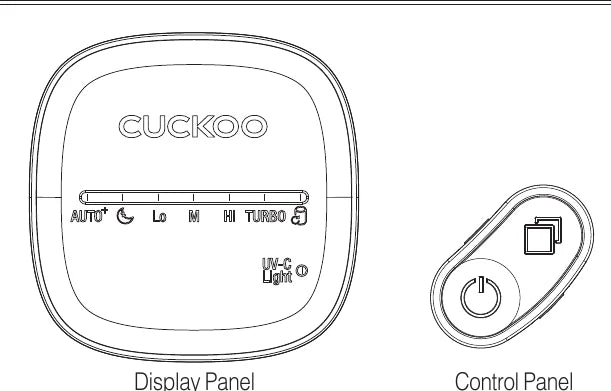
- 1
AUTO+
- Lit during Auto Air Purification operation
- 2
Sleep (moon icon)
- Lit during Sleep Air Purification operation
- 3
Lo, M, Hi, TURBO
- Displays the fan speed
- 4
Filter Replacement icon
- Lit when a filter needs replacing
- 5
Power button
- To turn the air purifier on or off
- 6
Mode button
- Used when Air Cleaner Operation Mode is selected
- 7
UV-C Light
- Lit during UV LED operation
Purification Display Panel
- Air Quality Indicator - Displays how clean the surrounding air is using its 8 colored LED lights
※ Levels of cleanliness are displayed in 8 different colors.
- (Poor) Red → Purple → Orange → Yellow → Light Green → Green → Light Blue → Blue (Clean)
※ Insert the power plug and press the [Power] button to turn on product.
※ Make sure you hear a beep when pressing a button. This Control & Display Panel may look different from the actual appearance.
※ During Air Purification operation, the product’s performance may vary according to the air volume.
※ If Sleep operation is selected, the Air Quality Indicator will automatically turned off.
※ If different products are used in the same area, there may be a difference in pollution level due to air circulation.
Self Diagnostic Mode / Basic Operation of Display Panel
Self Diagnostic Mode
If the display panel continues to illuminate under normal conditions or after an action is taken, please contact our customer service center.
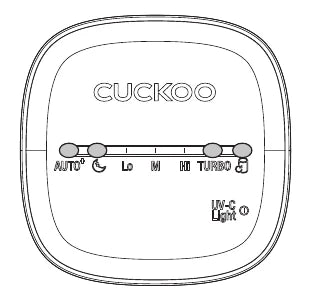
- This will indicate an issue with the filter cover.
- Re-install the filter cover.
- If the issue has not been resolved, please contact our Customer Service Center.
Basic Operation
-
Insert the power plug.
- A buzzing sound will go off and the air purifier will enter Standby Mode.
-
Press the Power button.
- Display Panel will automatically illuminate and the fan will begin operation. The air purifier will run its previous operating mode. If the filter cover is not properly installed, a filter cover error will illuminate on the display panel.
-
Press the mode button to set your desired operation mode.
- Every time you press the mode button, the mode will change in this order
- Auto Air Purification → Sleep Air Purification → Manual Gear 1 → Manual Gear 2 → Manual Gear 3 → Turbo Air Purification
-
During operation, press and hold the mode button for 3 seconds to turn the UV-C LED on or off.
- ※ UV LED may be turned on or off depending on the setting.
-
To turn off the product, press the Power button once again.
- All lamps in the display panel will turn off and then will enter standby mode.
Operating Modes
AUTO+
Auto+ Mode will automatically adjust air volume according to the surrounding environment. To conserve energy, the fan will turn off when air quality is good.
- To start auto mode, press the Power Button while in standby Mode. (It is operated in Auto Air Purification for initial entry and, if there is previous operation history, it is operated in the previous mode.)
- In Auto Mode, the air purifier will sense how clean the air is and will adjust fan speed accordingly.
SLEEP
Sleep Mode will minimize air volume and dim display lights
- Start sleep mode by pressing the mode button once while in auto mode.
- For a sound sleep, the air volume will minimize and the air purifier will operate quietly.
- The Air Quality Indicator will turn off while in Sleep Mode.
MANUAL
Allows you to select the fan speed.
- To enter manual mode, press the mode button twice while in Auto Mode.
- Press the mode button to set desired fan speed (Lo, M, Hi).
TURBO
Turbo Mode will quickly remove dust with maximized performance
- To enter turbo mode, press the mode button five times while in auto mode.
- Proceed with high-speed air purification.
※ This image of the display panel screen is drawn to show each operation mode. The panel may slightly differ while in operation.
Guide and Other Settings for each Operational State
Operation Status Information
| Pollution Level | Air Quality Indicator |
|---|---|
| Level 1 (Clean) | Blue |
| Level 2 | Sky Blue |
| Level 3 | Green |
| Level 4 | Light Green |
| Level 5 | Yellow |
| Level 6 | Orange |
| Level 7 | Purple |
| Level 8 (Poor) | Red |
Other Settings — Button Sound ON/OFF Setting
This is the method of setting the button sound feature.
-
Insert the power plug and begin Standby Mode (Display Panel lamps will turn off). (While in operation, press the Power button to stop.)
-
Press and hold the Mode button for 3 seconds to set the button sound ON or OFF. (Mute for OFF, melody plays for ON)
Cleaning and Maintenance Guide
How to Clean the Fine Dust Sensor (Clean once every one to two months)
-
Open the filter cover from the back.
-
Open the cover of the Fine Dust Sensor.
- Clean first with a soft brush.
-
Carefully wipe the Fine Dust Sensor lens with a swab.
- Clean first with a soft brush.
- ※ If cleaning is not performed regularly, it may cause deterioration of the Fine Dust Sensor performance.
- ※ Cleaning cycle varies depending on the usage environment so please perform more frequent cleaning in a dusty environment.
How to Clean the Main Body (Clean once every two to four weeks)
-
Soak a soft cloth with lukewarm water and wring it out before wiping down the exterior.
-
Use a swab or cotton flannel to clean the dust in grooves on the exterior.
※ Do not wipe the Control Panel and the Display Panel with an alkaline detergent.
※ Do not use sulfuric acid, hydrochloric acid or any organic solvent (thinner, kerosene, etc.) to wipe the surfaces of the product.
※ Do not place any stickers on the exterior. Doing any of these may damage the surface.
How to Clean the Air Outlet (Clean once every two to four weeks.)
-
Use a soft brush and a vacuum cleaner to clean the dust in the air outlet.
※ Cleaning cycle may vary depending on surrounding environment. You may need to clean more in a dustier environment.
How to Clean the Pre-Filter (Clean once every two to four weeks.)
- Clean the pre-filter once every two to four weeks.
- Pre-filter can be reused when you remove the dust and/or clean it with water.
- Not cleaning the pre-filter for an extended period of time may deteriorate its performance.
- Functional filter, Deodorization filter and Ultrafine dust collection filter cannot be cleaned and reused. Please do not clean them with water.
- The filter cleaning cycle may vary according to the surrounding environment.
-
Open the filter cover in the back.
- To open the air purifier, grab and pull from the top left and right section.
- ※ Do not forcefully pull from the bottom section of the filter cover. This may damage the product.
-
Use a soft, dry cloth or a soft brush to remove dust from the filter cover.
-
Remove the Total Care Safe Filter and use a vacuum cleaner to remove the dust from the pre-filter.
- If not cleaned, some of it may fall onto the floor when you remove the Pre-filter.
-
You can use a vacuum cleaner to remove dust from the pre-filter when its attached to the Total Care Safe Filter. You can also remove the pre-filter and clean it with lukewarm water.
- When removing dust with a vacuum cleaner, be careful to not exert excessive force. This may damage the filter.
- After cleaning the pre-filter with water, place it in a shaded area to completely dry it.
- ※ Water remaining on the filter may cause a malfunction or odor.
-
Caution
- Cleaning with hot water or drying under direct sunlight may deform the filter.
-
Attach the pre-filter to the Total Care Safe Filter, place it inside the air purifier, and then re-install the filter cover.
- To lock cover, push it in until you hear a clicking sound.
How To Replace the Filters
- If the filter replacement light is lit, replace the filter.
- Always unplug the power cord before replacing a filter.
- If you exceed the filter cleaning or replacement cycle, the performance may deteriorate or an odor may develop.
- Please use genuine CUCKOO filters only. Otherwise, this may hinder the performance or cause the air purifier to breakdown.
- Do not use if the surface of the Air Purification Filter is torn or wet. Instead, replace with a new filter. For filter purchase, contact our Customer Service Center.
- The filter replacement cycle may vary according to the surrounding environment.
Filter Cleaning and Replacement Cycle
| Filter | Cleaning / Replacement | Cleaning/Replacement | Note | |
|---|---|---|---|---|
| Pre-Filter | Detachable pre-Filter | Once in 2 to 4 weeks | Cleaning & Washing | |
| Functional Filter | Allergen Filter | Once / 4 months | Replacement | |
| Ultra-Deo PM2.5 Filter (H13 True HEPA + Activated Carbon Filter) | Once / 12 months | Replacement | ||
※ Filter replacement cycle may differ depending on the environment and time of use.
※ The life test of Ultra PM 2.5 Filter and Deodorizing Filter is done by JEMA1467 (Air cleaners of household and similar use) evaluated the life span by burning tobacco.
How to Replace the Air Purifying Filter
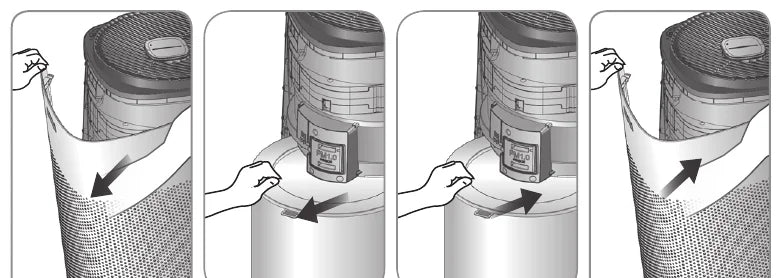
Please check before asking for Support.
▼ If used incorrectly and/or not in accordance with the manual, the product may not work properly. Please take the following measures accordingly if there is a problem with the product. If a problem persists, please contact our Customer Service Center.
| Problem | Checklist | Recommended Actions |
|---|---|---|
| The product won’t work even if I pressed the Power button. | • Is the power plug properly and completely plugged into an outlet? | • Insert the power plug in a power outlet of 120V-60Hz. |
| • Has there been a power outage? | • Use the product after you connect to an electrical source. | |
| • Is the product properly assembled? | • Assemble the product properly. | |
| • Did you press the ON/OFF button? | • Press the ON/OFF button. | |
| The air volume won’t change. | • Is the product in the MANUAL mode? | • Change to the operation mode you wish to use. |
| • Is the product in the SLEEP Mode? | • The minimum air volume is set to SLEEP Mode. | |
| Air purification does not work properly | • Is the internal pollution level severe? | • Ventilate the room, then use the product. |
| • Is the room too large? | • Use a product that suits the area of use. (Avoid placing near an area with high air circulation such as a door or window) | |
| • Is there any obstacle around the product? | • Remove all obstacles. | |
| • Is the product installed where wind cannot move freely? | • Install the product elsewhere. | |
| • Has the period for filter cleaning and replacement elapsed? | • Check the filter cleaning and replacement cycle. Clean or replace the filter if needed. | |
| There is an odor coming from the air vent. | • Did you smell this odor after purchasing the product? | • The odor is from the activated carbon. It will disappear one to two weeks after using the product. The scent of activated carbon (charcoal) is harmless. |
| • Is the product used in a place with much smoke and/or odor? | • The air purification performance may decrease in areas with much smoke or smell. Ventilate the room before using the product. | |
| • Has the period for filter cleaning and replacement elapsed? | • Check the filter cleaning and replacement cycle. Clean or replace the filters if needed. | |
| The air quality indicator color does not change. | • Is there dust on the Lens of the Dust Sensor? • Does the dust pollution level stay the same? |
• Clean the lens of the Dust Sensor. |
| When other functional defects occur | • Check the nature of the problem, pull out the power plug and request for service. |
Product Specifications
| Category | Air purifier |
| Model name | CAC-K1910FW |
| Rated Voltage and Current | 120V~, 60Hz |
| Rated Power Consumption | 60W (1A) |
| Dust Collecting Method | Mechanical dust collecting method |
| Safety Device | Power is blocked when the door is being opened or closed |
| Place for Use | For indoors |
| Product Size | 13.2(W) x 13.2(D) x 25.6(H) Inch |
| Product Weight | 15.4 lbs (7kg) |
※ The information (exterior, design, and specifications) provided in this User Manual is subject to change.
※ This appliance is intended for home use (Class B) and is suitable for home use. It can be used in all areas.
Inquiry about Malfunction
Overtime, product parts may wear out due to heat, moisture, dust and other causes. This exposure may cause a product malfunction.
In the case that
-
An issue occurs that is not in the “Please check before asking for Support.” section.
-
You can feel electricity when you touch the product.
-
The product is connected to a power source, but the motor is not working.
-
Other malfunctions occur.
Please stop using the product.
Please unplug the product and contact our Customer Service Center.
CUCKOO
www.cuckooamerica.com
We will provide satisfactory consultation and service to you complaints, suggestions, and recommendations. We just ask for your product model name, status, and contact information.
- After reading this manual, keep it in a place easily accessible to the user for future reference.
- This manual includes the warranty.
- Caution : Please read this manual carefully to ensure safety and a longer product lifespan.
- This manual can be downloaded from the website.
Document Number
10383-0022B0 Rev.0